

Abigail253
Participant
October 2, 2026
Question

Resize Page to Image Size

  • October 2, 2026
  • 1 reply
  • 23 views

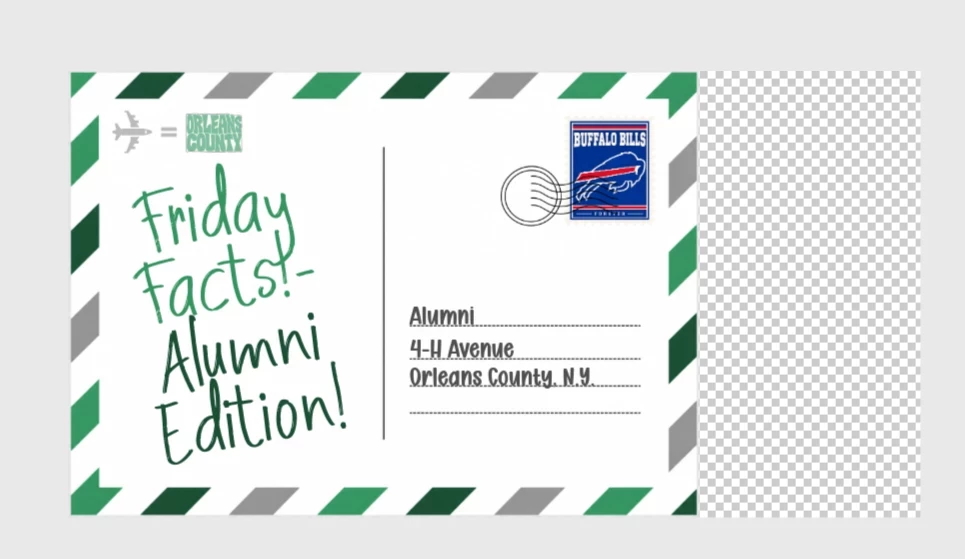
Sometimes if i start a project, it ends up being smaller than the size of the project, especially if it has a transparent background. I wish there was a resize page to shape option so I do not have to save as a JPEG then open up in another file to crop. I have provided an example of a project that ended up smaller than intended, and the resize is just a guessing numbers game. 
 

    1 reply

    CORCTON34033231
    Community Expert
    Community Expert
    October 4, 2026

    Good news — Adobe Express has exactly this: the Crop page feature. Select outside the canvas to reveal "Edit page" at the top, choose "Crop page", then pick "Fit to content" — it crops the page automatically, removing the empty space around your design elements, so you won't need the save-as-JPEG-and-recrop workaround anymore. You can also enter exact width/height values, pick a preset aspect ratio, or drag the corner handles, then hit Done.


    Full steps here: https://helpx.adobe.com/express/web/arrange-layers-and-pages/crop-pages.html