


Participating Frequently
December 27, 2021
Answered

Since update, embedded videos cannot be edited or deleted?

  • December 27, 2021
  • 4 replies
  • 470 views
Since the latest update, something has changed about how embedded videos work in Webpage projects. On a PC, it used to be that clicking on a video brought up a pop-up with an "Edit" and "Delete" option. To actually play the video, you had to "Preview" your page first.
 
After the update, clicking on the video just plays the video even in editing mode. So how on earth do you Edit or Delete it now?
This topic is closed to new replies. Start a new post to keep the conversation going.
Correct answer Manmeet2016

Hi Springheel,


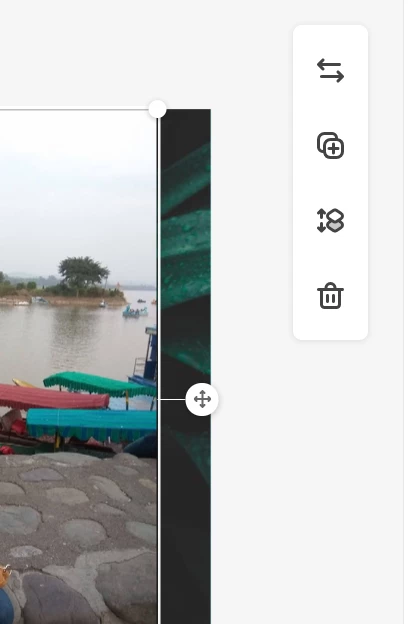
I will be happy to assist you here. Just try to click on the video once, before you play that and you will be able to see a few options at the right side of the page and you may 'Delete' or 'Edit' the video. You may refer to the screenshot below. Hope this helps!


Thanks,

Manmeet


4 replies

Manmeet2016Community ManagerCorrect answer
Community Manager
December 28, 2021

Hi Springheel,


I will be happy to assist you here. Just try to click on the video once, before you play that and you will be able to see a few options at the right side of the page and you may 'Delete' or 'Edit' the video. You may refer to the screenshot below. Hope this helps!


Thanks,

Manmeet


Participant
January 3, 2022

Hello,

I have the same problem ! when I click on the video I don't have the few options, the video just plays...

Can you help me please ?


Participant
January 3, 2022

Usually I use mozilla. I try to change and use Edge and it worked ! The options are on the videos.