


Rudi Spitzers
Known Participant
December 2, 2025
Question

Top bar missing in Express

  • December 2, 2025
  • 1 reply
  • 181 views

We work with two different premium accounts. In one account the top options bar is missing. See image. Is there a way to add this bar to the top iof the screen?
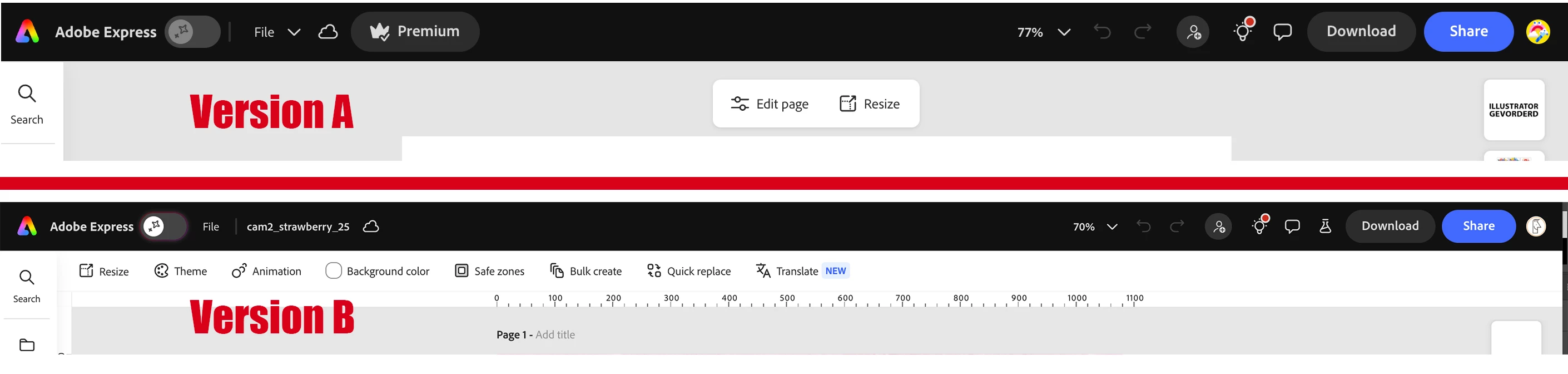

problem-options-bar.jpg

1 reply

Tarun Saini
Community Manager
Community Manager
December 2, 2025

Hi @Rudi Spitzers,


Thanks for reaching out! Could you please share the complete screenshot of your screen with Adobe Express open? If you click on the File option, you will be able to see the option to toggle on Bleed and Margins and others on the Edit page side. check the screenshot below-


TarunSaini_0-1764673785217.png


Regards,

Tarun

Rudi Spitzers
Known Participant
December 2, 2025

Hello Tarun

thanks for your quick response. This is a screenshot of my entire screen. I work with macOS and Chrome.

Scherm­afbeelding 2025-12-02 om 12.21.00 PM.png

Tarun Saini
Community Manager
Community Manager
December 2, 2025

Thanks for your response @Rudi Spitzers,


Did you try using the other suggested browsers (Safari, Microsoft Edge, and Google Chrome) or incognito mode to see if it makes a difference? 


Also, try clearing the browser's cache and cookies, restarting the browser and trying again. For more information on how to clear cache and cookies, check this link- https://adobe.ly/4a5ipUF and how to use incognito mode- https://adobe.ly/4a2UzZV 


Also, check this article and let us know if that helps- https://helpx.adobe.com/express/web/whats-new/whats-new.html 


Regards,

Tarun