


Participant
Feb 2, 2022 1:29 PM UTC
Question

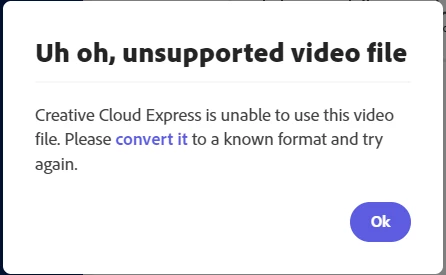
"Uh oh, unsupported video file"

Hi, so I've been using Adobe Creative Cloud Express (previously Spark) for a long time and all of a sudden it no longer accepts my video files when creating videos? I always work with .mp4 files and have never had any issues before. In most cases, these are files generated by Adobe Premier Pro. I have even tried using Adobe Media Encoder to convert them to alternatives, but still get the same error message. 

Can someone advise if this is a known bug?

Thanks

Paul
 

This topic is closed to new replies. Start a new post to keep the conversation going.

4 replies

Participant
Feb 19, 2022 3:20 AM UTC

I have tried your solutions of clearing cache/using incognito mode and I still cannot upload a video, even once converted. Spark worked so well, but CCE is useless if you cannot quickly import videos. Please advise.

Translate
Community Manager
Feb 2, 2022 4:11 PM UTC

Hi Paul,


Sorry for the trouble. Would you be able to clear cache and try again with the incognito/private mode on the browser you are using?


Let us know if it works. We are here to help.


Thanks,
Saquib

Translate
Participant
Feb 3, 2022 8:57 AM UTC

Hi Saquib,

Apologies for the delay in getting back to you. It seems that the issue has resolved itself without me having to clear my cache or open an incognito browser window. Not sure what the reason for the error was, but I do know that my colleague was having the same issue with it at the same time.

Anyway, thank you for your help, if it happens again I will report back

best regards

Paul

Translate
Community Manager
Feb 3, 2022 1:23 PM UTC

Glad it's working fine now. Thanks for reporting back, Paul.

Regards,
Saquib

Translate