

October 13, 2025
Answered

Unable to upload file

  • October 13, 2025
  • 1 reply
  • 354 views

1) This has happened a few times. I create an image in Firefly Vid and then attempt to upload the file into Express: 1:1 post for Instagram.

2) Putting into a different project: same result "Unable to Upload the File".

The work around has been to resize the image.
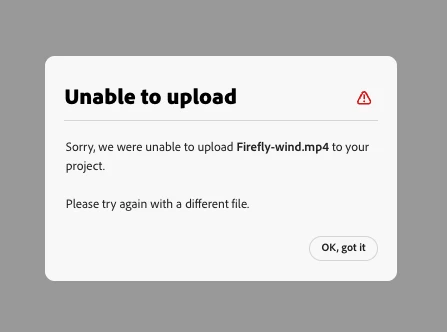
 

Thanks
Nate

Correct answer Oh.N8

Thanks for the info @Oh.N8 


Could you please let us know the prompt you've used to create the video?


Regards,

Tarun


Firefly Vid
Prompt:
Kale character hot air balloon moving, eyes blink

The prompt worked. 
The new Express File is the issue. 🙂


Cheers
Nate

1 reply

Tarun Saini
Community Manager
Community Manager
October 13, 2025

Hi @Oh.N8,


Thanks for flagging this issue. Could you please answer some questions below-


  1. What are the dimensions and file format of the image you're trying to upload?
  2. Are you uploading the image into a blank canvas or a pre-designed template in Express?
  3. Are you using the browser version of Express or the desktop/mobile app?
  4. Have you tried uploading the same image from a different browser or device? If so, did the issue persist?
  5.  Can you share the steps you followed to investigate further?


Regards,

Tarun

Oh.N8Community ExpertAuthor
October 13, 2025

hey @Tarun Saini 


Thanks for the quick response:
1) 540 by 540
2) Blank Canvas/ New Project
3) Web Chrome browser Mac Mini M1

4) No I haven't tried these steps.

5) 1st upload the downloaded vid made in FF Vid  (Other vids not made in FF Vid have worked no problem.)
2) Get an error
3) Upload again and select resize and edit.
b) Start editing.
c) Download

Cheers
Nate

Tarun Saini
Community Manager
Community Manager
October 13, 2025

Thanks for the info @Oh.N8 


Could you please let us know the prompt you've used to create the video?


Regards,

Tarun