January 15, 2026
Answered

What happened to the toggle buttons for bleed lines & margins?

  • January 15, 2026
  • 3 replies
  • 211 views

What happened to the toggle buttons for bleed lines & margins?? Can you please add that back? Why would it be removed? Thanks!

Correct answer Tarun Saini

Hi @Cooper Communications,


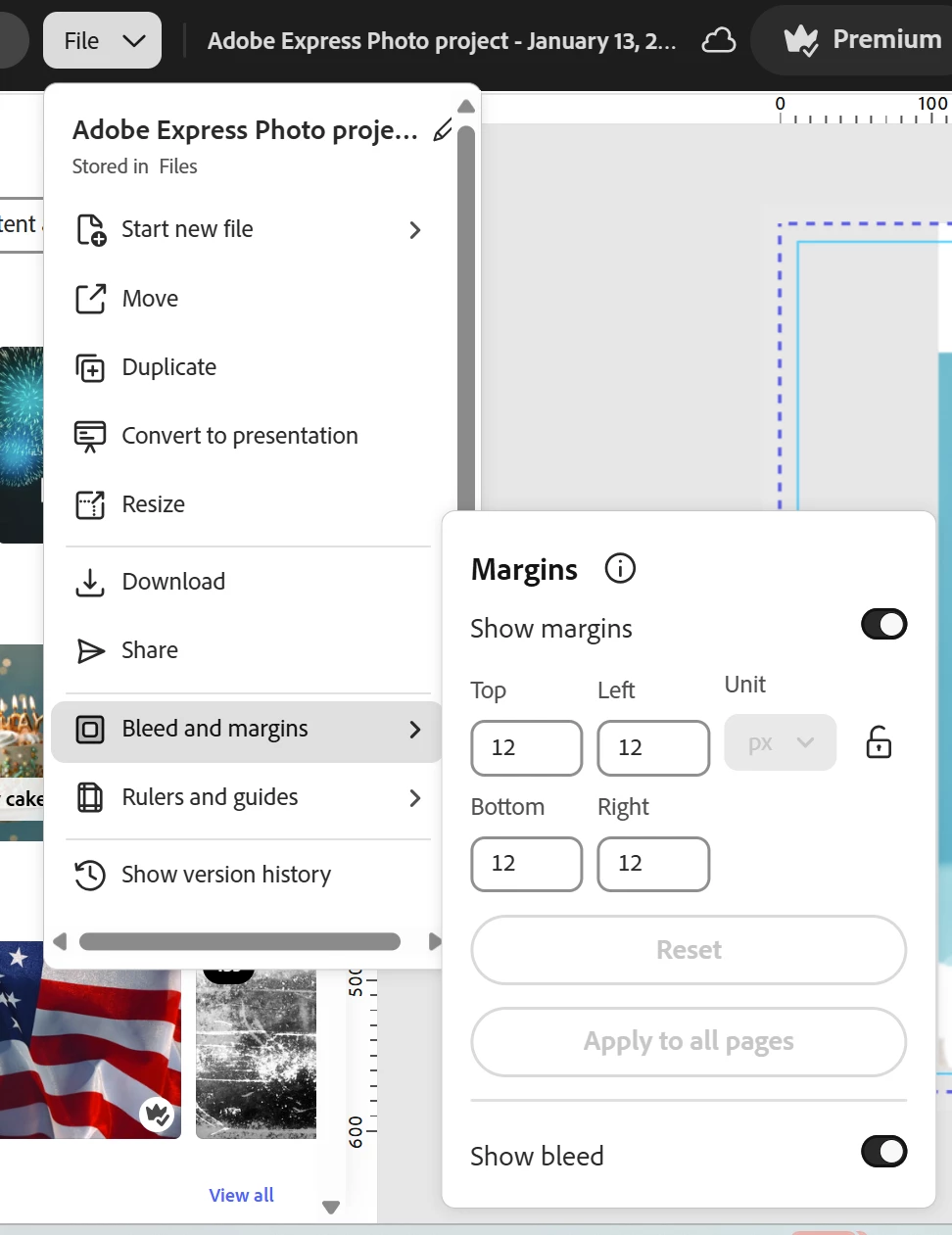
Welcome to the community! If you are looking for the toggle button for bleed and margins, you will find them under the file option. Please check the screenshot below for more info-


TarunSaini_0-1768585383149.png


Let us know if that helps.


Regards,

Tarun

3 replies

January 22, 2026

Anyone else lose their ability to view margins? The option was removed from the menu and now only rulers are available and need to be set for every page, which is really frustrating.


Also, the ability to resize a page to 3 decimal places is now gone, which is terrible for setting page sizes to meet bleed lines for publishing. If I try to set it to 6.125, it resizes to 6.13. I have checked the pdf output and it was rounded, so it's not just the interface.

Amitej S
Community Manager
Community Manager
January 19, 2026

Hi @Cooper Communications, Welcome to the Adobe Express community! 


Could you please share which platform you are working on and where the bleed/margin buttons are not visible? Is it happening with large file sizes or any specific ones? If possible, could you share a screen recording of the interface you see? It might help us investigate the issue for you.


Also, have you tried using any private/incognito browsing mode, or any other recommended browsers (Edge, Safari, Firefox, or Chrome), on a desktop device to see if it gives you the same experience or if that makes any difference? 


Do share your observations, we are here to help! 

Best!

January 19, 2026
Hello - thank you for replying. I have attached a screenshot from my
Firefox browser. Under File, it used to be there the bleed & crop margins
however, I assume after some update, it is now no longer there. I noticed
this changed at least a couple weeks ago. It isn't available with any size
file I am working on. I also noticed, when I access any of my files from
the Adobe Express mobile app, the bleed lines/crop margin toggles are
available.

I predominantly use my desktop/laptop to create - mobile app for something
I need quickly.

Funny thing, as I was doing my screen record to show my interface, the
bleed & margins have now magically appeared. Obviously, this must have been
a Firefox problem you just worked on? My attached screenshot shows that it
was not there 20 minutes ago. I attached a second screenshot showing it is
now there.


--
Thanks,
McKenzie Marker
January 22, 2026

I am still having issues via Firefox with the bleed/margins option. It seems there is no rhyme or reason as to when it shows & when it doesn't. Some of my files I can open, go to File & the option is there. I can then open another file of mine in a new tab & that option is then missing. There is clearly a glitch with this via Firefox. Please fix!

Tarun Saini
Community Manager
Tarun SainiCommunity ManagerCorrect answer
Community Manager
January 16, 2026

Hi @Cooper Communications,


Welcome to the community! If you are looking for the toggle button for bleed and margins, you will find them under the file option. Please check the screenshot below for more info-


TarunSaini_0-1768585383149.png


Let us know if that helps.


Regards,

Tarun