


Participant
October 16, 2026
Answered

Where are my File Folders?

I have all my files organized in folders. I used to see all the folders at the top when I went to My Stuff. As of last week, it only shows the files and I can’t find a way to view the folders. I am able to see the folders when I save a file but I want them back so I can pick a folder as my starting point, then create a file within that folder. Thanks in advance!

justlearnskills
justlearnskillsCorrect answer
Community Expert
October 17, 2026

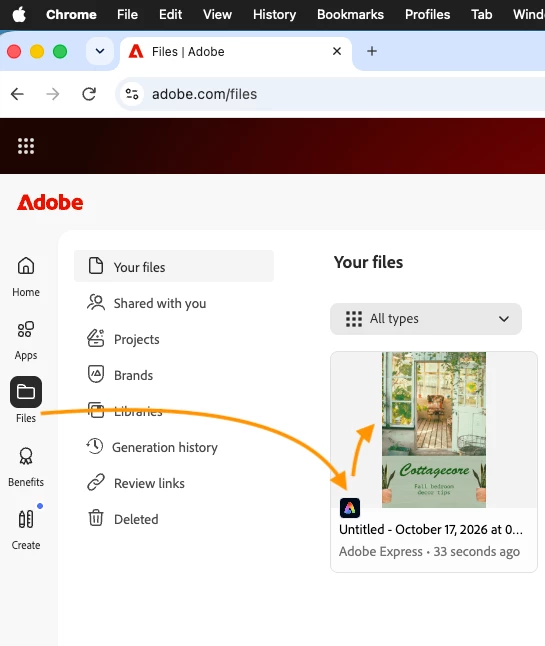
​@default3rkwhod4y91j The fastest to see your files is going to adobe.com and select files on the left hand side or go to https://www.adobe.com/files


m

2 replies

justlearnskills
Community Expert
justlearnskillsCommunity ExpertCorrect answer
Community Expert
October 17, 2026

​@default3rkwhod4y91j The fastest to see your files is going to adobe.com and select files on the left hand side or go to https://www.adobe.com/files


Translate
m
Leak Fix Experts
Participant
October 17, 2026

Same thing happened to me when the Express home page layout changed. A few things to check:


1. On the Express home page, open "Your stuff" and look for a Folders tab/filter near the top — in the newer layout the folders moved behind a tab instead of showing by default.


2. Use the search bar at the top and search for a file by name. If the files show up in search, they're still in your account and it's just a view/filter issue.


3. Double-check you're signed in with the same Adobe ID you created the folders under — signing in with a different email is the most common reason files seem to "disappear."


4. As a fallback, your files also live in Creative Cloud storage, so you can browse them directly at assets.adobe.com.


Hope that helps — in my case the folders were all still there, just one extra click away.

Translate
Leak Fix Experts | 111 Nashville Hwy, Columbia, TN 38401 | (931) 800-6431 | info@leakdetectioncolumbiatn.us | Open 24/7 | https://leakdetectioncolumbiatn.us/?utm_source=adobecommunity&utm_medium=citation