Participant
March 24, 2022
Answered

Why can’t my students use icons in their videos anymore?

  • March 24, 2022
  • 3 replies
  • 730 views

In Spark videos, my students have always been able to search the icons to add them to their slides. Now nothing shows up for them. They have to either use text or photos. What happened?

This topic has been closed for replies.
Correct answer Amitej S

Hi Emily,


Thanks for reaching out, and sorry for the experience with the Creative Cloud Express/Spark Video. This shouldn't be happening.

Would you mind sharing with us the workflow? Is there any error message that pops up? Also, it would be great if you could share screenshots?


Meanwhile, could you please try updating the app to the latest version and try the mentioned steps:

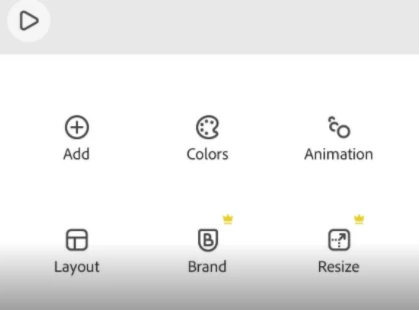
1. Select the project that has to be worked upon.

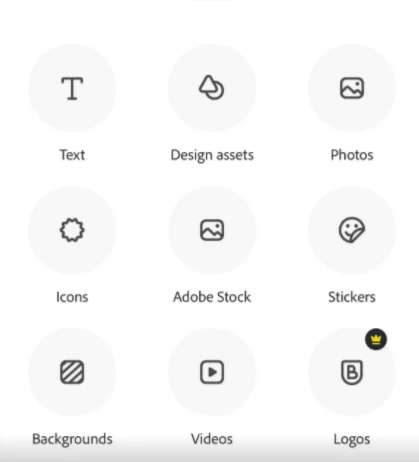
2. Tap the add option, then the Icon or other options as required.


This will give you multiple icons, and you may choose any of those.


Please refer to the screenshots.


We are here to help, let us know how it goes.


Regards,

Amitej

3 replies

mullein737
Participant
April 14, 2022

my icons menu is also suddenly missing. now there is a shapes menu but icons are gone


Adobe Employee
April 14, 2022

Hi,


In the current version of Creative Cloud Express, on both web and mobile, the "Icons" items has been replaced by "Shapes". "Shapes" includes all the same content as the former "Icons" feature, and adds more content.


After selecting "Shapes", search for a term just as you did with the former "Icons" menu. You will get a grid of items that contains what was formerly called "Icons".


Greg

Adobe


Adobe Employee
March 28, 2022

Hi Emily,


When you say "nothing shows up for them", what exactly appears in the app? Is that you tap to insert an icon, enter a search term such as "rabbit", and then get no results? If so, is there an error message that displays? Please share a screenshot of what you see when you try to add an icon.


With Internet connections in schools, there are sometimes restrictions on what servers can be contacted. If possible, try using Spark Video when connected to an unrestricted network, such as your home network or a public library, and see if you can add icons. If that works, please give us a contact with your school's IT department so we can work with them to configure access to the services required by Spark Video.


Thanks,

Greg (Adobe Spark Video Team)

Participant
April 4, 2022

They type in a term to search for an icon, and it's just blank. There is no error message. This only happens on the student ipads, not on mine, so I am unable to test on another network. Here is a screenshot of what it looks like when I searched for "book" on a student's ipad. 


It could be our filter, but then I don't understand why photos would show up! Very puzzling.


Thanks for your help!

Adobe Employee
April 4, 2022

Hi Emily,


It would be better if we move this conversation to private email, if you don't mind. You can contact me directly at dow@adobe.com


Thanks,

Greg (Adobe Spark Video Team)

Amitej S
Community Manager
Amitej SCommunity ManagerCorrect answer
Community Manager
March 28, 2022

Hi Emily,


Thanks for reaching out, and sorry for the experience with the Creative Cloud Express/Spark Video. This shouldn't be happening.

Would you mind sharing with us the workflow? Is there any error message that pops up? Also, it would be great if you could share screenshots?


Meanwhile, could you please try updating the app to the latest version and try the mentioned steps:

1. Select the project that has to be worked upon.

2. Tap the add option, then the Icon or other options as required.


This will give you multiple icons, and you may choose any of those.


Please refer to the screenshots.


We are here to help, let us know how it goes.


Regards,

Amitej
