Participant
November 20, 2018
Answered

Missing fonts will not activate

  • November 20, 2018
  • 15 replies
  • 72615 views

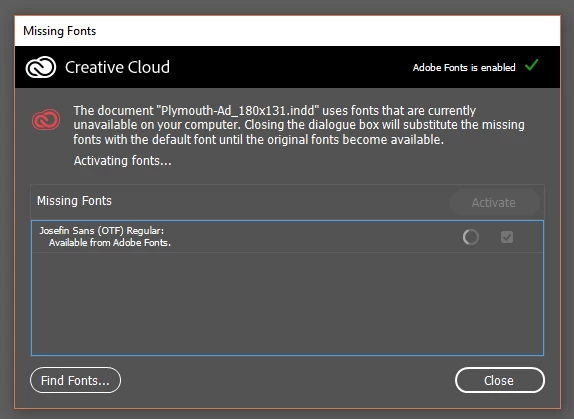
No font's will activate in any adobe program, the spinning wheel just spins for about 3-4 minutes then stops.

I've tried unticking and reticking the 'enable Adobe Fonts' option, restarted my computer and it's still happening.

Account information is all correct as I can sign in to the website with the same information.

This is all I see:

Correct answer HARSHIKA_VERMA

Hi All,
We are sorry to hear you are experiencing missing fonts issue. We would request you to please try the steps suggested in this article: https://helpx.adobe.com/fonts/kb/resolve-missing-fonts.html


If you're experiencing this error on Illustrator and InDesign applications, please try the step suggested in this article: https://helpx.adobe.com/fonts/kb/troubleshoot-fonts-illustrator-indesign.html


If nothing works, please share the coresync logs-


> Attach the recent CoreSync logs from your computer so we can take a closer look–
On OS X:
1. Open the Finder
2. under the Go menu, select "Go To Folder"
3. in the window that opens, type: ~/Library/Logs/CreativeCloud/CoreSync/


On Windows:
1. Open Windows Explorer
2. The log folder is hidden by default, so make sure that hidden folders and files are visible. Under the Organize menu, select Preferences and then the View tab. Choose the "Show hidden files, folders, & drives." option, then click Apply to confirm the changes.
3. Go to C:\Users\(username)\AppData\Local\Temp\CreativeCloud\CoreSync\
where "(username)" is the name of your user folder on your computer.


Attach the 3 or 4 most recent CoreSync-yyyy-MM-dd.log files and please specify whether you are activating fonts in Creative Cloud Desktop or on the Adobe Fonts site and upload them to a shared location such as Dropbox and share the URL with me over a private message.


I will be happy to help.


Thanks,
Harshika


<Marking as correct only to highlight>

15 replies

Participant
March 25, 2022

I just spent an hour trying to resolve this font issue, it's about time Adobe resolved this problem. How about a refund for this month!?

Edu Couchez
Inspiring
January 14, 2022

Also here... wasting hours and customer explanations about "Adobe usual issues"... fonts, always fonts. Missing each day... even my own Legal fonts uploaded through cloud. Always misin random ones... have nearly 50 installed, I cant manually beeingh each day installing-uninstalling. Thats suposed to be a "creative cloud" not a "survival cloud with hacks and codng"...

HARSHIKA_VERMA
Community Manager
HARSHIKA_VERMACommunity ManagerCorrect answer
Community Manager
September 1, 2021

Hi All,
We are sorry to hear you are experiencing missing fonts issue. We would request you to please try the steps suggested in this article: https://helpx.adobe.com/fonts/kb/resolve-missing-fonts.html


If you're experiencing this error on Illustrator and InDesign applications, please try the step suggested in this article: https://helpx.adobe.com/fonts/kb/troubleshoot-fonts-illustrator-indesign.html


If nothing works, please share the coresync logs-


> Attach the recent CoreSync logs from your computer so we can take a closer look–
On OS X:
1. Open the Finder
2. under the Go menu, select "Go To Folder"
3. in the window that opens, type: ~/Library/Logs/CreativeCloud/CoreSync/


On Windows:
1. Open Windows Explorer
2. The log folder is hidden by default, so make sure that hidden folders and files are visible. Under the Organize menu, select Preferences and then the View tab. Choose the "Show hidden files, folders, & drives." option, then click Apply to confirm the changes.
3. Go to C:\Users\(username)\AppData\Local\Temp\CreativeCloud\CoreSync\
where "(username)" is the name of your user folder on your computer.


Attach the 3 or 4 most recent CoreSync-yyyy-MM-dd.log files and please specify whether you are activating fonts in Creative Cloud Desktop or on the Adobe Fonts site and upload them to a shared location such as Dropbox and share the URL with me over a private message.


I will be happy to help.


Thanks,
Harshika


<Marking as correct only to highlight>
Participant
February 1, 2021

Why is this continue to be a problem? Isn't this something they should fix? For a program this expensive seems odd to have such blatant bugs.']


rebeccapetro
Participant
April 30, 2021

Dude, it has been like this for at least 3 years.  Their stock is crushing it, who cares. 

Participant
September 9, 2020

For as much money as we pay for our Adobe monthly subscription, we SHOULD NOT have problems like this!!! I can't get my fonts to sync, all my adobe fonts are missing, I've tried all the suggestions in this thread, and I STILL CAN'T get my fonts to work. I've wasted HOURS today trying to get this to work and I'm past deadline!!! HELP!!!

kpossibles
Known Participant
September 10, 2020

What app are you using and which version of CC are you on: 2019 or 2020)? I noticed when I'm in InDesign or Illustrator 2019, a lot of unused fonts automatically deactivate now, although I might have selected a preference a while ago and forgot about it.


I worked on a cover again recently in Illustrator where the previous cover was made like a couple months ago and the fonts deactivated. But they activated fine through the app font activation pop-up.


If you're in the most recent 2020 version, you could try installing a separate older version of the app (2019) and try it again to see if the font activates that way. Another potential solution is updating to the recent version if you're on an older CC version (make sure it's a separate installation if you have the space) and seeing if the font activation is solved that way.


Just so you know, 2020 saved files DON'T have backwards conversion with older CC versions and have to be "converted" to older version compatible files, so be aware that could be a potential problem if you're working on a collaborative project where a client or an editor might have a different version installed.

Participant
July 20, 2020

I had a similar problem, tried all the other suggested fixes and nothing worked.  Then I noticed in the CC app (on MacOS) when I went to manage fonts I had to click "activate fonts"  Not sure why that wasn't the default but cleared it up for me.

Participant
September 9, 2020

Tried this...didn't work for me. GRRRR!!!

xtanda
Participant
June 2, 2020

If re-login your account  and de-activating the font via the browser did not help (as happened with me) try this: 

=> change your default browser to Chrome.


My default browser was Brave with its adblocker. It seems this interfered with the communication between Adobe application and the Adobe Fonts. The moment I set Chrome as the default browser, it activated.

Hope this helps someone.

Inspiring
May 22, 2020

Adobe support is notoriously terrible when it comes to things like this, the CSR's will give you assurance that it'll be fixed and give you bandaide solutions in the meantime that end up being every CSR's go to solution for the next couple of years. These things are clearly not reported to or not cared about by the actual program techs who update the adobe programs. This specific font issue has existed for years throughout updates and continues to this day. Everything specified in this thread as a solution has been tried and re -tried by customers for years across different forums and help posts and I'm sick and tired of this font issue being ignored.

Participant
April 27, 2020

Had the same issue, solved by launching the program directly from the creative cloud application rather than launching through windows

Eyetooth.Design
Known Participant
May 7, 2020

Nothing ever works with Adobe!!

I cannot open any files, as fonts rarely sync.  Logging in and out doesn't fix it, turning font sync on and off does not fix it.  Even when I eventually manage to open a file that does not need fonts updated (cause thank god I don't use adobe's fonts for everything), then the apps just completely freeze on me (either on the loading screen or the app opens and is completely unresponsive) and I can do nothing but restart my machine.

After all that the same things continue to happen.  Come on Adobe!!! These issues have been ongoing for many many years now! What are you doing to rectify them?

I loath and detest Adobe but there are no commercially viable alternatives at present.  These issues cannot be that hard to fix when you have had years to try and resolve them.

Don't bother contacting Adobe support either cause they simply delete all your preference files, install loads of other versions of the software, uninstall all your drivers and somehow make the problem even worse than it was before. 

Inspiring
May 22, 2020

Half the issue is employee's reading from a pre-written list of solutions giving the illusion of a real solution.

CCoffin
Participant
January 13, 2020

Hello! So i've had this issue for a couple months now. It began once I started using Adobe Fonts in my projects. This issue is present in Illustrator / Photoshop / XD typically after first booting the application, but frequently it will lose the font WHILE inside and modifying the document.

In the past I've been able to rectify it by toggling the "adobe fonts" setting in the "services" section of the Creative Cloud apps preferences. However it doesn't seem to work every time, and right now i'm unable to use the fonts at all, it will not find them if I activate them inside the app, or toggle the switch in the Creative Cloud Preferences. 

I'm using the most recent version of all apps, and creative cloud app itself. 

I'm using Mac OSX Catalina 10.15.2

Any support would be great, as I've seen others have the issue as early as first quarter of 2019. I hope there's a fix ASAP because it's affecting my productivity at work.

Attached are a few screenshots showing the msg in app, which doesn't rectify if I select "activate fonts"
And the CC app showing that the fonts don't show up in my collcetion sometimes. Also the web that shows clearly that they should be activated and function as expected. 

Thanks in advance, 

Sincerely,
CCoffin. 

CCoffin
Participant
January 29, 2020

Still awaiting a response please.