Muhammad_Ahmed23
Participant
May 27, 2023
Answered

Where are The Fonts in Adobe Photoshop?

  • May 27, 2023
  • 4 replies
  • 2402 views

Where can I find and access the font options in Adobe Photoshop? I'm looking to customize the typography of my design, and I'm unsure of where to locate the font settings within the Photoshop software. Could you guide me on how to access and utilize the available fonts in Adobe Photoshop?

    This topic has been closed for replies.
    Correct answer Imaginerie

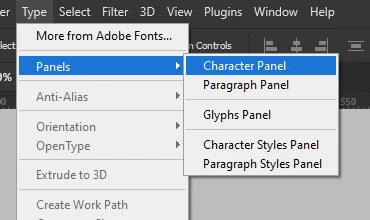
    All the type options are situated in the type menu (as expected!)
    You may want to open both the character and paragraph panel.
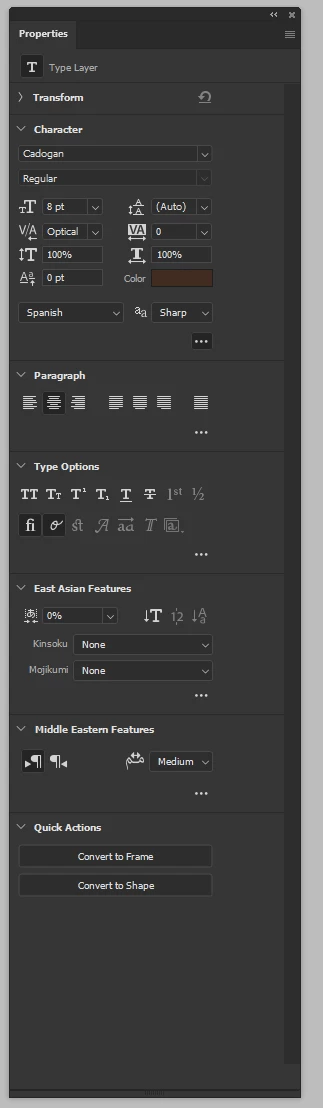
    Once you have typed the text, you can access most use options in the properties panel, which is a very useful panel as well...


    Hope it answers your question...

    @Test Screen Name is right, your screenshot doesn't make any sense regarding your question, if you have an issue with a typeface, feel free to clarify in your answer, we probably can help!


    4 replies

    Participant
    August 30, 2023
    quote

    Where can I find and access the font options in Adobe Photoshop? I'm looking to customize the typography of my design, and I'm unsure of where to locate the font settings within the Photoshop software. Could you guide me on how to access and utilize the available fonts in Adobe Photoshop?


    By @Muhammad_Ahmed23

    I've been working on a project in Adobe Photoshop. I'm trying to customize the typography of my design, but I'm having trouble finding where the font options are located within the software. I've searched through various menus and panels, but I just can't seem to locate the font settings. I'd really appreciate it if someone could guide me on how to access and make use of the available fonts in Adobe Photoshop. 

    Abambo
    Community Expert
    Community Expert
    August 30, 2023

    Check this post: https://community.adobe.com/t5/adobe-fonts-discussions/where-are-the-fonts-in-adobe-photoshop/m-p/13825161#M8123


    Please let us know if there are still questions open!

    ABAMBO | Hard- and Software Engineer | Photographer
    Abambo
    Community Expert
    Community Expert
    May 31, 2023

    Please go to Help→System Info… and copy and paste the text here.


    ABAMBO | Hard- and Software Engineer | Photographer
    Imaginerie
    Community Expert
    ImaginerieCommunity ExpertCorrect answer
    Community Expert
    May 29, 2023

    All the type options are situated in the type menu (as expected!)
    You may want to open both the character and paragraph panel.
    Once you have typed the text, you can access most use options in the properties panel, which is a very useful panel as well...


    Hope it answers your question...

    @Test Screen Name is right, your screenshot doesn't make any sense regarding your question, if you have an issue with a typeface, feel free to clarify in your answer, we probably can help!

    Legend
    May 28, 2023

    The screen shot has no connection to your question. Please explain how these two are connected. And what you are doing to cause this.

