Participant
April 8, 2025
Question

Broken dependencies and linked files while using aliases

  • April 8, 2025
  • 1 reply
  • 258 views

Hi folks,

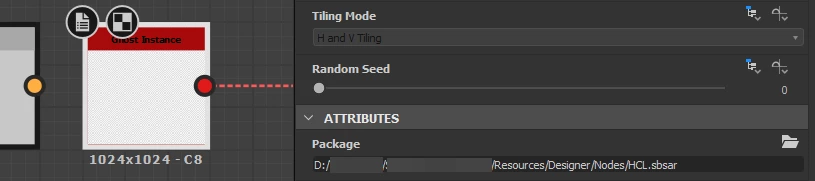
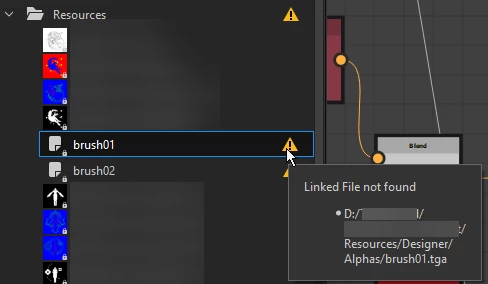
I am trying to find out why linked files and other dependenices are broken when opening .sbs files on different machines. So far we've been manually relocating the files but this costs a lot of time.
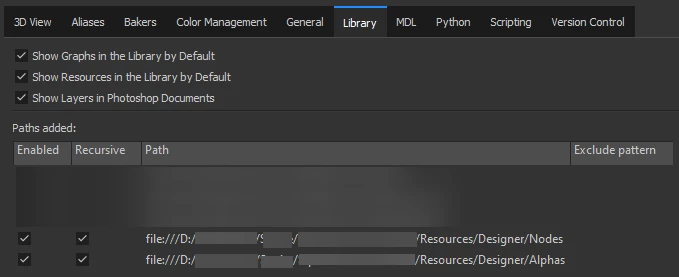
Even though all machines have the alias set up correctly and have Library paths added for the custom nodes/files, it seems like the alias doesn't work on files/nodes used from this custom library path.


Any idea how to solve this? 


I attached some screenshots below to hopefully make it a bit more clear.
1 reply

Luca Giarrizzo
Community Manager
Community Manager
April 8, 2025

Hello @TIOM,


Thank you for reaching out! Can you send a bug report so I can investigate this in more detail?


  1. In Designer, go to 'Help > Report a bug...'.
  2. Check the 'Send additional information' option.
  3. Attach one of the SBS files impacted by the 'Linked file not found' warnings.
  4. Send the report.


I will send you a direct message to confirm that I have received what I need to investigate the issue.


Best regards.

Luca Giarrizzo | Quality Engineer - Substance 3D Designer | Adobe
TIOMAuthor
Participant
April 8, 2025

Hello Luca,


Thanks for the quick reply!
I've reported a bug just now. (ref:ADB-39407438-D9H9), please let me know if you need anything else.


Kind regards,
Timo

Luca Giarrizzo
Community Manager
Community Manager
April 8, 2025

Thank you! I have received the bug report and associated files. Let us continue the discussion in our user support system, and once we have identified (and hopefully fixed) the problem, I will post a message in this thread for the benefit of other users, without disclosing your project paths and assets.


Best regards.

Luca Giarrizzo | Quality Engineer - Substance 3D Designer | Adobe