

Participant
May 10, 2022
Answered

"Coat Color" in white color

  • May 10, 2022
  • 1 reply
  • 218 views

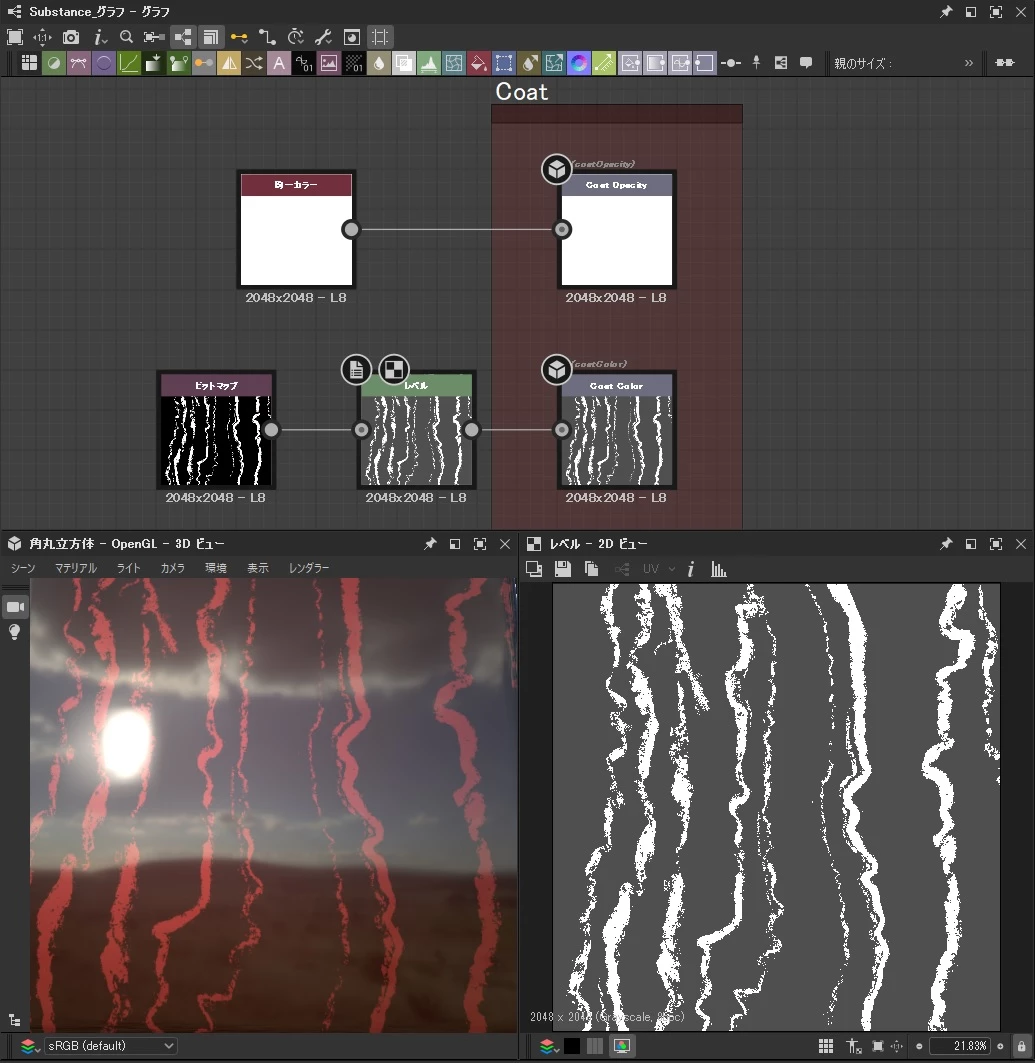
I want to paint "Coat Color" in white color.

Even if I put white color bitmap in "Coat Color", it becomes transparent.

Do you have a plan?
 

This topic has been closed for replies.
Correct answer Luca Giarrizzo

Hello,


The clear coat gets its color by approximating an absorption effect. Absorption is subtractive, so while you may be able to subtract light and shift color to a different hue of lower luminance, you cannot make it brighter and push it to white.

For your specific need, you may lower the saturation of the base color, which should make it look like the coating pushes the underlying color to white, although it is the underlying color itself which is doing that.


I hope this is clear enough, let me know if you need further assistance!

Best regards.


1 reply

Luca Giarrizzo
Community Manager
Luca GiarrizzoCommunity ManagerCorrect answer
Community Manager
May 10, 2022

Hello,


The clear coat gets its color by approximating an absorption effect. Absorption is subtractive, so while you may be able to subtract light and shift color to a different hue of lower luminance, you cannot make it brighter and push it to white.

For your specific need, you may lower the saturation of the base color, which should make it look like the coating pushes the underlying color to white, although it is the underlying color itself which is doing that.


I hope this is clear enough, let me know if you need further assistance!

Best regards.


Luca Giarrizzo | Quality Engineer - Substance 3D Designer | Adobe

