Participating Frequently
September 17, 2021
解決済み

Creating a highlight/shadow on a 2D graphic

  • September 17, 2021
  • 返信数 6.
  • 1172 ビュー

Hi!

Does anyone have a tutorial or suggestion on how to create a highlight / shadow on 2D graphic?  Any example on a simple shape like a circle would be so helpful!

このトピックへの返信は締め切られました。
解決に役立った回答 Luca Giarrizzo

Hello @Substance5EE2,


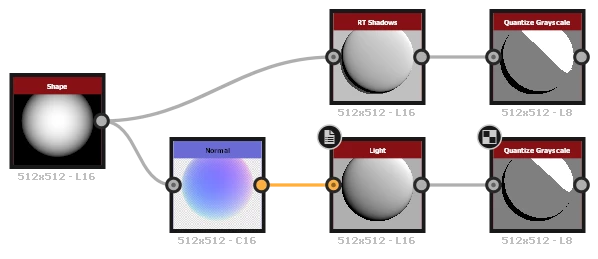
To produce cartoon shading on a shape, you can connect a combination of Normal and Light node or our new RT Shadows node into a Quantize Grayscale node, as shown in this example.


I hope this is helpful!


Best regards.


返信数 6

Participant
September 20, 2021

Here is an example for the shadow

davescm
Community Expert
Community Expert
September 18, 2021

Can you give a little more information on what you are trying to achieve. Do you want to just add a shadow and highlight to a 2D image, which would be more effectively done in Photoshop, or do you want to add height information based on a 2D image so that when lit and rendered in 3D it catches highlights and creates shadows.

Dave

gtapperdesign作成者
Participating Frequently
September 20, 2021

Sure! I have a bunch of amourphous blob shapes I need to create hard edges shadows/highlights for like this.


Luca Giarrizzo
Community Manager
Community Manager
September 21, 2021

Hello @Substance5EE2,


To produce cartoon shading on a shape, you can connect a combination of Normal and Light node or our new RT Shadows node into a Quantize Grayscale node, as shown in this example.


I hope this is helpful!


Best regards.


Luca Giarrizzo | Quality Engineer - Substance 3D Designer | Adobe