
Participant
August 22, 2021
Answered

Edge Detect graph result differs after Blend graph

  • August 22, 2021
  • 1 reply
  • 395 views

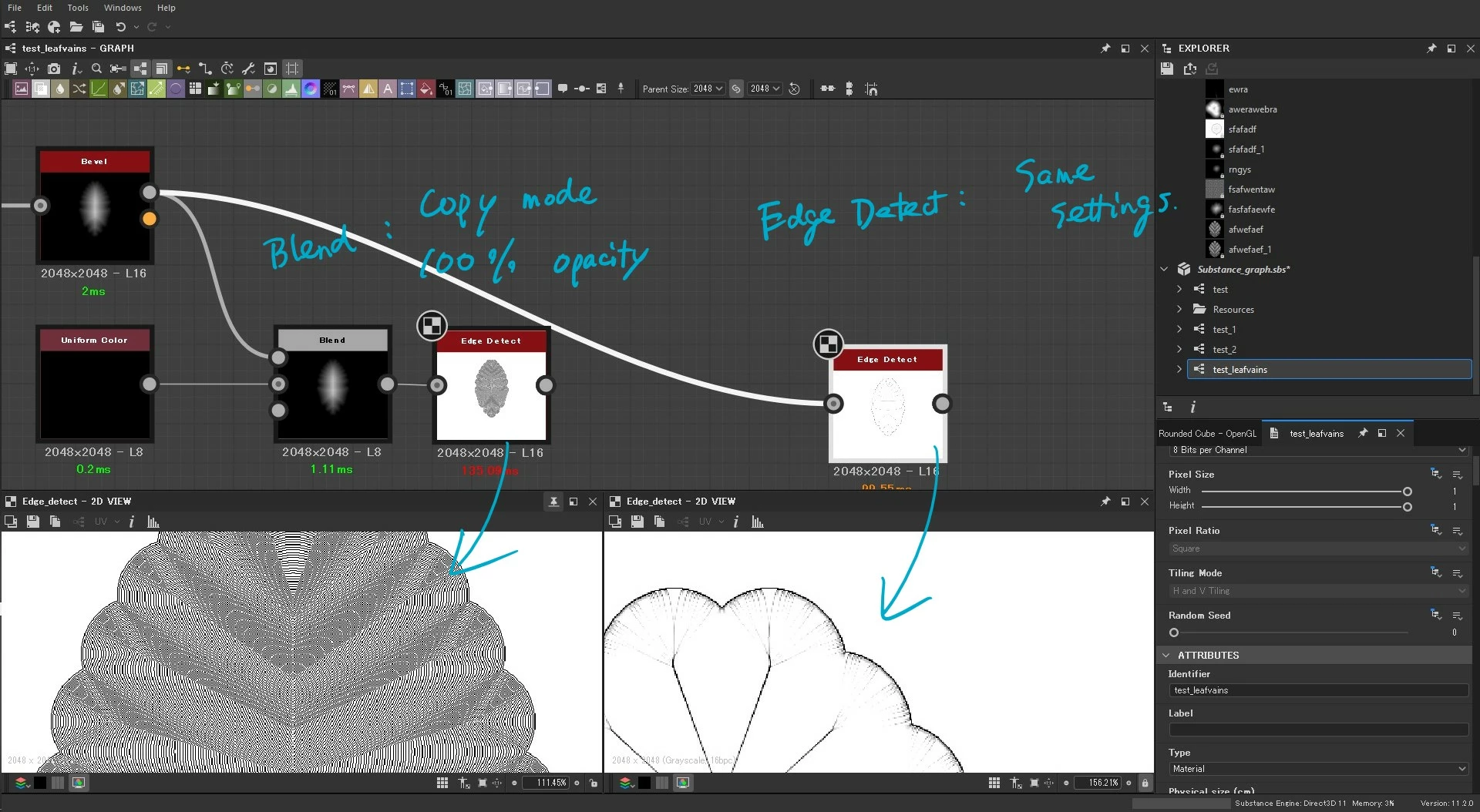
Hi! I am making a leaf vein. I got two results from the similar graphs. Does anybody know why do these results differ?


Settings: 2 Edge Detect graphs have the same settings. The Blend graph has Copy blend mode and 100% opacity.
This topic has been closed for replies.
Correct answer davescm

I'll check your sbs file later when I'm back in the office but from glancing  at your screenshots the inputs are different to those edge detect nodes. One is being fed a 16 bit image, the other an 8 bit image which is more likely to have stepping in the gradient.


Dave

1 reply

davescm
Community Expert
davescmCommunity ExpertCorrect answer
Community Expert
August 22, 2021

I'll check your sbs file later when I'm back in the office but from glancing  at your screenshots the inputs are different to those edge detect nodes. One is being fed a 16 bit image, the other an 8 bit image which is more likely to have stepping in the gradient.


Dave

3460aIIwAuthor
Participant
August 22, 2021

Hi, Dave


That is the answer. I can solve it.

Thank you very much 🙂


masashi

davescm
Community Expert
Community Expert
August 22, 2021

You're welcome 🙂

Dave