Participant
April 9, 2022
Answered

Hello [ Edit : Paramater visibility issue between Designer and Painter]

  • April 9, 2022
  • 1 reply
  • 657 views

I used Visible for some parameters.
Inside the designer and player, the parameters are displayed correctly.
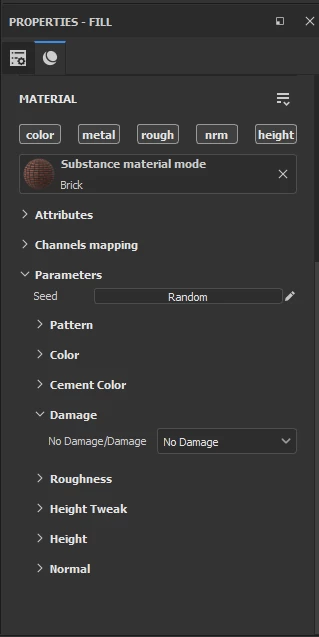
But when I load the SBSAR file into Painter, all the parameters are displayed as if I did not use the visible if code.
How can I solve the problem?

This topic has been closed for replies.
Correct answer Luca Giarrizzo

This appears to be a bug either in the export or in the way Substance Painter is presenting the parameters. I've just tried it with another simple test material and get the same results.

I'll tag Adobe's @Luca Giarrizzo to see if he can shed any light on this.


Dave


Hello @masoud23969367ntho.,


First, thank you @davescm for bringing this issue to my attention!


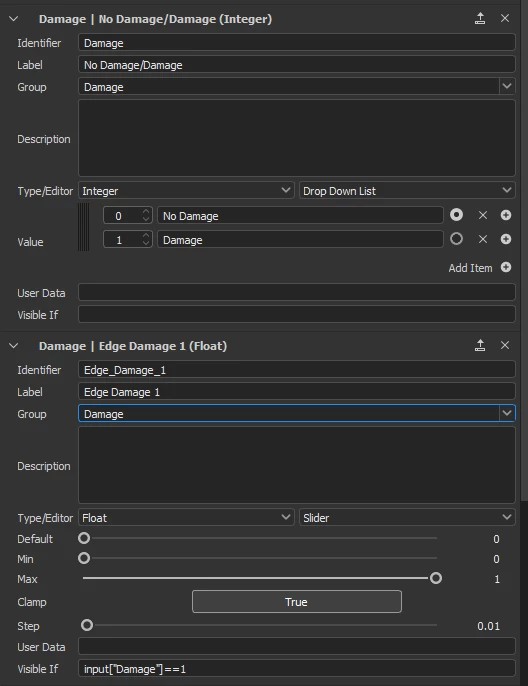
The problem appears to be caused by the use of spaces in the Visible if statement, which causes it to not be parsed correctly in Painter. Removing the spaces fixed the issue in my testing with the assets you kindly provided.


@GeoffroySC from the Painter team may help looking further into this. I will flag this issue to that team. Thank you for your report and valuable help!


Best regards.



1 reply

davescm
Community Expert
Community Expert
April 9, 2022

What is the dependency for visibility?

Dave

Participant
April 9, 2022

I have two parameters of damage and no damage
When I put the parameter on damaged
The other 4 parameters are shown
But it should not be shown when selecting no damage
inside the designer and player is correctly work
but inside the painter all parameters shown, no matter which one choose

davescm
Community Expert
Community Expert
April 9, 2022

Can you post the sbs and I'll take a look at it

Dave


