


Participant
June 21, 2023
Answered

How do I fix the normal map from the "multi angle to normal" node?

  • June 21, 2023
  • 1 reply
  • 1497 views

Hi !
I'm a 3D material creator.
I want to take a real fabric and photograph it in 8 different directions under the same intensity of light (clockwise) and then extract the PBR maps in substance designer.
I used the template provided by the software to extract the maps, and the results were amazing. I was able to see very fine details, but unfortunately I found a major flaw. (See attached image) I have gone through numerous node operations to fix this, but I have not been able to do so, and I have come to believe that this was intended and built in when the "multi angle to normal" node was designed. I would like to ask the developers on the forum for their opinion. As you can see in the attached screenshot, the top and bottom of the normal maps are inverted, is there any way to fix this?

Best,
Pat Kim
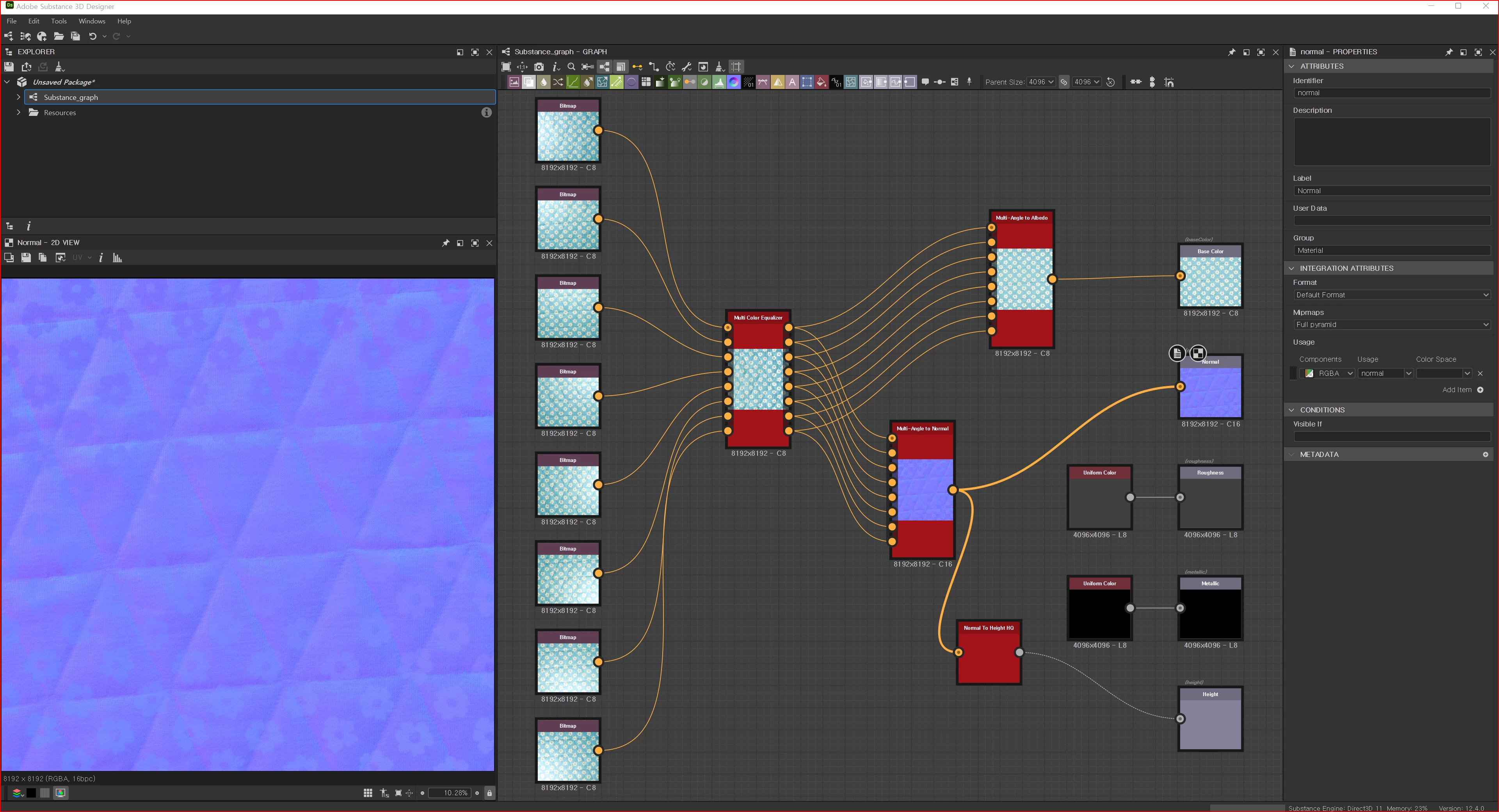

This topic has been closed for replies.
Correct answer Cyril Dellenbach

Hi, @Cyril Dellenbach 
Sorry for the late response.
I just checked my Google Drive, and I've updated the source image for the case where the error occurred.
Could you please check it out?


Hi again @Pat Kim,


I've made some tests on my own and there's indeed an issue between your images and the Multi-Angle to Normal node. Considering the bitmaps and the tests made, the problem very likely comes from our side.


With that being said, this node has already been planned to be reworked, so I've shared the dataset to the person in charge of reworking it, but I've unfortunately no ETA to share.


In the meantime, you can try to use Image to Material from Substance 3D Sampler in order to get a Normal map from your pictures, but this probably won't be as precise as the Multi-Angle node.


Best regards,


1 reply

Participant
June 27, 2023

A good job!
I am a computer scientist doing research in 3D computer graphics.
I know  enough about the "photometric stereo technique" used to extract normal maps from multiple images.
I am   interested in knowing what is going on.

(1) To do so, I would like to know further information as follows.
(1.1) Two or three ordinary photos (taken under the office lighting condtion)  of the fabric from which you extracted the normal map .
(1.2) The input 8 images to the "Color Equalizer" box.

(2) If you have an example of fabric whose normal map looks OK, then please provide both information mentioned above for this fabric. Then it will help me to guess at what is going on.

--
I hope that developers of the "multi-angle to normal" algorithm in Substance would respond to this issue.


Pat KimAuthor
Participant
June 29, 2023

Thank you for your response.

Here are the images for cases (1) and (2).
I hope this will help you resolve the issue.

download url - https://drive.google.com/drive/folders/16fEzUEof_OAyfGF6GYeNG_EiVEM_0HKy?usp=sharing

Cyril Dellenbach
Community Manager
Community Manager
June 30, 2023

Hi @Pat Kim,


Thanks for your patience.


I've made some tests on my side and wasn't able to reproduce this normal issue. Therefore, the person behind the node has been notified, but can you send us the pictures causing problem with the Multi-Angle node? In the google drive link you shared, both the error and the non-error folders have the same pictures.


Let me know,


Cyril Dellenbach (Micro) | QA Support Artist | Adobe