Participating Frequently
May 2, 2022
Answered

How make this shape?

  • May 2, 2022
  • 2 replies
  • 577 views

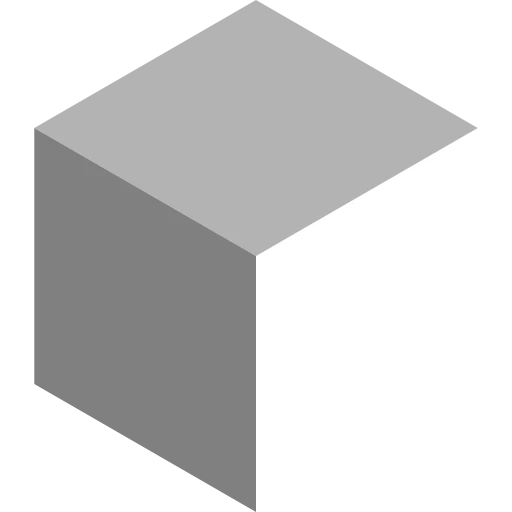
Not even sure what this shape is called but the Polygon1 node first shape. What I want to do is the image below made of shapes ...

This topic has been closed for replies.
Correct answer Luca Giarrizzo

Hello,


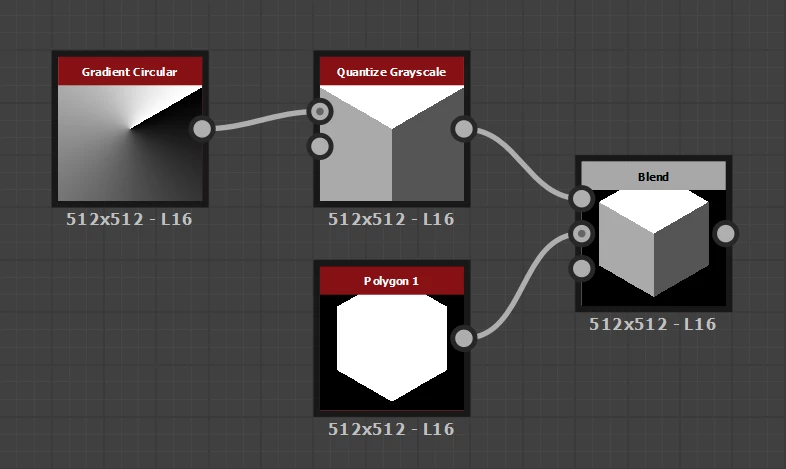
You can split the output of a Gradient Circular node rotated 30 degrees into 3 sections using a Quantize node, then multiply the result agains a Polygon 1 node set to 6 sides.


I hope this helps!


2 replies

Luca Giarrizzo
Community Manager
Luca GiarrizzoCommunity ManagerCorrect answer
Community Manager
May 3, 2022

Hello,


You can split the output of a Gradient Circular node rotated 30 degrees into 3 sections using a Quantize node, then multiply the result agains a Polygon 1 node set to 6 sides.


I hope this helps!


Luca Giarrizzo | Quality Engineer - Substance 3D Designer | Adobe
espr3ss0Author
Participating Frequently
May 4, 2022

Wow, like magic! 🙂

Luca Giarrizzo
Community Manager
Community Manager
May 4, 2022

Thank you @espr3ss0, I am glad you like it!


Luca Giarrizzo | Quality Engineer - Substance 3D Designer | Adobe
espr3ss0Author
Participating Frequently
May 2, 2022

The Polygon1 is a hexagon what I meant was the Rombus, how can I exactly align the 3 of them?

Participant
May 2, 2022


quote

The Polygon1 is a hexagon what I meant was the Rombus, how can I exactly align the 3 of them?


By @espr3ss0

You could either use math to align them or you could try messing around with the cube 3d node and add some color adjustments

espr3ss0Author
Participating Frequently
May 3, 2022

Not sure how I could do that without some kind of mask.