Participating Frequently
May 31, 2023
Answered

How to add more output to a multi switch grayscale

  • May 31, 2023
  • 1 reply
  • 873 views

Hello, 

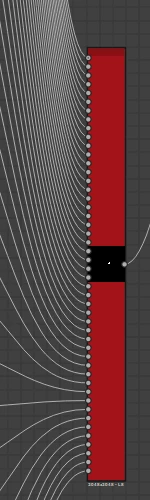
currently I want to have more then 20 outputs for my multi_switch_grayscale. I tried already a couple of things. 

I added more blend nodes, change the outputs to 20+ and higher.

change the Visible if to 20+


But my multi switch doesn't change after 20, it stays on 20, even it has way more nodes connected.

Did I forget something to change?


This topic has been closed for replies.
Correct answer davescm

Hi

I've just added an additional 5 inputs to the multiswitch grayscale ( attached below ) and it works.

To do it I had to :

Open the reference, copy it and paste it into a new package for editing

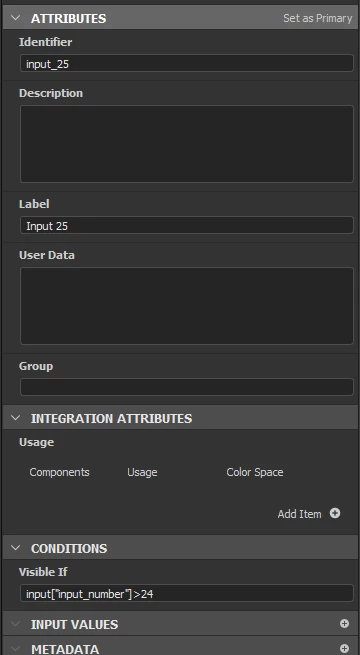
Add the additional inputs, label each and ensure the visible if statement was added to each (incrementing the last number each time).

Add the additional blend nodes. I actually just used Ctrl+D to duplicate the previous then edited the Opacity function again incrementing the integer for each new node

I edited the graph input parameter for Input number to make the max 25

I edited the graph input parameter for Input Selection gain making the max 25.

Then I changed the graph label and name and saved the package


Dave


1 reply

davescm
Community Expert
Community Expert
May 31, 2023

Did you edit the function graph that drives opacity for each additional blend node?

Dave

Participating Frequently
May 31, 2023

You are right, I indeed didn't change the opacity layer.

I changed the opacity layers now, but I still won't go further then 20


davescm
Community Expert
davescmCommunity ExpertCorrect answer
Community Expert
May 31, 2023

Hi

I've just added an additional 5 inputs to the multiswitch grayscale ( attached below ) and it works.

To do it I had to :

Open the reference, copy it and paste it into a new package for editing

Add the additional inputs, label each and ensure the visible if statement was added to each (incrementing the last number each time).

Add the additional blend nodes. I actually just used Ctrl+D to duplicate the previous then edited the Opacity function again incrementing the integer for each new node

I edited the graph input parameter for Input number to make the max 25

I edited the graph input parameter for Input Selection gain making the max 25.

Then I changed the graph label and name and saved the package


Dave