Participant
February 24, 2023
Answered

How to auto-fill attribute value in Substance Designer on creating new graph

  • February 24, 2023
  • 1 reply
  • 303 views

Is there a way to have Substance Designer auto-fill in the Author / Author URL on creating new graph? 
Through python API, how to do that?

This topic has been closed for replies.
Correct answer Cyril Dellenbach

Hi @hellosbs,


There is some way to do this with Python API, but the easiest workflow probably remains to create your own template with the Author and URL already filled in, and to simply use this template for every new project.


Create a new Substance Graph with all the outputs you frequently use (you can start with an already existing template), add the attributes you want (author, author url, etc.) and save this graph inside a folder where you'll let all your custom templates. You can now link the custom template folder to Substance 3D Designer:

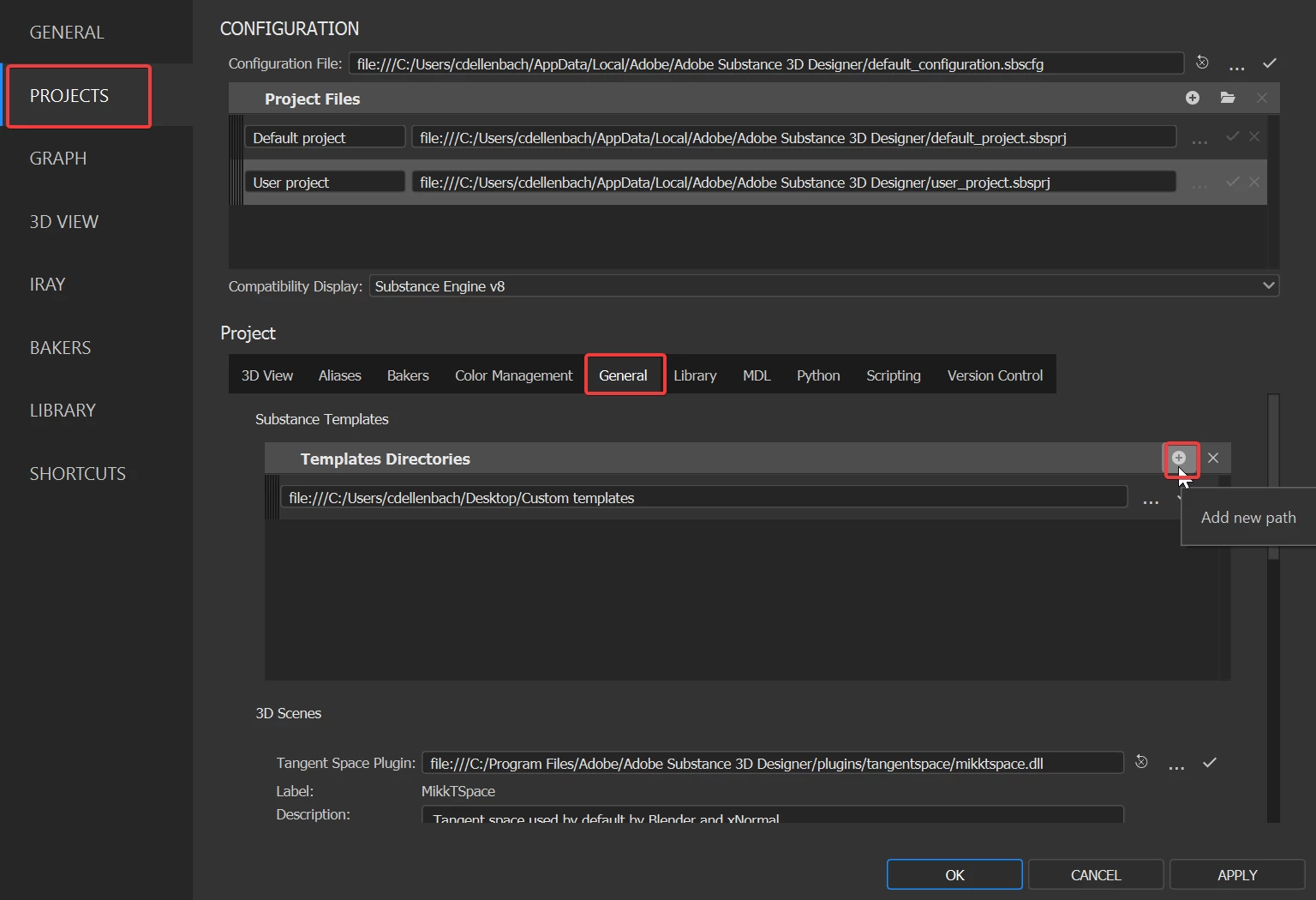
Edit > Preferences > Projects > General > Add new path


Your custom template should now be available in the template list when creating a new graph.


Best regards,


1 reply

Cyril Dellenbach
Community Manager
Cyril DellenbachCommunity ManagerCorrect answer
Community Manager
February 28, 2023

Hi @hellosbs,


There is some way to do this with Python API, but the easiest workflow probably remains to create your own template with the Author and URL already filled in, and to simply use this template for every new project.


Create a new Substance Graph with all the outputs you frequently use (you can start with an already existing template), add the attributes you want (author, author url, etc.) and save this graph inside a folder where you'll let all your custom templates. You can now link the custom template folder to Substance 3D Designer:

Edit > Preferences > Projects > General > Add new path


Your custom template should now be available in the template list when creating a new graph.


Best regards,


Cyril Dellenbach (Micro) | QA Support Artist | Adobe