

weltraumimport
Participant
July 19, 2021
Answered

How to contain a pattern in other shapes (aka creating something like a border)

  • July 19, 2021
  • 1 reply
  • 1373 views

I'm fairly new to designer and i'm breaking my head over this.

I want to create something similar to here:
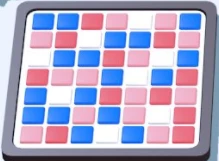
And i've created a few tile generators that do their job with the color tiles perfectly, but i can't find a way to contain the tile generator patterns in a border shape kinda? Is there a smart way to create a shape/border around the tiles? So far my cube looks like this, without any white border and without the grey border at all because if i add a mask, it cuts the tiles on the edges in half
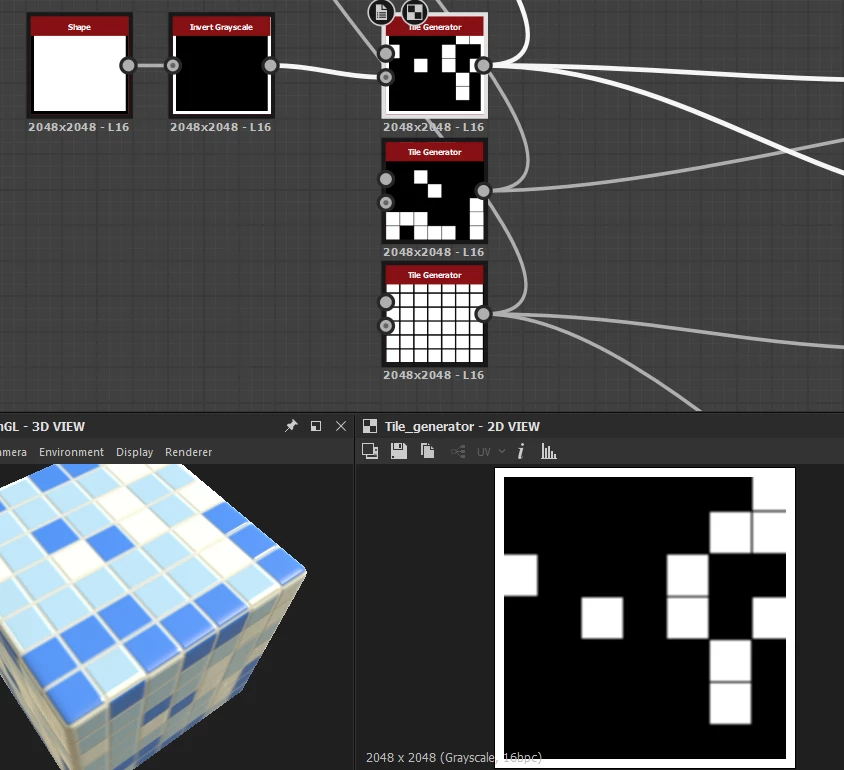
Maybe i'm entirely missing a point in how to control patterns in designer? Any tip or help is appreciated

Thank you!
This topic has been closed for replies.
Correct answer Luca Giarrizzo

Hello!


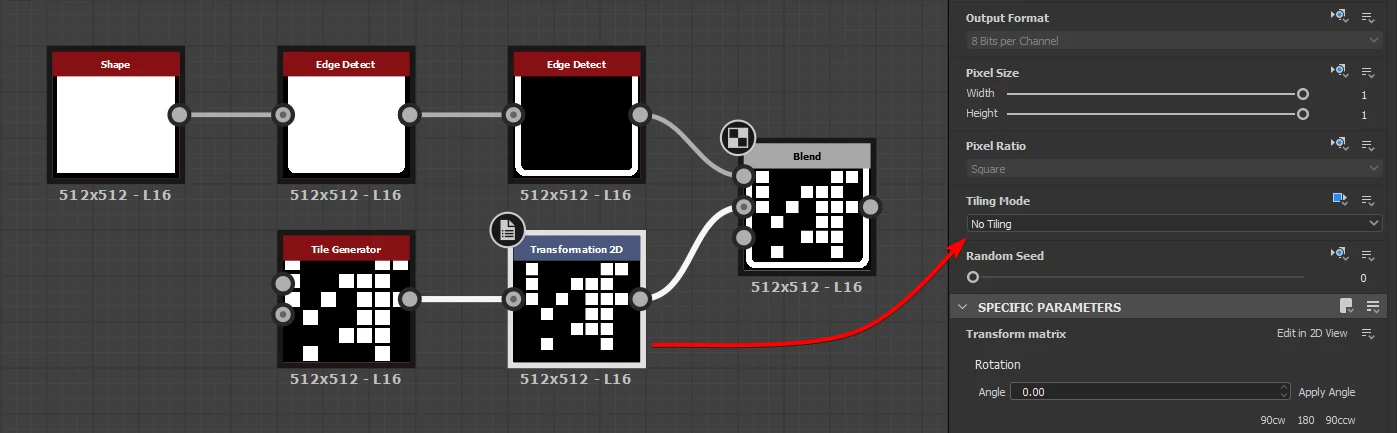
An easy solution can be to scale the tiles down without tiling, then blend the border in, as follows:


To disable tiling on the Transformation 2D node, set the Tiling Mode parameter's inheritance method to Absolute, and select the No tiling option.


A Shape node is fed to an Edge Detect node which Edge Roundness parameter is set to 1.0. This provides as square with round corners which can then be connected to another Edge Detect node to extract the border shape.


I hope this helps!


Best regards.


1 reply

Luca Giarrizzo
Community Manager
Luca GiarrizzoCommunity ManagerCorrect answer
Community Manager
July 19, 2021

Hello!


An easy solution can be to scale the tiles down without tiling, then blend the border in, as follows:


To disable tiling on the Transformation 2D node, set the Tiling Mode parameter's inheritance method to Absolute, and select the No tiling option.


A Shape node is fed to an Edge Detect node which Edge Roundness parameter is set to 1.0. This provides as square with round corners which can then be connected to another Edge Detect node to extract the border shape.


I hope this helps!


Best regards.


Luca Giarrizzo | Quality Engineer - Substance 3D Designer | Adobe
weltraumimport
Participant
July 19, 2021

Thanks sm for explaining!! that solution works great for my material it looks so nice now ;o;

Luca Giarrizzo
Community Manager
Community Manager
July 20, 2021

I am glad!


Have fun with the Substance 3D tools!


Luca Giarrizzo | Quality Engineer - Substance 3D Designer | Adobe