This topic has been closed for replies.
Correct answer davescm

Hi

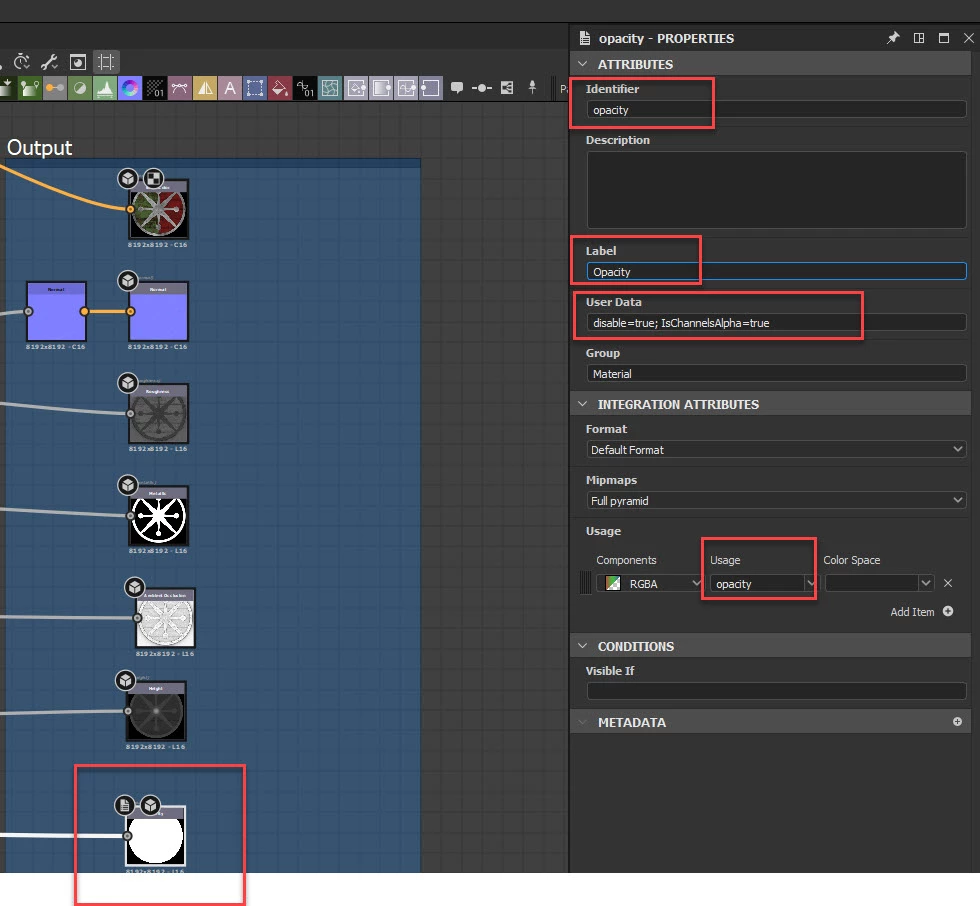
In 3D Designer, add an output node to your material with the identifier "opacity", the label "Opacity" set the usage to "opacity". In user data for that node add the following  disable=true; IsChannelsAlpha=true

Plug your mask into that opacity output node.


Publish the material as a sbsar


In 3D Painter use Alt+drag to place the material as a decal

1 reply

davescm
Community Expert
davescmCommunity ExpertCorrect answer
Community Expert
August 29, 2021

Hi

In 3D Designer, add an output node to your material with the identifier "opacity", the label "Opacity" set the usage to "opacity". In user data for that node add the following  disable=true; IsChannelsAlpha=true

Plug your mask into that opacity output node.


Publish the material as a sbsar


In 3D Painter use Alt+drag to place the material as a decal