piotro14533619
Participating Frequently
November 18, 2024
Answered

how to expose only one parameter from 2

  • November 18, 2024
  • 2 replies
  • 393 views

Hey guys,


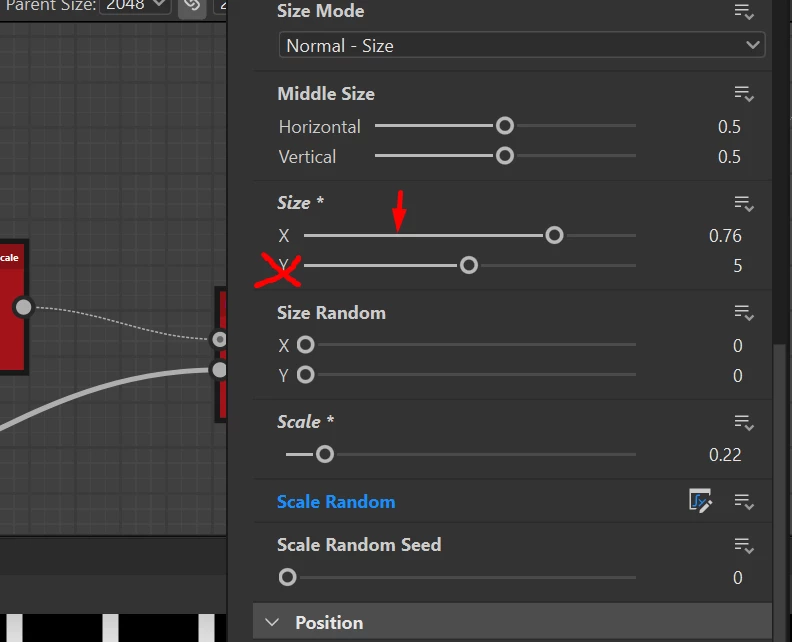
I have a small trouble with exposing the parameters (still in learing process). I'd like to expose only one Size parameter in X axis without Y one. Is there any way to do this using functions maybe? Still having Y axis to be set on 5 in this case.

Im attaching a screenshot to show you what I want to achieve.


Cheers!
Correct answer Marco Vitale

Hey piotro,

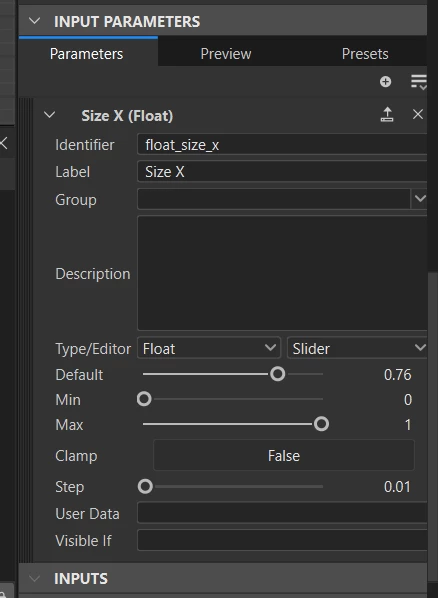
You first create an input parameter for your graph, as a single float, name it.

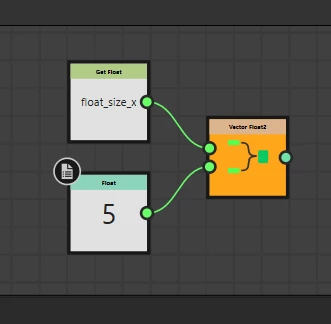
Next you create a function for the parameter you want to control, and since this is a Float2 you have to combine the input float with a constant Float and plug both into a Vector2 to create the Data Type you need for this parameter.

Stay healthy and creative Marco


2 replies

devjitp42731918
Participant
April 14, 2025

I was creating a subgraph for some utility, Using a "Input Value" was not working for me. I Used a uniform color node, expose its parameter as slider, then take a value processor, in there grab the identifier of the color node through "get float" and combine it with "vector float2", other float being the constant float that you desire. (or any other type of value), set the vector float to output and then plug the value processor to an input of the node and assign it in the "Use node input value".


I hope that makes sense.

Marco VitaleCommunity ExpertCorrect answer
Community Expert
November 18, 2024

Hey piotro,

You first create an input parameter for your graph, as a single float, name it.

Next you create a function for the parameter you want to control, and since this is a Float2 you have to combine the input float with a constant Float and plug both into a Vector2 to create the Data Type you need for this parameter.

Stay healthy and creative Marco


piotro14533619
Participating Frequently
November 20, 2024

Thank you Marco for the help! It works super great!