AdamZ101
Participant
Aug 13, 2021 7:42 PM UTC
Answered

How to expose Rotation within the Transformation 2D node

Hi, I'm trying to expose only the rotation of the Transformation 2D node. When I click "Expose as a new graph" next to Transform Matrix, I  get "X Y Z W" when the Sbsar is brought into Unity. How Can I expose that as a either a percentage or something that's more user friendly? Thanks!

This topic is closed to new replies. Start a new post to keep the conversation going.
davescm
davescmCorrect answer
Community Expert
Aug 13, 2021 10:09 PM UTC

Hi

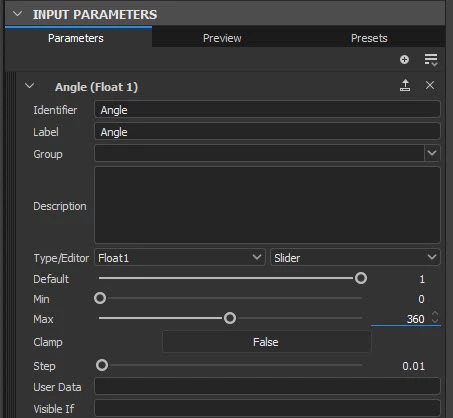
Create a new input parameter called, for example, Angle, with minimum 0 and maximum 360


In transform 2D create an empty function for the transform matrix.

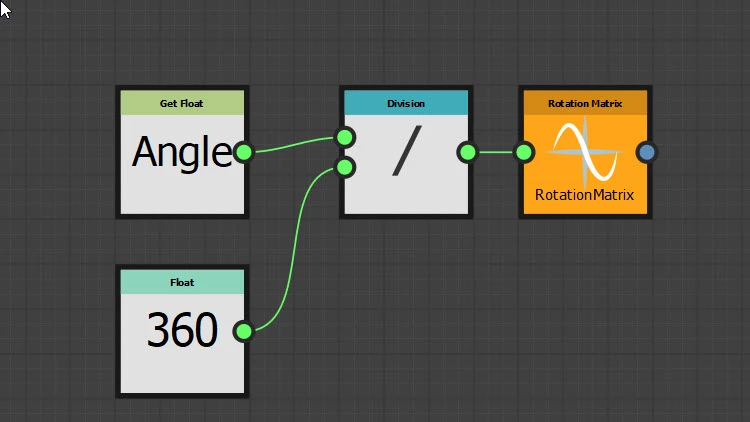
In that function set a Get Float node to the Angle parameter, divide it by 360 and send it to a Rotation Matrix node which you should also right click and set as the output node


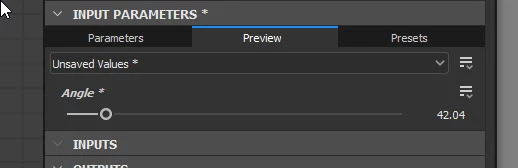
You should now be able to control your rotation with the graph "Angle" input parameter (0-360 degrees)


Dave


3 replies

davescm
Community Expert
davescmCommunity ExpertCorrect answer
Community Expert
Aug 13, 2021 10:09 PM UTC

Hi

Create a new input parameter called, for example, Angle, with minimum 0 and maximum 360


In transform 2D create an empty function for the transform matrix.

In that function set a Get Float node to the Angle parameter, divide it by 360 and send it to a Rotation Matrix node which you should also right click and set as the output node


You should now be able to control your rotation with the graph "Angle" input parameter (0-360 degrees)


Dave


Translate
AdamZ101
AdamZ101Author
Participant
Aug 16, 2021 6:05 PM UTC

Thanks so much Dave!

Translate
davescm
Community Expert
Community Expert
Aug 16, 2021 6:35 PM UTC

You're welcome 🙂

Dave

Translate