Inspiring
November 9, 2022
Answered

How to get a middle height value from a height image?

  • November 9, 2022
  • 2 replies
  • 744 views

My first instinkt is lots of blur.   But it  gives totally  wrong result if  90% is just black pixels  and only 10% is actual height of something .   Besides blur makes same kind of halos you see in hipass usually .  So I wonder is there any  proper math to calculate  a height  image middle point ?

This topic has been closed for replies.
Correct answer Luca Giarrizzo

Hello @kirkr5689!


The Summed Area Table node may be useful in this scenario: it returns the sum of all pixel values in the rectangle from the top left corner up to a pixel.


With this in mind, we can do the following:

  1. Get the sum of all pixel values for our source image
  2. Get the number of non-black pixels in our source image
  3. Divide the first by the second to get the average grayscale value of all non-black pixels


1 is done by sampling the pixel on the bottom right corner of the Summed Area Table node output.

2 is done by rounding all pixel values in the source image so that computing their sum effectively returns the number of non-black pixels, then doing the same as in 1


The result looks like this :
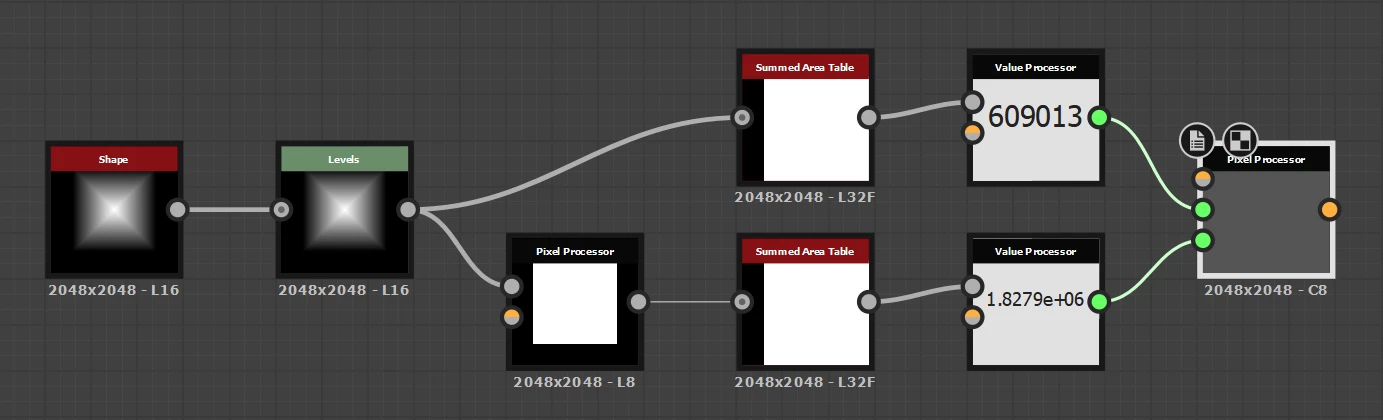


You can see it in action in the attached video. Changing the size of the shape does not affect the result, since we ignore pixels with a value of zero.


This returns the average height value. If you want the height middle point, then a simple Distance node may do the trick to eliminate pixels with a value of zero, then using the Min Max node as suggested by @davescm.
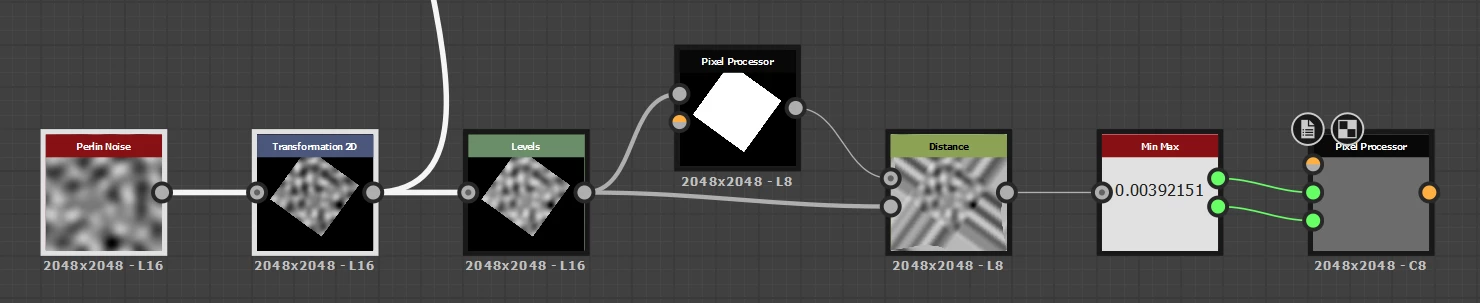


I hope this addresses your request!


Best regards.



2 replies

Luca Giarrizzo
Community Manager
Luca GiarrizzoCommunity ManagerCorrect answer
Community Manager
November 14, 2022

Hello @kirkr5689!


The Summed Area Table node may be useful in this scenario: it returns the sum of all pixel values in the rectangle from the top left corner up to a pixel.


With this in mind, we can do the following:

  1. Get the sum of all pixel values for our source image
  2. Get the number of non-black pixels in our source image
  3. Divide the first by the second to get the average grayscale value of all non-black pixels


1 is done by sampling the pixel on the bottom right corner of the Summed Area Table node output.

2 is done by rounding all pixel values in the source image so that computing their sum effectively returns the number of non-black pixels, then doing the same as in 1


The result looks like this :


You can see it in action in the attached video. Changing the size of the shape does not affect the result, since we ignore pixels with a value of zero.


This returns the average height value. If you want the height middle point, then a simple Distance node may do the trick to eliminate pixels with a value of zero, then using the Min Max node as suggested by @davescm.


I hope this addresses your request!


Best regards.



Luca Giarrizzo | Quality Engineer - Substance 3D Designer | Adobe
davescm
Community Expert
Community Expert
November 14, 2022

I don't know how I missed it in the past, but the Summed Area Table node was a new one on me !


Thanks for the info Luca


Dave


davescm
Community Expert
Community Expert
November 10, 2022

It is quite difficult (read I've not found a way) to do that with existing functionality.

There is the Min Max node which will give you the minimum and maximum values. However the middle value could be anywhere betweeen them and your question seems to want to ignore much of the image.

Pixel processor does not help as it parallel processes all individual pixels and does not store the info in a way that can be used to calculate a mean, median or mode for the different pixel values.


Perhaps if you explain the problem you are trying to resolve by having that value, there may be another approach.

Dave

kirkr5689Author
Inspiring
November 10, 2022

Thanks alot Dave, I need it to put one height in aproximally same level of another one  without  changing its amplitude .  The way they would intersect each other rather than  be one over and under another . Looks like  it could be in beween  of what minmax  returns . With a bit of extra blur  to kill extreme spikes( except if the spikes are predominantly  up  or otherwize)   it should be more or less correct  my guess  for most cases .   I didn't even know such node exists

