Participant
December 15, 2022
Answered

How to insert node between two connected nodes using python.

  • December 15, 2022
  • 1 reply
  • 1213 views

I have two nodes, and I want to insert an sRGB_to_ACEScg colorspace conversion node between them.

NodeA has it's baseColor output connected to the NodeB input.


I want to insert the sRGB_to_ACEScg node between them.


I have successfully connected the output of the sRGB_to_ACEScg node to the input of NodeB.


However, I am having a hard time trying to find out how to take what was connected to NodeB and connecting it to the sRGB_to_ACEScg node input.

The smaple files all show how to create nodes and wire them up but nothing on how to get the connection and connect it to another node input.


This topic has been closed for replies.
Correct answer Luca Giarrizzo

Hello Paul,


In simple terms, inserting a new node a between two connected nodes A and B involves the following steps:

  1. Acquiring the connected properties of nodes A and B
  2. Deleting the existing connection between A and B
  3. Creating the new node
  4. Creating new connections:
    • Node A output --> New node input
    • New node output --> Node B input


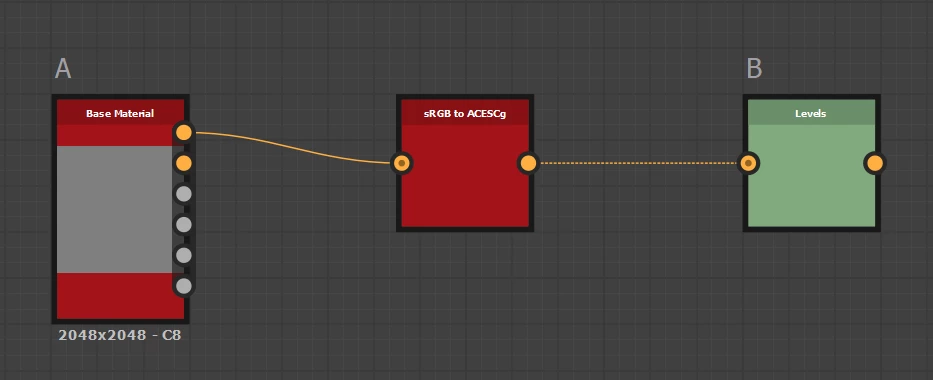
Here is a sample script which does just that. Bear in mind the script applies to the specific setup illustrated below. It also assumes a single connection exists for nodes A and B and that the new node has a single connectable input and output.


import sd
from sd.api import sdapplication, sdproperty
import os

app = sd.getContext().getSDApplication()
pkg_mgr = app.getPackageMgr()
ui_mgr = app.getQtForPythonUIMgr()

rsc_dir = app.getPath(sdapplication.SDApplicationPath.DefaultResourcesDir)

graph = ui_mgr.getCurrentGraph()
graph_nodes = graph.getNodes()
node_a = None
node_b = None

# Define nodes A and B
for node in graph_nodes:
	label = node.getDefinition().getLabel()
	if label == "Base Material":
		node_a = node
	elif label == "Levels":
		node_b = node

# Get connected output of node A
node_a_output_props = node_a.getProperties(sdproperty.SDPropertyCategory.Output)
node_a_connected_output_prop = None
for prop in node_a_output_props:
	if node_a.getPropertyConnections(prop):
		node_a_connected_output_prop = prop

# Get connected input of node B
node_b_input_props = node_b.getProperties(sdproperty.SDPropertyCategory.Input)
node_b_connected_input_prop = None
for prop in node_b_input_props:
	if node_b.getPropertyConnections(prop):
		node_b_connected_input_prop = prop		

# Create new node
target_pkg = pkg_mgr.loadUserPackage(os.path.join(
	rsc_dir,
	"packages",
	"color_space_conversion.sbs"
	))
target_rsc = target_pkg.findResourceFromUrl("pkg:///srgb_to_acescg")
new_node = graph.newInstanceNode(target_rsc)
pkg_mgr.unloadUserPackage(target_pkg)

# Get connectable input of new node
new_node_input_props = new_node.getProperties(sdproperty.SDPropertyCategory.Input)
for prop in new_node_input_props:
	if prop.isConnectable():
		new_node_input_prop = prop

# Get connectable output of new node
new_node_output_props = new_node.getProperties(sdproperty.SDPropertyCategory.Output)
for prop in new_node_output_props:
	if prop.isConnectable():
		new_node_output_prop = prop

# Replace existing connection
node_a.deletePropertyConnections(node_a_connected_output_prop)
node_a.newPropertyConnection(
	node_a_connected_output_prop,
	new_node,
	new_node_input_prop
	)
new_node.newPropertyConnection(
	new_node_output_prop,
	node_b,
	node_b_connected_input_prop
	)


You can see the script in action in the attached video. Have fun!

 

1 reply

Luca Giarrizzo
Community Manager
Luca GiarrizzoCommunity ManagerCorrect answer
Community Manager
December 19, 2022

Hello Paul,


In simple terms, inserting a new node a between two connected nodes A and B involves the following steps:

  1. Acquiring the connected properties of nodes A and B
  2. Deleting the existing connection between A and B
  3. Creating the new node
  4. Creating new connections:
    • Node A output --> New node input
    • New node output --> Node B input


Here is a sample script which does just that. Bear in mind the script applies to the specific setup illustrated below. It also assumes a single connection exists for nodes A and B and that the new node has a single connectable input and output.


import sd
from sd.api import sdapplication, sdproperty
import os

app = sd.getContext().getSDApplication()
pkg_mgr = app.getPackageMgr()
ui_mgr = app.getQtForPythonUIMgr()

rsc_dir = app.getPath(sdapplication.SDApplicationPath.DefaultResourcesDir)

graph = ui_mgr.getCurrentGraph()
graph_nodes = graph.getNodes()
node_a = None
node_b = None

# Define nodes A and B
for node in graph_nodes:
	label = node.getDefinition().getLabel()
	if label == "Base Material":
		node_a = node
	elif label == "Levels":
		node_b = node

# Get connected output of node A
node_a_output_props = node_a.getProperties(sdproperty.SDPropertyCategory.Output)
node_a_connected_output_prop = None
for prop in node_a_output_props:
	if node_a.getPropertyConnections(prop):
		node_a_connected_output_prop = prop

# Get connected input of node B
node_b_input_props = node_b.getProperties(sdproperty.SDPropertyCategory.Input)
node_b_connected_input_prop = None
for prop in node_b_input_props:
	if node_b.getPropertyConnections(prop):
		node_b_connected_input_prop = prop		

# Create new node
target_pkg = pkg_mgr.loadUserPackage(os.path.join(
	rsc_dir,
	"packages",
	"color_space_conversion.sbs"
	))
target_rsc = target_pkg.findResourceFromUrl("pkg:///srgb_to_acescg")
new_node = graph.newInstanceNode(target_rsc)
pkg_mgr.unloadUserPackage(target_pkg)

# Get connectable input of new node
new_node_input_props = new_node.getProperties(sdproperty.SDPropertyCategory.Input)
for prop in new_node_input_props:
	if prop.isConnectable():
		new_node_input_prop = prop

# Get connectable output of new node
new_node_output_props = new_node.getProperties(sdproperty.SDPropertyCategory.Output)
for prop in new_node_output_props:
	if prop.isConnectable():
		new_node_output_prop = prop

# Replace existing connection
node_a.deletePropertyConnections(node_a_connected_output_prop)
node_a.newPropertyConnection(
	node_a_connected_output_prop,
	new_node,
	new_node_input_prop
	)
new_node.newPropertyConnection(
	new_node_output_prop,
	node_b,
	node_b_connected_input_prop
	)


You can see the script in action in the attached video. Have fun!

 

Luca Giarrizzo | Quality Engineer - Substance 3D Designer | Adobe
Participant
December 20, 2022

I was able to get it working.  Someone at Adobe was able to point me in the right direction.  Much like what you have provided above.  Thank you for your solution.

Luca Giarrizzo
Community Manager
Community Manager
December 22, 2022

Hello Paul,


Good news! I am glad you can move forward in your script.

Feel free to get back to us if you need further guidance.


Best regards.

Luca Giarrizzo | Quality Engineer - Substance 3D Designer | Adobe

