

Participant
October 8, 2024
Question

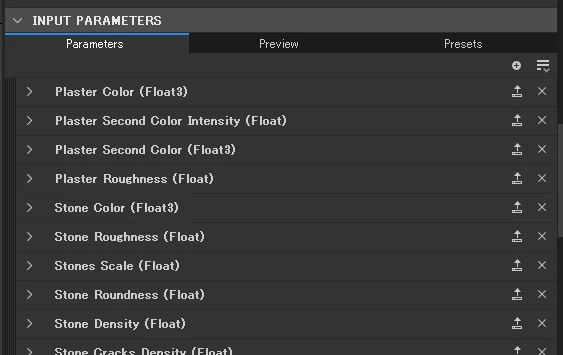
How to reorder exposed parameters using Python

  • October 8, 2024
  • 3 replies
  • 610 views

Hello! 


I want to create a tool to reorder parameters.

Is there a way to reorder exposed parameters and get their identifiers using Python API?
 

Thanks



This topic has been closed for replies.

3 replies

Luca Giarrizzo
Community Manager
Community Manager
October 9, 2024

Hello,


Thank you @Marco Vitale!


In addition to Marco's thoughtful replies, please note that in Designer version 13.1.0 the following methods were added in the SDSBSCompGraph class:

  • reorderGraphInput(inputIdentifier: str, newPosition: int)
  • reorderGraphOutput(outputIdentifier: str, newPosition: int)


This should let you reorder existing graph parameters.


Best regards.

Luca Giarrizzo | Quality Engineer - Substance 3D Designer | Adobe
uni9153Author
Participant
October 14, 2024

Thank you for your response.


When I used reorderGraphInput method, I got this attribute error.
Can I use this method in version 14.0?


[ERR][45]Traceback (most recent call last):

[ERR][46] File "<string>", line 14, in <module>

[ERR][47]AttributeError

[ERR][48]:

[ERR][49]'SDSBSCompGraph' object has no attribute 'reorderGraphInput'

Luca Giarrizzo
Community Manager
Community Manager
October 14, 2024

Yes, this method is available in version 14.0.0.


The sample script below in version 14.0.2. It creates inputs and outputs for a Substance graph if they do not already exist, then reorders them to match a specific list.

You can run the script in Designer's Python Editor, then change the order of the inputs and outputs created by the script, then run the script again. Inputs and outputs should retrieve their original order.


Let me know if you experience any issues with it.


import sd
from sd.api import sdproperty, sdvaluestring
from sd.api.sbs import sdsbscompgraph

import typing

app = sd.getContext().getSDApplication()
ui_mgr = app.getQtForPythonUIMgr()

graph = ui_mgr.getCurrentGraph()
typing.cast(sdsbscompgraph.SDSBSCompGraph, graph)
nodes = graph.getNodes()

target_ids = [
	"basecolor",
	"normal",
	"roughness",
	"metallic",
	"height",
	"ambientocclusion",
	"opacity",
	"scattering"
]

input_ids = [item.get() for item in graph.getInputIdentifiers()]
output_ids = [item.get() for item in graph.getOutputIdentifiers()]
output_ids_matching = [item for item in output_ids if item in input_ids]


for identifier in target_ids:
	if identifier not in output_ids:
		print("Adding output '{}'".format(identifier))
		output_node = graph.newNode("sbs::compositing::output")
		output_node.setAnnotationPropertyValueFromId("identifier", sdvaluestring.SDValueString.sNew(identifier))
		output_ids.append(identifier)
		
	if identifier not in input_ids:
		print("Adding input '{}'".format(identifier))
		output_node = graph.newNode("sbs::compositing::input_grayscale")
		output_node.setAnnotationPropertyValueFromId("identifier", sdvaluestring.SDValueString.sNew(identifier))
		input_ids.append(identifier)

print("Reordering inputs...")
for index, id in enumerate(target_ids):
	graph.reorderGraphInput(id, index)

print("Reordering outputs...")
for index, id in enumerate(target_ids):
	graph.reorderGraphOutput(id, index)


Best regards.

Luca Giarrizzo | Quality Engineer - Substance 3D Designer | Adobe
uni9153Author
Participant
October 8, 2024

I also want to get thier Labels and group names.

Community Expert
October 8, 2024

I'm not sure how to get the group names, but you can get the label with:


property.getLabel()


Here is an excert from the python API documentation of the sdproperty module:


sdproperty module
class sd.api.sdproperty.SDProperty(APIContext, handle, *args, **kwargs)
Bases: sd.api.sdapiobject.SDAPIObject

Description of property defined by an identifier, a type, and some additional information

getCategory() → sd.api.sdproperty.SDPropertyCategory
Get the category of the property (see SDPropertyCategory)

getClassName() → str
Returns the most specific name of the class this APIObject is

getDefaultValue()
Get the default value of the property

getDescription() → str
Get the description of the property

getId() → str
Get the identifier of the property. The identifier is unique in the current category.

getLabel() → str
Get the label of the property

getType()
Get the first type of all available types returned by getTypes() (defined for convenience)

getTypes()
Get all types supported by this property

isConnectable() → bool
Indicates whether the property is connectable (i.e. if another node’s property can be connected to it)

isFunctionOnly() → bool
Indicates if the property value is only controlled by a function. If so calling getPropertyValue/setPropertyValue is not allowed

isPrimary() → bool
Indicates whether the property is the primary property in its category

isReadOnly() → bool
Indicates whether the property is readonly

isVariadic() → bool
Indicates whether the property is variadic. If True, this parameter will be represented as multiple properties on the instance

release() → None
Releases an APIObject


You can also find the Scripting Documentation in the "Help" Menu in Substance Designer:


Stay healthy and creative

Marco

Community Expert
October 8, 2024

Hey there,

I hope you are well and healthy.

Here is a small snippet, which loops through all input properties of the current graph (you can also replace the current graph by an arbitrary node, the code should work as well) it stores the properties in a dictionary, the key is the property identifier and the value is the sdProperty-Object, so you should be able to sort it easily and reorder them.

import sd

ctx = sd.getContext()
app = ctx.getSDApplication()
qtUiMgr = app.getQtForPythonUIMgr()
current_graph = qtUiMgr.getCurrentGraph()

parameters_dict = {}
parameters = current_graph.getProperties(sd.api.sdproperty.SDPropertyCategory.Input)
for parameter in parameters:
    # Filter default properties, which can't be reordered
    if (
        parameter.getId() != "$outputsize"
        and parameter.getId() != "$format"
        and parameter.getId() != "$pixelsize"
        and parameter.getId() != "$pixelratio"
        and parameter.getId() != "$tiling"
        and parameter.getId() != "$randomseed"
    ):
        parameters_dict[parameter.getId()] = parameter

 Stay healthy and creative

Marco

uni9153Author
Participant
October 8, 2024

Thank you! I'll check it right away.