
Participant
July 26, 2021
Answered

How to tile entire material in SD

  • July 26, 2021
  • 1 reply
  • 736 views

I want to parametrically control tiling of entire material (using the green noodles). There used to be option for this. If I use Material Transform node I cannot see tiling option. There is Stretch and Rotation that I obviously don't want. I can eyeball scale of the transform but cannot see how I could tile the material parametrically so that it stays seamless.
This topic has been closed for replies.
Correct answer Luca Giarrizzo

Hello,


To easily adjust tiling using a Material Transform node, you can use the x2 and /2 buttons under the Stretch section of the Transformation parameter. These buttons scale the textures to exactly 200% and 50% of their previous size respectively.


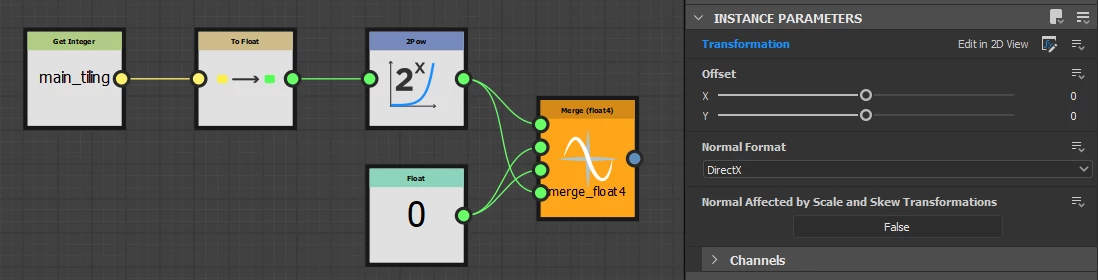
If you need to control this effect using a simple exposed integer parameter, you can use a function to drive the Transformation parameter's matrix values .


Scaling the textures to exactly power of two increments (50%, 100%, 200%, 400%...) is equal to applying a power of two to the X and W components of the transformation matrix (X, Y, Z, W) such as (2^tiling, 0, 0, 2^tiling).


I hope this is helpful!


Best regards.


1 reply

Luca Giarrizzo
Community Manager
Luca GiarrizzoCommunity ManagerCorrect answer
Community Manager
July 27, 2021

Hello,


To easily adjust tiling using a Material Transform node, you can use the x2 and /2 buttons under the Stretch section of the Transformation parameter. These buttons scale the textures to exactly 200% and 50% of their previous size respectively.


If you need to control this effect using a simple exposed integer parameter, you can use a function to drive the Transformation parameter's matrix values .


Scaling the textures to exactly power of two increments (50%, 100%, 200%, 400%...) is equal to applying a power of two to the X and W components of the transformation matrix (X, Y, Z, W) such as (2^tiling, 0, 0, 2^tiling).


I hope this is helpful!


Best regards.


Luca Giarrizzo | Quality Engineer - Substance 3D Designer | Adobe
Participant
September 7, 2021

Thank you, much appreciated! 

Luca Giarrizzo
Community Manager
Community Manager
September 7, 2021

I am happy to help!


Luca Giarrizzo | Quality Engineer - Substance 3D Designer | Adobe