kpamir
Participant
December 15, 2023
Answered

How to use custom suffix to for "match by mesh name" feature in designers baker

  • December 15, 2023
  • 1 reply
  • 195 views

I have two different resolutions of meshes, but I do not want to go through the process of renaming my geo from high to low as its a bit of a pain in Zbrush to do that.


So I exported lower res geo with the same name as the high res geo and want to use a "_high" suffix to match to.


In painter I can customize this input to make it work but in designer this does not seem to be possible.


Am i missing an option to allow this?


Thanks

This topic has been closed for replies.
Correct answer Cyril Dellenbach

Hello @kpamir,


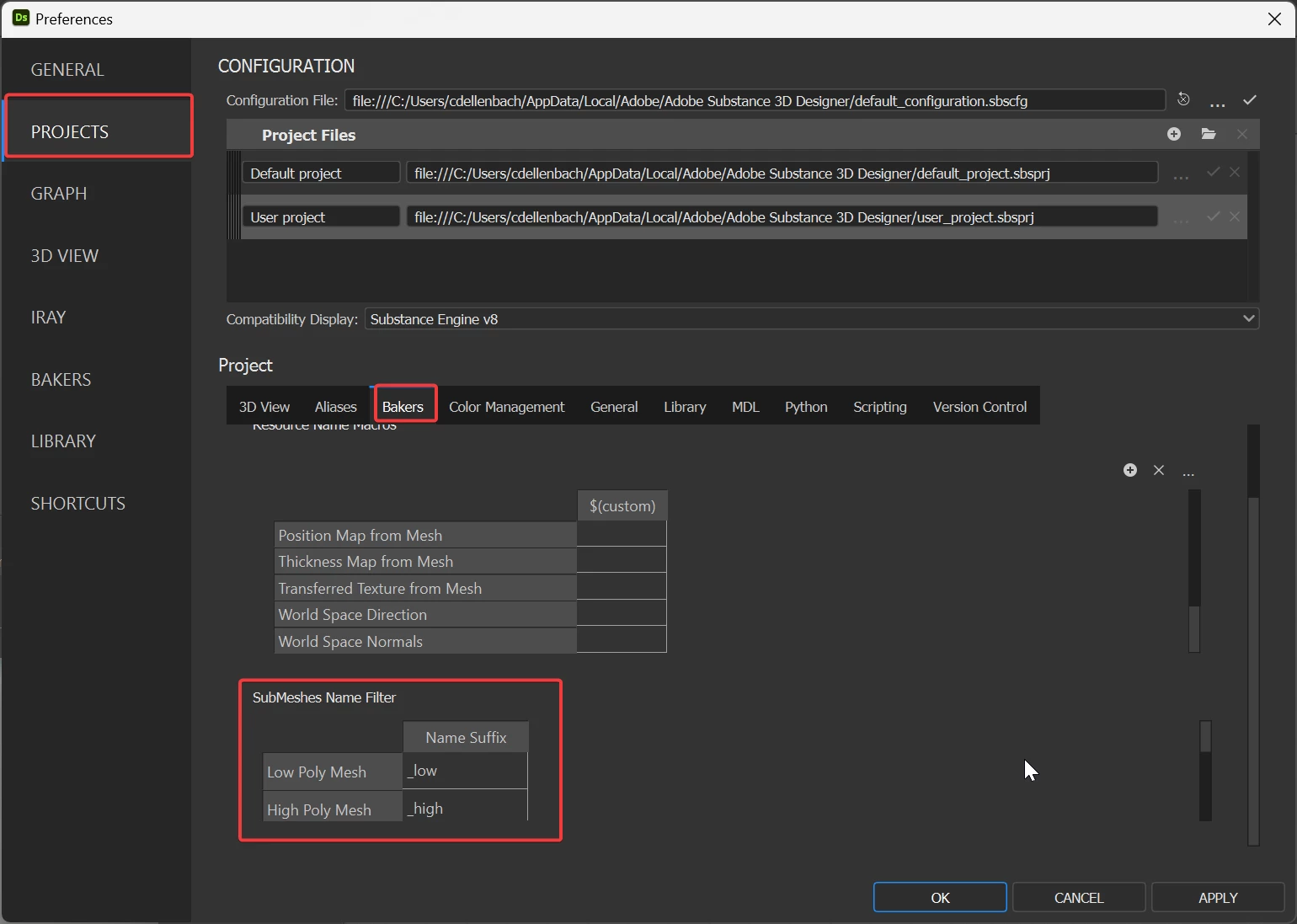
The option to edit the suffix is in the Project Settings : Edit > Preferences > Projects > Bakers > SubMeshes Name Filter


Regards,

1 reply

Cyril Dellenbach
Community Manager
Cyril DellenbachCommunity ManagerCorrect answer
Community Manager
December 18, 2023

Hello @kpamir,


The option to edit the suffix is in the Project Settings : Edit > Preferences > Projects > Bakers > SubMeshes Name Filter


Regards,

Cyril Dellenbach (Micro) | QA Support Artist | Adobe