


Participating Frequently
September 28, 2023
Answered

I want to expose an Input Value Node (from SD newbie)

  • September 28, 2023
  • 1 reply
  • 804 views

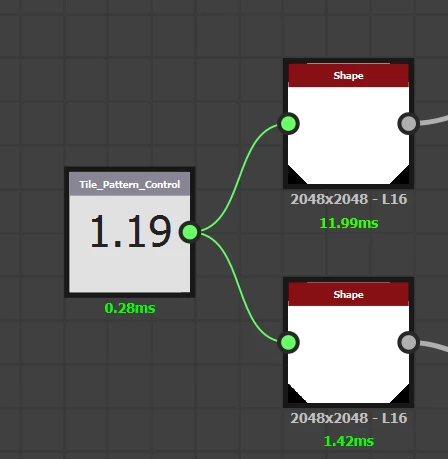
I want to somehow expose an Input Value Node in my graph (so it can be adjusted by the user) that's currently driving the scale values of two shape nodes, but I can't find an "expose as new graph input" button on the Input Value Node. I'm a SD newbie who just learned about input values and I'm eager to use them!



This topic has been closed for replies.
Correct answer davescm

The Input Value node is automatically exposed as a graph input when you publish the graph as an sbsar so it does not need to be exposed separately. The max , min and default values are set in the node's properties.


If you use the sbs as a node within another larger graph (just drag it in) then the Input Value appears as a green input node to that node.


Dave

1 reply

davescm
Community Expert
davescmCommunity ExpertCorrect answer
Community Expert
September 28, 2023

The Input Value node is automatically exposed as a graph input when you publish the graph as an sbsar so it does not need to be exposed separately. The max , min and default values are set in the node's properties.


If you use the sbs as a node within another larger graph (just drag it in) then the Input Value appears as a green input node to that node.


Dave

Participating Frequently
September 28, 2023

Hi Dave,

Thank you for the clarity

I'm still confused though because I’m wanting to be able to control the “default” value of the input node from the graph,  maybe under the “input parameters” ?

I see the input under “Inputs” but there is no slider to control the “default” value? I also cannot control it in the Preview section.


davescm
Community Expert
Community Expert
September 28, 2023

Hi

When using an Input Value node, you set the default value in the properties for the node, rather than the graph. The same with the max and min values. So just click the node and go to Properties > Specific Parameters

Dave