


morgansmcd33
Participant
Jul 9, 2021 2:40 PM UTC
Answered

MDL export Errors

I'm doing some test with MDLs. 
I've created an MDL graph in SD based on the Metallic_Roughness preset. I'm making no edits to the graph and simply exporting it (to render in vray). On export I'm getting the following errors:
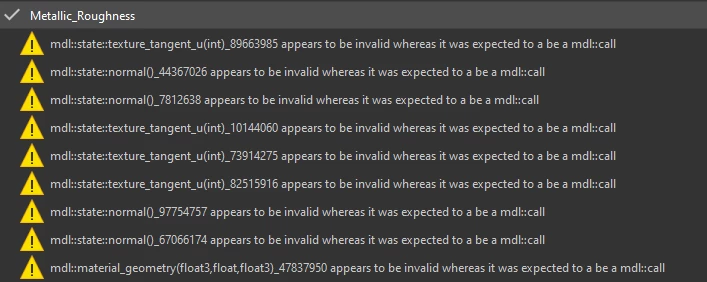
Though the exports 'succeeds' I'm curious what's causing the errors as I'm running into issues on the vray side as well so I'm trying to track down anything that might be the cause.

TIA

Morgan

This topic is closed to new replies. Start a new post to keep the conversation going.
Luca Giarrizzo
Luca GiarrizzoCorrect answer
Community Manager
Jul 15, 2021 8:52 AM UTC

Hello Morgan,


These warnings are caused by the way MDL graphs are processed, and do not imply the exported MDL is compromised in any way.


You can load your exported MDL back into Substance 3D Designer to check its behaviour:

  • In the 3D View panel, open the Renderer menu and select the Iray option
  • Open the Materials menu and open the Default material's submenu – or any other currently applied material's submenu
  • At the bottom of the list, select the Load... option
  • In the file browser, select your exported MDL module
  • In the Properties panel, the MDL properties and exposed parameters should be visible and can be tested


Best regards.

Luca Giarrizzo | Quality Engineer - Substance 3D Designer | Adobe

2 replies

Luca Giarrizzo
Community Manager
Luca GiarrizzoCommunity ManagerCorrect answer
Community Manager
Jul 15, 2021 8:52 AM UTC

Hello Morgan,


These warnings are caused by the way MDL graphs are processed, and do not imply the exported MDL is compromised in any way.


You can load your exported MDL back into Substance 3D Designer to check its behaviour:

  • In the 3D View panel, open the Renderer menu and select the Iray option
  • Open the Materials menu and open the Default material's submenu – or any other currently applied material's submenu
  • At the bottom of the list, select the Load... option
  • In the file browser, select your exported MDL module
  • In the Properties panel, the MDL properties and exposed parameters should be visible and can be tested


Best regards.

Translate
Luca Giarrizzo | Quality Engineer - Substance 3D Designer | Adobe
morgansmcd33
Participant
Jul 15, 2021 11:53 AM UTC

Good to know, thanks for the reply.

Translate