


Participant
April 28, 2022
Answered

MDL not showing in 3D View

  • April 28, 2022
  • 2 replies
  • 707 views

Hello,

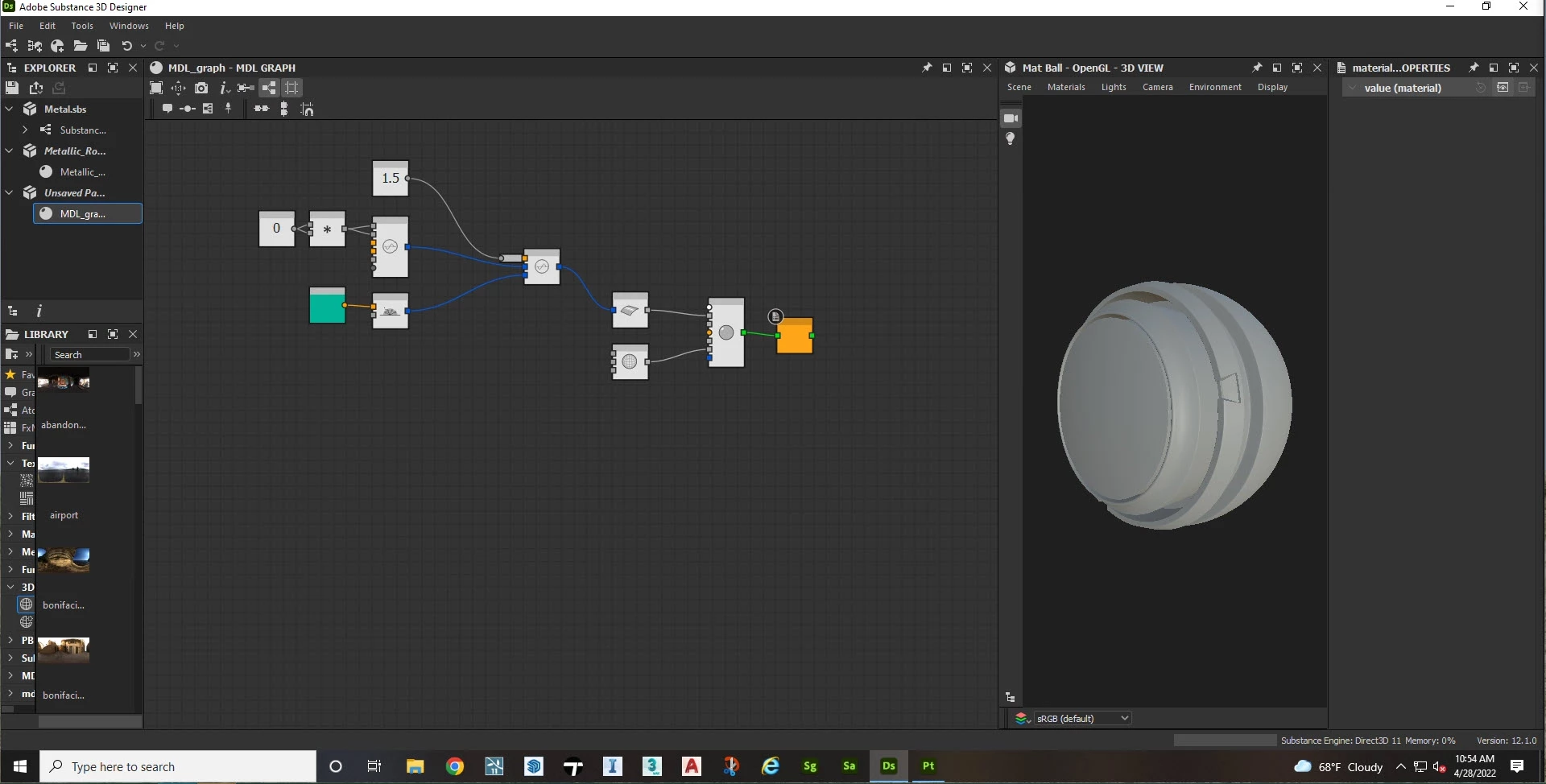
I'm new to Designer and I'm trying to follow the car paint material tutorial on youtube and mine is different because of the various updates. One big thing is that I can't get the material to show up in the 3D viewport. Any help is appreciated!


Correct answer Matt Susla

Solved: I went through my preferences and turned on the CPU under the IRAY tab and turned on Post Processing in the 3D View tab.

2 replies

Luca Giarrizzo
Community Manager
Community Manager
May 4, 2022

Hello @Matt Susla,


MDL materials may only be displayed in the 3D View when the Iray renderer is selected.

At that point, you may right-click on empty space in the MDL graph and select the Use as material definition in 3D View option.


For your information. the MDL graphs and Iray sections of the documentation were both recently redone, and may be useful resources in your work.


Best regards.


Luca Giarrizzo | Quality Engineer - Substance 3D Designer | Adobe
Matt SuslaAuthorCorrect answer
Participant
April 28, 2022

Solved: I went through my preferences and turned on the CPU under the IRAY tab and turned on Post Processing in the 3D View tab.