


Participating Frequently
October 12, 2023
Question

Method for automatically creating decorative tile pattern

  • October 12, 2023
  • 2 replies
  • 1090 views

I'm trying to figure out a method to create this tile pattern 
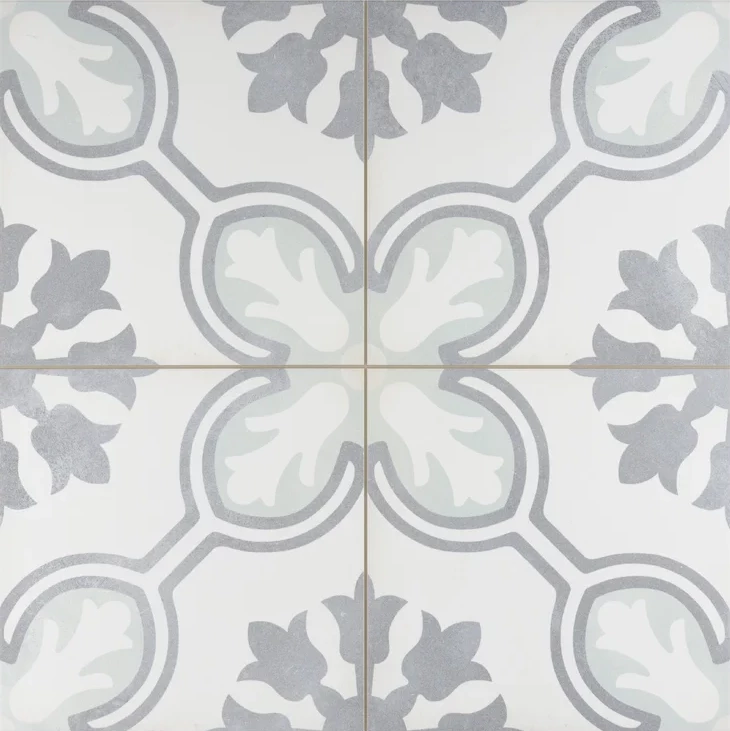
I understand that a lot of people manually create the shapes that make up the tile but is there a way that I can upload a file of the shapes and substance designer automatically recognize them/give the option to color the shapes?

I was thinking that I could image trace 1 part of this pattern in adobe illustrator and upload it to substance designer as a vector but I'm not sure how to do that. From there, I'm assuming I could just use the transform node for the other 3 parts since they're just reflections of each other.

The ulimate goal is to be able to expose the proper parameters and replace the input image according to whatever tile pattern I'm trying to recreate.

I hope that makes sense. Any help is appreciated, thank you.

This topic has been closed for replies.

2 replies

olemid
Community Expert
Community Expert
October 16, 2023

I've done this before, shown in this post: https://www.artstation.com/artwork/4XelvY


The important takeaway is that some patterns make sense to do procedurally, and others do not. In my case, I drew the patterns in Procreate or Photoshop, and then brought them in. SVGs also work, so like you say you can import something from Illustrator via the SVG node. 

Cyril Dellenbach
Community Manager
Community Manager
October 13, 2023

Hello @ShadowGlow,


This is an interesting question.


You don't have to make a pattern from scratch. A lot of people do it, because you'll gain a lot of control on your material, which is usually harder to obtain with bitmaps, but Substance 3D Designer has many tools to get a result.


E.g. you could simply import in Designer the image shared here (as long as you have the permissions) and use a Color to Mask or an Histogram Select to extract the pattern from the image.


Don't hesitate to blend multiple results of Histogram Selects together.


Probably that you could ease Designer's workflow by sending the image first to Photoshop/Illustrator, but I'm pretty sure you can also have a clean result through Designer.


With that being said, a 100% automatic .SBSAR that takes this kind of input images and turns it into a clean pattern, will probably be harder to build.


Best regards,


Cyril Dellenbach (Micro) | QA Support Artist | Adobe
Participating Frequently
October 23, 2023

@Cyril Dellenbach Would you say that I could achieve the same result using color to mask? It seems to be more precise when it comes to masking based on a specific color value. It's perfectly fine if I can't automate this with an input image. The main goal is just to be able to create the texture. I tried to use sampler first but since the pattern consists of 4 tiles, I didn't see a way to add the input images and also have the grout lines where they should be.


That brings me to my next question. Is there a visual example of how to use pattern distrubtion maps in the tile sampler node? Using "pattern number" isn't giving me the result I need but I haven't found any examples of how I'm supposed to create the pattern distribution map. I saw the black and white example image on the adobe help page but that doesn't tell me anything other than the fact that it should be a black and white image. I'm using the tile sampler color node, not the grayscale.

Cyril Dellenbach
Community Manager
Community Manager
October 24, 2023

Hi @ShadowGlow,


The Color to Mask node could be a solution, but as always with Substance 3D Designer, there are a lot of various way to obtain the desired result.  It's on you to find what suits the most for this specific project.


What exactly is your goal when mentioning the pattern distibution? You can learn more on the Tile Sampler node in our documentation.


Cyril Dellenbach (Micro) | QA Support Artist | Adobe