Known Participant
January 6, 2024
Answered

Multiple Instances

  • January 6, 2024
  • 2 replies
  • 1991 views

Hello,


Why can't I have two instances of Designer open at the same time?

This topic has been closed for replies.
Correct answer CelineDameron

I see ! 
I often face the same 'problem' but we have solutions : 
- first, you can pin graph views so that you can switch between then without having to 're-open' them everytime. It's really convenient, I use that all the time.
- then, don't hesitate to move components. You can, for example, place graph views side by side which could be pretty handy in your case. If you work with two screens, you can undock the 3D view and place it on the second screen to free space or can even do that with your graph views ! 

- to finish, you also have the 'in context edition' option that can be useful to inspect instances. There is a nice explanation of this feature here : https://helpx.adobe.com/substance-3d-designer/interface/preferences-window.html
Scroll down until you find 'Enable graph editing in context' section 


Here is my setup for complex projects as an example. I pin graph views and I put them side by side when I need to frequently iterate between graphs. 
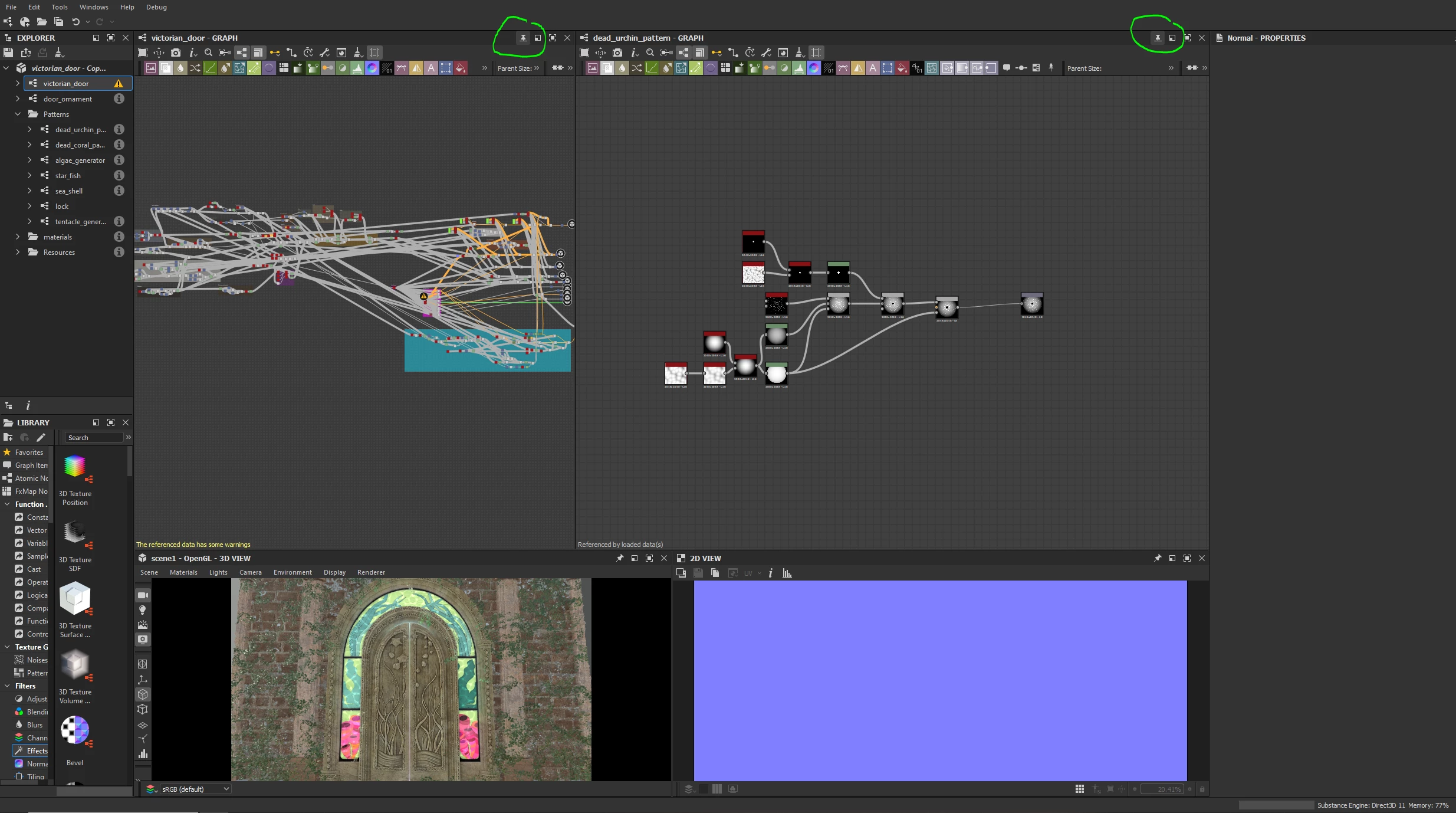
 

Hope this will help 🙂 

 

2 replies

RoxanaMDAuthor
Known Participant
January 8, 2024

Hi, and thanks for getting back to me!


I have some complex subgraphs from a course, and I want to recreate them while referencing what they've done. It becomes challenging when I'm in the same instance, creating a new subgraph and switching back and forth. Every time I do that, it has to load a bunch of nodes, and it takes forever.


I would like to quickly examine their node structure and settings and then seamlessly return to my subgraph to make any necessary changes or additions.

CelineDameronCommunity ManagerCorrect answer
Community Manager
January 10, 2024

I see ! 
I often face the same 'problem' but we have solutions : 
- first, you can pin graph views so that you can switch between then without having to 're-open' them everytime. It's really convenient, I use that all the time.
- then, don't hesitate to move components. You can, for example, place graph views side by side which could be pretty handy in your case. If you work with two screens, you can undock the 3D view and place it on the second screen to free space or can even do that with your graph views ! 

- to finish, you also have the 'in context edition' option that can be useful to inspect instances. There is a nice explanation of this feature here : https://helpx.adobe.com/substance-3d-designer/interface/preferences-window.html
Scroll down until you find 'Enable graph editing in context' section 


Here is my setup for complex projects as an example. I pin graph views and I put them side by side when I need to frequently iterate between graphs. 


Hope this will help 🙂 

 

RoxanaMDAuthor
Known Participant
January 14, 2024

Great!

Thank you so much!

davescm
Community Expert
Community Expert
January 6, 2024

I am not an Adobe employee or developer, but in general an application can be programmed to open as the only instance or allow multiple instances (opened with Shift + Click).  I suspect that Designer has been programmed as single instance due to the potential heavy use of resources (hence the need to adjust the TDR and TDLR timeout values in Windows.

Does that cause any issues, given that multiple packages and graphs can be opened within a single instance?


Dave

Community Manager
January 8, 2024

Well done Dave ! 
We prevent launching two instances at the same time to avoid system overload issues.  
That been said, like Dave, I'm curious to know why you would like to be able to do that @RoxanaMD.
Maybe something is missing so that you can work as you wish and maybe we can find a solution !
