


Inspiring
January 27, 2022
Question

Non-square rotation deformation

  • January 27, 2022
  • 1 reply
  • 231 views

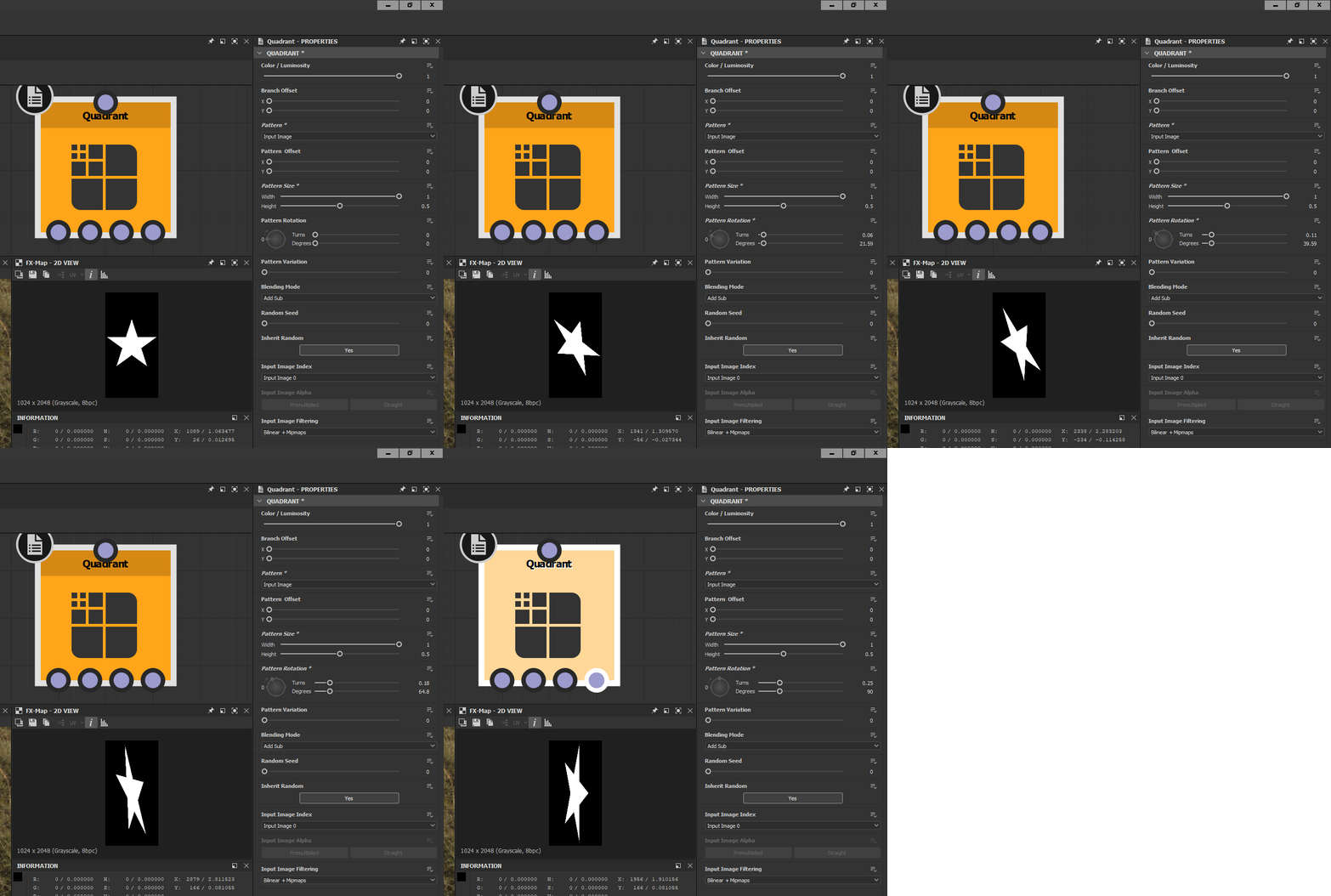
is there a math approach , a function graph that could fix  stretching and squeezing of an input image in Fx-map while  using rotation.   I see It's possible in transform node transform matrix of 4 values   but I couldn't figure out how to do it with float2  in fx-mp 'pattern size'.   is it possible at all?
 

This topic has been closed for replies.

1 reply

Luca Giarrizzo
Community Manager
Community Manager
January 27, 2022

Hello,


A quick and dirty way would be to use custom values for the Render region parameter depending on the specific image ratio, and disabling tiling. Here is an example:


A more robust implementation can be found in any node which includes the Non square expansion parameter, which includes the Star node, as a matter of fact!


Select the Star node and press Ctrl+E or right-click on the node and select the Open reference option in the contextual menu. You can then take a look at how FX-Maps nodes are setup in the node to account for the non-square ratio. Please note most of the math is performed in the FX-Maps's Output size parameter function, as the necessary values are often computed and initialised there before being passed to other parameters. 


Happy learning!


Best regards.


Luca Giarrizzo | Quality Engineer - Substance 3D Designer | Adobe
kirkr5689Author
Inspiring
January 28, 2022

Thanks for reply.  Unfortunally I am still doesn't understand how render region and tiling region works . They does something for sure  but I can't figure out what's exactly.

Found this too lines only in thr help:


  • Render Region:
    Lets you set the starting pixel range for each side of the FX-Map, resulting in a stretching effect.
  • Tiling Region:
    Lets you offset the tiling distance of the FX-Map.


It explains me nothing actually.      Could you eleborate it   in more details please.    A few very simple usage examples maybe?   To explain  render size and tiling size interaction .  Right now I can't figure out how  they work together to prevent  rotation sqeezing. It all seems totally random  when I try to manually tweak sliders there.    Also disabling tiling doesn't change a thing on my side.  


What I want is to make  a noise  with a kind of non-square expansion where scale of features stay same  when you expand  or contract  in both dimentions,  not just one  and could  scale the features  totally independently  from  output size ratio factor .