

Remo3D
Participant
September 14, 2023
Answered

pathe and spline crash in clo3d sbsar file

  • September 14, 2023
  • 1 reply
  • 392 views

Hello please help
When I use path and line in the new update and export the sbsar file to clo3d Crash even though the file size is small and the device specifications are high
When using any other file that does not contain (spline and path )  it works fine
Please help and solve the problem
This topic has been closed for replies.
Correct answer Nicolas3D

Hi
Splines and Paths require the Substance Engine v9. Unfortunately, Clo3D is still using the previous Engine version. They are working on the update and they will deliver a new version, but I don't know when. 


If you want to be sure that the SBSAR you are creating in Designer will work in Clo3D, you can go to the Preferences, then in the Projects tab, and then, for the option Compatibility Display, select Substance Engine v8.

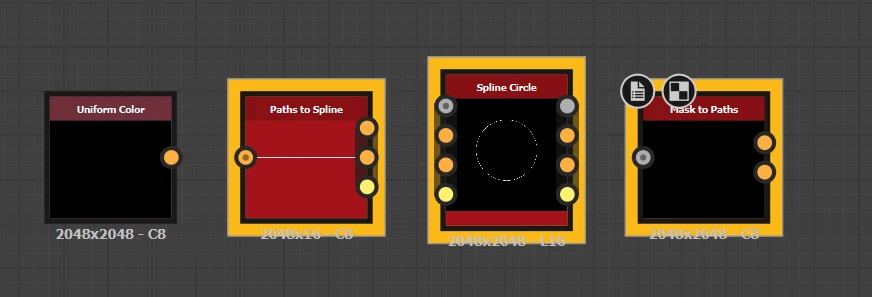
Once you do that, all the nodes requiring Engine v9 will be highlighted in yellow in the graph view. 

1 reply

Nicolas3D
Community Manager
Nicolas3DCommunity ManagerCorrect answer
Community Manager
September 14, 2023

Hi
Splines and Paths require the Substance Engine v9. Unfortunately, Clo3D is still using the previous Engine version. They are working on the update and they will deliver a new version, but I don't know when. 


If you want to be sure that the SBSAR you are creating in Designer will work in Clo3D, you can go to the Preferences, then in the Projects tab, and then, for the option Compatibility Display, select Substance Engine v8.

Once you do that, all the nodes requiring Engine v9 will be highlighted in yellow in the graph view. 

Remo3D
Remo3DAuthor
Participant
September 15, 2023

Thanks for the answer, very useful