Answered
Plugins & Custom assets
Hi,
Since Adobe is using a different install location, how do I transfer all the custom assets and materials I had setup in Substance Painter and Designer? I'm missing all of them since it installed.
Thank you!

Hi,
Since Adobe is using a different install location, how do I transfer all the custom assets and materials I had setup in Substance Painter and Designer? I'm missing all of them since it installed.
Thank you!
Hello!
In simple terms, the default locations for plugins and custom assets change from an Allegorithmic/Substance Designer folder (A) to an Adobe/Adobe Substance 3D Designer folder (B). The organisation of all files and folders within has not changed. You may thus move your content from folders A to B.
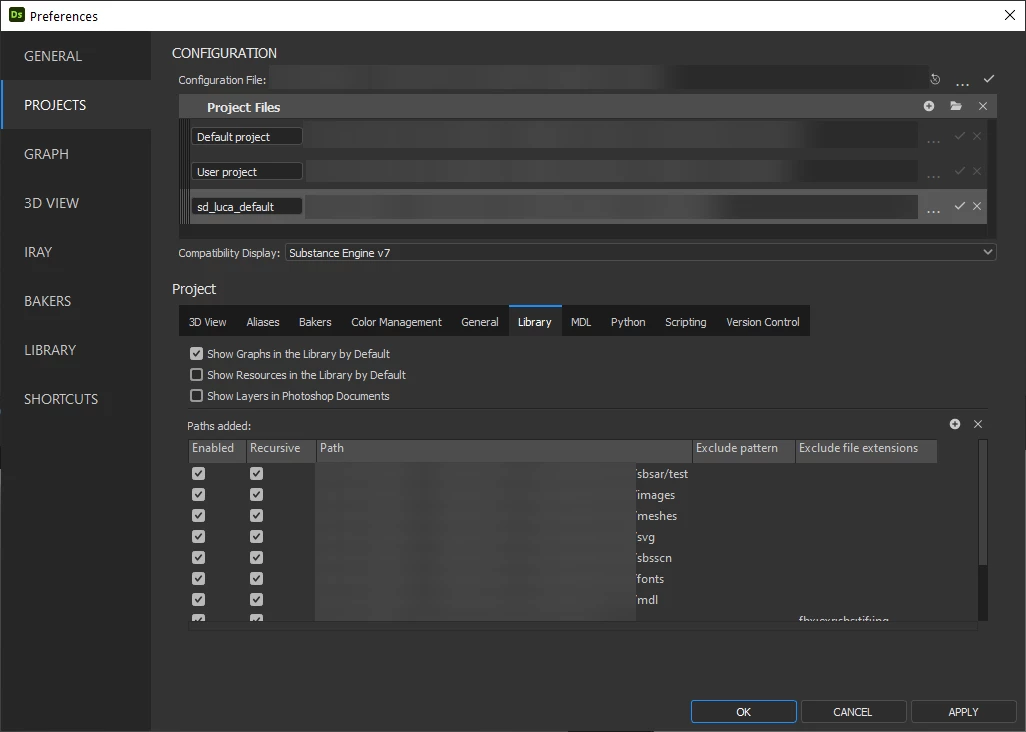
For all custom content which was not saved to a default location – such as the Documents folder – please note you can point Substance 3D Designer to your custom content by setting up a Project file in the software.
Project files let you add custom folders as watched folders for Library content and Plugins in the corresponding tabs.
Library content can then be curated in the application and loaded Plugins are listed in the Plugin Manager.
Feel free to let me know if you need further assistance on this topic.
Already have an account? Login
No account yet? Create an account
Enter your E-mail address. We'll send you an e-mail with instructions to reset your password.


 AdChoices