

Participant
February 14, 2024
Answered

Publish button is missing

  • February 14, 2024
  • 1 reply
  • 253 views

Hi,

I can't figure out why I don't see the 'publish' button so that I can save and import the material in Substance Painter?
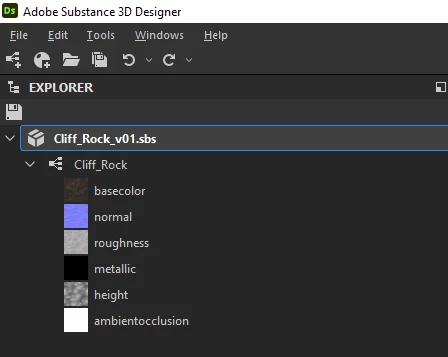
Cheers,
Jacques.

This topic has been closed for replies.
Correct answer Cyril Dellenbach

Hi Jacques,


Thanks for the message.


The Publish/Send to feature is a Python implementation. Therefore, as mentionned in this page of the documentation, there is likely a conflict between Designer's installation of QtForPython and its dependencies, and an existing installation on the system.

Remove any other system installation of QtForPython (PySide2) and Shiboken2.


Regards,

1 reply

Cyril Dellenbach
Community Manager
Cyril DellenbachCommunity ManagerCorrect answer
Community Manager
February 14, 2024

Hi Jacques,


Thanks for the message.


The Publish/Send to feature is a Python implementation. Therefore, as mentionned in this page of the documentation, there is likely a conflict between Designer's installation of QtForPython and its dependencies, and an existing installation on the system.

Remove any other system installation of QtForPython (PySide2) and Shiboken2.


Regards,

Cyril Dellenbach (Micro) | QA Support Artist | Adobe
TKIOAuthor
Participant
February 14, 2024

Thanks a lot Cyril!
I'm going to try to uninstall et re-install first as some python stuffs are necessary for my work... I'll see if that fixes anything.
Cheers,
Jacques.
