Participating Frequently
August 20, 2024
Answered

Quantise Color Node

  • August 20, 2024
  • 4 replies
  • 1258 views

Hi I am q new to designer so hopefully this is something basic.   I can only see 2 ouput nodes on the new quantise color node.  In the Adobe tutorial she has 4.  Also, when I click on the palette i get a white screen with the text of the number of colors; not the nice c/palette she gets.  I have a mac m1.  I tried adobe website and watched the latest tut.  Latest version of designer intalled.  If someone can suggest anything pls let me know or if/when I figure it out I will post.   Tried adobe robots and adobe agent-centre.....  Thanks. 

    This topic has been closed for replies.
    Correct answer Luca Giarrizzo

    Hello,
     
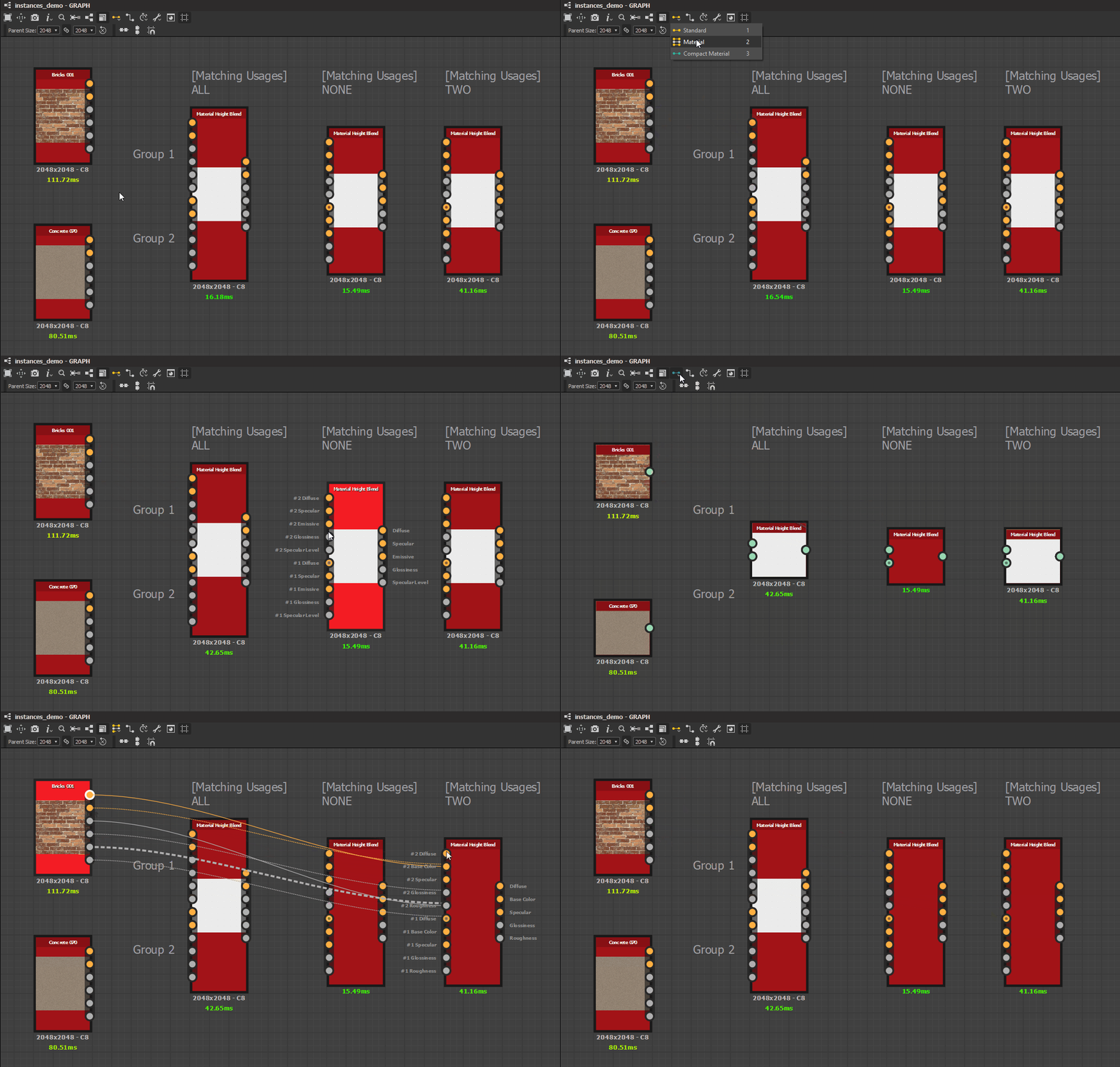
    It appears a Link Creation Mode other than 'Standard' is currently enabled.


    Please note it is easy to enable one of these modes by accident, since they are mapped to the '1', '2' and '3' keys or the keyboard's number row respectively.

    Material and Compact Material modes allow linking multiple connectors in a single operation.

    Output and input connectors are matched when they share the same Usage attribute. When usages do not match, the connections are not possible in this mode.


    Input and Output connectors with the same Group attribute can be connected in a single operation.
    In Compact Material mode, grouped inputs and outputs are recoloured and superimposed to reduce the number of links on screen if the graph becomes too cluttered.

    Link Creation Modes are demonstrated below:


    I hope this was helpful and informative!


    Best regards.

    4 replies

    Participating Frequently
    August 29, 2024

    Thank you so much Luca!   You even posted a video!   V generous.  I hoped it was something basic.   Really appreciate your help and Dave too (you probably didnt realise just how new I am to DS)  All the best and thank you  🙂

    Luca Giarrizzo
    Community Manager
    Luca GiarrizzoCommunity ManagerCorrect answer
    Community Manager
    August 28, 2024

    Hello,
     
    It appears a Link Creation Mode other than 'Standard' is currently enabled.


    Please note it is easy to enable one of these modes by accident, since they are mapped to the '1', '2' and '3' keys or the keyboard's number row respectively.

    Material and Compact Material modes allow linking multiple connectors in a single operation.

    Output and input connectors are matched when they share the same Usage attribute. When usages do not match, the connections are not possible in this mode.


    Input and Output connectors with the same Group attribute can be connected in a single operation.
    In Compact Material mode, grouped inputs and outputs are recoloured and superimposed to reduce the number of links on screen if the graph becomes too cluttered.

    Link Creation Modes are demonstrated below:


    I hope this was helpful and informative!


    Best regards.

    Luca Giarrizzo | Quality Engineer - Substance 3D Designer | Adobe
    davescm
    Community Expert
    Community Expert
    August 28, 2024

    Now why didn't I think of that! Thanks Luca.


    Dave

    kglad
    Community Expert
    Community Expert
    August 20, 2024

    in the future, to find the best place to post your message, use the list here, https://community.adobe.com/

    p.s. i don't think the adobe website, and forums in particular, are easy to navigate, so don't spend a lot of time searching that forum list. do your best and we'll move the post (like this one has already been moved) if it helps you get responses.


    <"moved from using the community">
    Participating Frequently
    August 27, 2024

    Hi  just got adobe email asking if i solved issue... but it said dont reply...😅  No I didnt yet


    davescm
    Community Expert
    Community Expert
    August 27, 2024

    Hi Sophie, I understand from another thread that @Cyril Dellenbach , whi I tagged earlier, is currently on leave. Hopefully he will see the tag on his return.

    Dave

    davescm
    Community Expert
    Community Expert
    August 20, 2024

    It seems to work OK here on Windows.


    'Latest version of designer intalled.'

    Can you go to Help > About Substance 3D Designer and confirm both the Version and build as well as the Engine version in use.


    Dave

    Participating Frequently
    August 20, 2024

    Hi Dave.  Yes sure.   I took a s/shot which is attached.  And thanks for trying to help.  M1 is 4 yrs old so perhaps it just wont cope...it struggles to render when I have plenty of heavy stuff.  

    davescm
    Community Expert
    Community Expert
    August 20, 2024

    Hi

    Unfortunately I don't have a Mac to test on, hopefully someone will join the thread who does, and can test/advise better.

    My understanding is that NEON is a CPU based engine which sounds right given the M1 architecture, on Windows I am using Direct 3D which is GPU based. If you press F9 are you given a choice of engines?


    Dave