


Referenced by loaded data warning after reloading a file
Hello,
First of all, I am new to Substance Designer.
I have been trying to follow one of the tutorials and there is one step to create subgraphs from a bunch of selected nodes. I also included Input and Output nodes with default settings. After that, I simply dragged and dropped the subgraphs into the main graph. However, every time I open the file, each created Subgraph have an icon "i" in a circle with the following warning:
Notes: Referenced by loaded data(s).
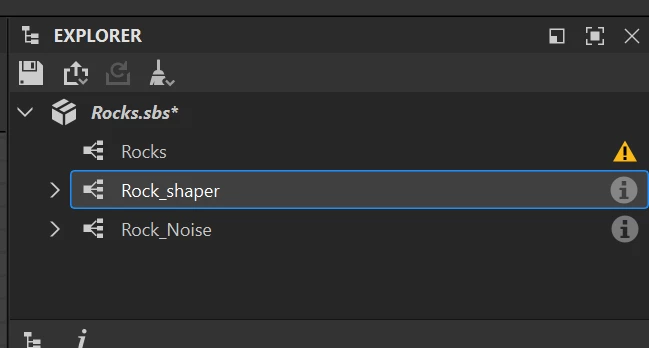
There is no info about what it means, it neither reacts to LMB nor to RMB, although everything seems to be working.
I don't even know if I should worry about it. I tried to search Documentation on Adobe website and found information on other warnings/errorsbut but there is nothing about Referenced by loaded data.
I would be grateful for any explanation on that
Thanks
EDIT: As a side note, when I double click on any subgraph and open it, I can't see anything but black texture. Does it have anything to do with the aforementioned warning?
 AdChoices