


J@y_C
Participant
May 12, 2023
Answered

Referenced resource not found

  • May 12, 2023
  • 1 reply
  • 1013 views

Hello! 

noob here i dont know much.

I moved all my Substance graphs from an unsafe package to my Substance_graph-Patterns save package.
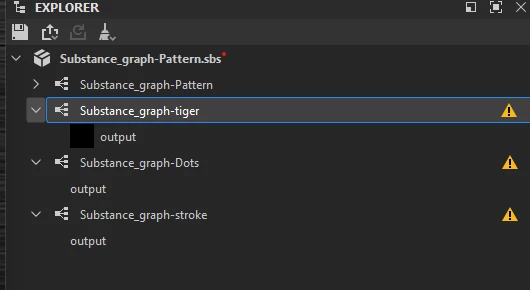
This is what i am getting 
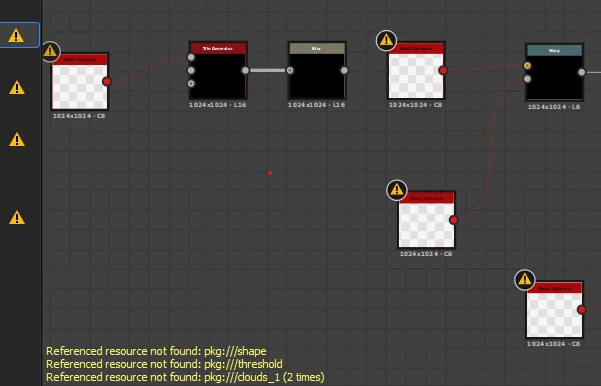
 

Reference resource not found :pkg///shape

Reference resource not found :pkg///threshold

Reference resource not found :pkg///clouds_1(2times).


Is there a way to fix this without doing it all over again?


Thank you.

 

This topic has been closed for replies.
Correct answer Cyril Dellenbach

Hi @J@y_C,


Thanks for the question.


Don't worry, you shouldn't have to do it all over again. It simply means that Substance 3D Designer don't find the path for those resources (shape, treshold, clouds). 


Find the referenced resources in the Explorer panel and check they exist at the location saved in their  File Path attribute.
If they do not, click RMB on the resource item in the Explorer and select the Relocate... option in the contextual menu to set a new valid target file for that resource.


You'll find more info about Designer's warnings here.


Best regards,


1 reply

Cyril Dellenbach
Community Manager
Cyril DellenbachCommunity ManagerCorrect answer
Community Manager
May 12, 2023

Hi @J@y_C,


Thanks for the question.


Don't worry, you shouldn't have to do it all over again. It simply means that Substance 3D Designer don't find the path for those resources (shape, treshold, clouds). 


Find the referenced resources in the Explorer panel and check they exist at the location saved in their  File Path attribute.
If they do not, click RMB on the resource item in the Explorer and select the Relocate... option in the contextual menu to set a new valid target file for that resource.


You'll find more info about Designer's warnings here.


Best regards,


Cyril Dellenbach (Micro) | QA Support Artist | Adobe