Participant
March 20, 2023
Answered

Selecting from multiple multiswitches

  • March 20, 2023
  • 4 replies
  • 649 views

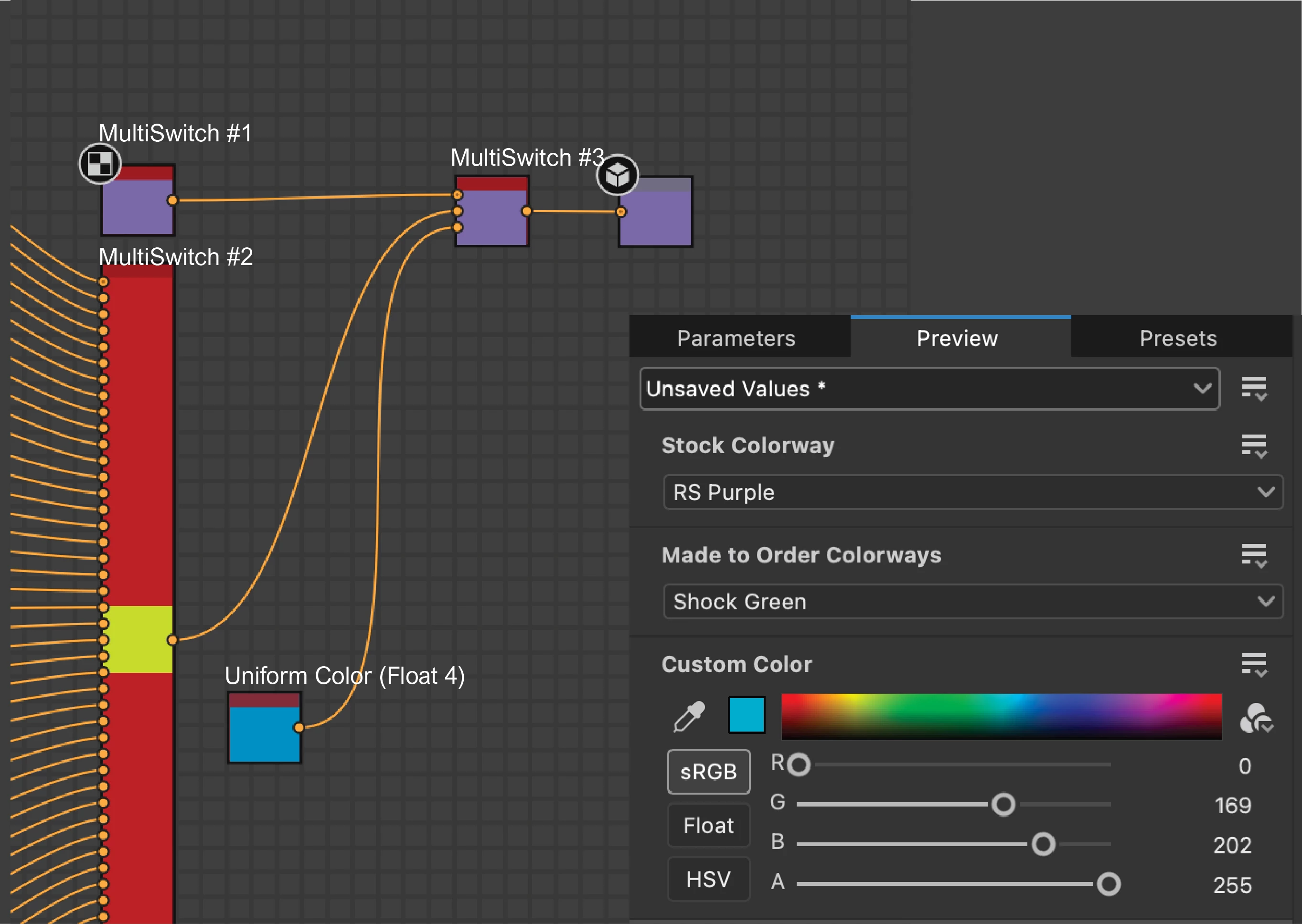
Hi all. I'm brand new to functions and I'm having trouble figuring this out. I have 3 nodes: 2 multiswitches and a Uniform Color. The multiswitches represent prescribed color pallets and the uniform color node represents a custom color option. I'm running all 3 through another multi switch(#3). The goal is that if the end user selects from any of the color pallets, that color is shown in the output. I'm assuming I need to  add a function to the input selection of multiswitch #3, but I don't know what to do after that. I imagine one of you smart people could figure this out pretty quickly. I appreciate any help

This topic has been closed for replies.
Correct answer Cyril Dellenbach

Hello Drew,


In addition to the helpful answers from Vincent and Dave, let me give you another possible workflow.


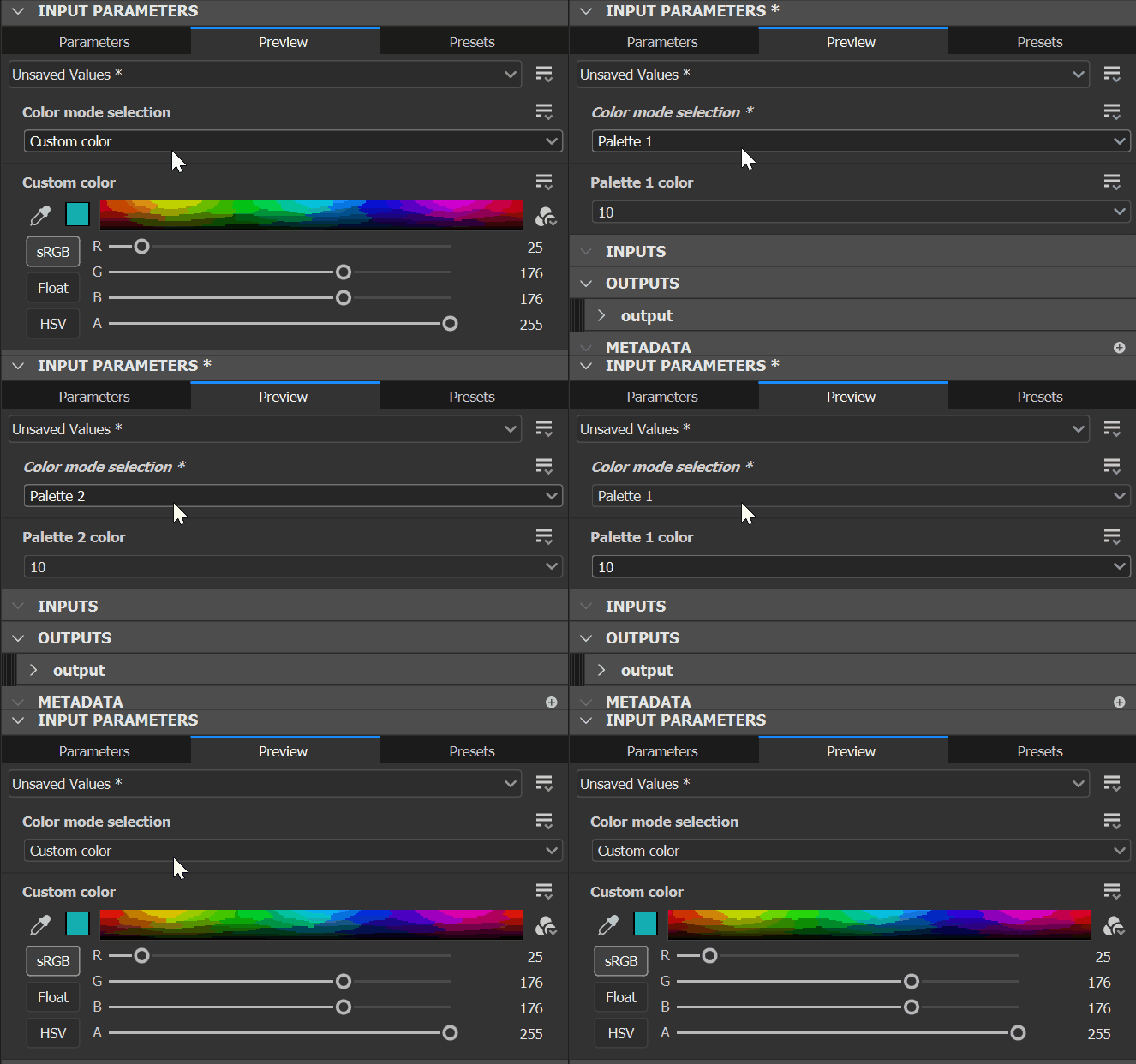
If I get you well, your goal is to set a choice between the custom color and the predefined palettes. Therefore, when we switch to the custom color, we want the predefined palettes parameters to be hidden, and vice versa.


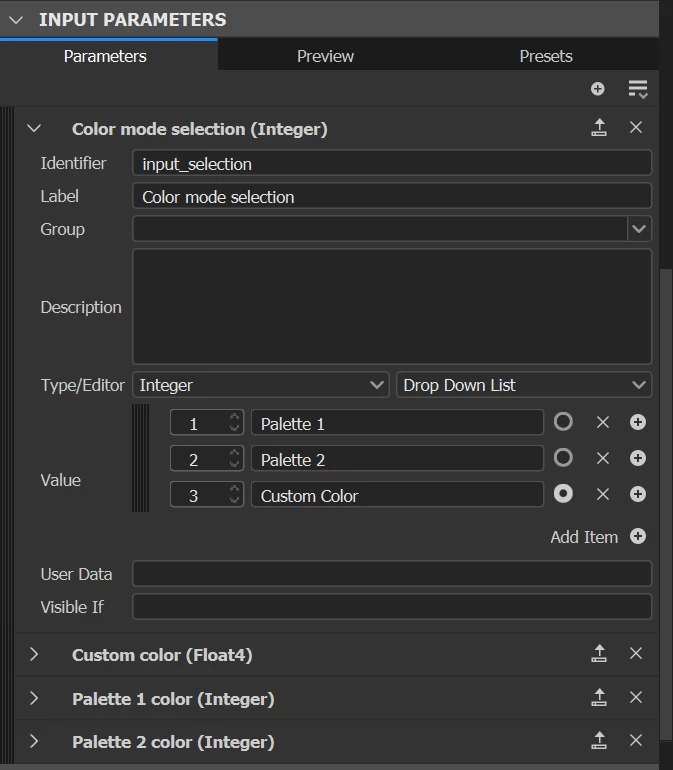
For this purpose, we'll expose the selection parameter from Multi switch #3 to an Integer/Drop Down List and let’s say the value 1 will be the Palette 1, value 2 the Palette 2  and value 3 the custom color.


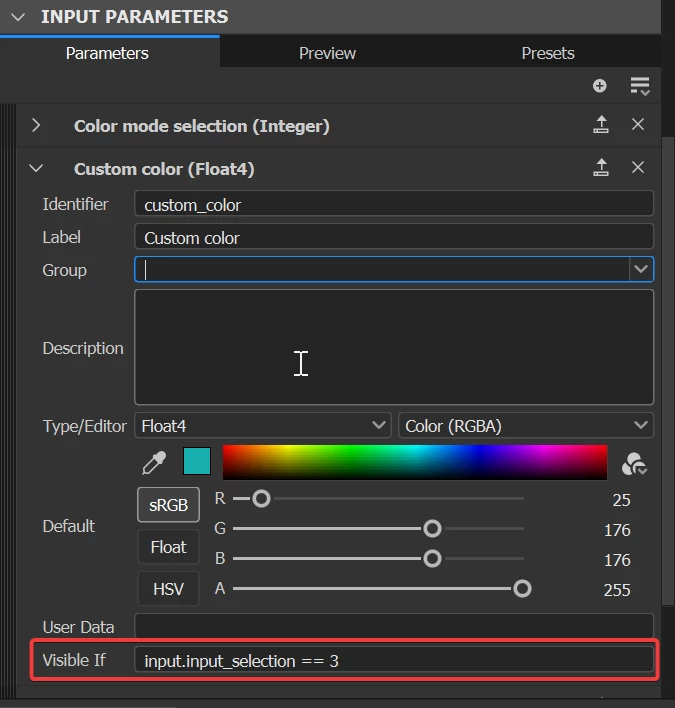
Now in the Visible If section of the palette 1 parameter, let’s add a command that turn it visible only if the Multi switch #3 is set to the value 1.

Visible If: input.”MultiSwitch03” == 1


Same for the Palette 2 parameter
Visible if: input.”MultiSwitch03” == 2


And same for the custom color parameter
Visible if: input.”MultiSwitch03” == 3


Down this message, you'll find the project I made for the example and you'll also find a secondary graph where the custom color isn't on the same level as the palettes. Basically, it demands to add another Switch with a little edited function in there. Tell me if you need more guidance with this one.


Best regards,


4 replies

Cyril Dellenbach
Community Manager
Cyril DellenbachCommunity ManagerCorrect answer
Community Manager
March 21, 2023

Hello Drew,


In addition to the helpful answers from Vincent and Dave, let me give you another possible workflow.


If I get you well, your goal is to set a choice between the custom color and the predefined palettes. Therefore, when we switch to the custom color, we want the predefined palettes parameters to be hidden, and vice versa.


For this purpose, we'll expose the selection parameter from Multi switch #3 to an Integer/Drop Down List and let’s say the value 1 will be the Palette 1, value 2 the Palette 2  and value 3 the custom color.


Now in the Visible If section of the palette 1 parameter, let’s add a command that turn it visible only if the Multi switch #3 is set to the value 1.

Visible If: input.”MultiSwitch03” == 1


Same for the Palette 2 parameter
Visible if: input.”MultiSwitch03” == 2


And same for the custom color parameter
Visible if: input.”MultiSwitch03” == 3


Down this message, you'll find the project I made for the example and you'll also find a secondary graph where the custom color isn't on the same level as the palettes. Basically, it demands to add another Switch with a little edited function in there. Tell me if you need more guidance with this one.


Best regards,


Cyril Dellenbach (Micro) | QA Support Artist | Adobe
Participant
March 21, 2023

Cyrille,

That was a great workaround. And yes, I think that will work. Thanks so much to the 3 of you!

davescm
Community Expert
Community Expert
March 21, 2023

It is not completely clear what you want but it may be this.


If you want a single dropdown parameter in the graph with say 10 options to control the behaviour of different multi-switches in different ways, then add that parameter as an input to the graph. A drop down list of colours can output an integer that can be used by nodes within the graph. I called mine 'Pallete'.

Next for each of the multiswitch nodes add a function to the selection that 'Gets' that Palette integer value and converts it into the a value that will be used by that node.


In the example below, if the integer from Pallete is 0-3 the function will output 1. If the value is 4 or 5 it will output 2. If the value is 6 or more it will output 3.

You can build a different logic for each multi switch node.


Dave


Vincent GAULT
Community Manager
Community Manager
March 21, 2023

Other question: are the stock palettes values & names defined by you?

Participant
March 21, 2023

Hi Vincent,


Thank you for helping. I'll try to answer your questions.


The important thing is the end user interface. I want the end user to understand that they are selecting colors from different color palettes. Let's call them color books since that may be more accurate.


  • There are 2 multiswitches and one uniform color node. MultiSwitch #1 is a color book with 20 different colors to choose from. Multiswitch #2 is a color book with 43 colors to choose from. And the last node is a custom color node. The reason that I have 2 color book multiswitches is that these color books correlate to IRL color books.
  • The end user would have the choice between a color from multiswitch #1 (Stock), Multiswitch#2, (Made to order), or a custom color.
  • The palettes are defined by me within the program, but they correlate to real world color books.


So far, I've connected those 3 nodes to multiswitch #3 and then opened its input selection parameter, named it Multiswitch #3 and created a drop down menu, which allows me to select one of the 3 color books. Then I can select a color from one of the books. What I want to do is bypass that open input selection parameter.


It sounds like you are on the right track. I don't have a strong grasp of "visible if" conditions. I think I still might need some more guidance.

Vincent GAULT
Community Manager
Community Manager
March 21, 2023

Hey Drew, So few questions before to start:

  • You have 2 multi switches (#1 & #2) because you have more than one color?
  • And I assume the final would either have the choice  between choosing a custom color OR one from your list?


If so, I would start by  having a "Custom color" checker parameter (meaning a boolean param, that we would link to a switch node that would either use the custom, or one of the color palette.
I would then add some Visible if conditions for the Custom color param, and the Stoock Coloreway param(s), so they appear just when its relevant