


Participant
September 6, 2021
Question

Stepping Artifacts with external height map

  • September 6, 2021
  • 3 replies
  • 2592 views

Hei!

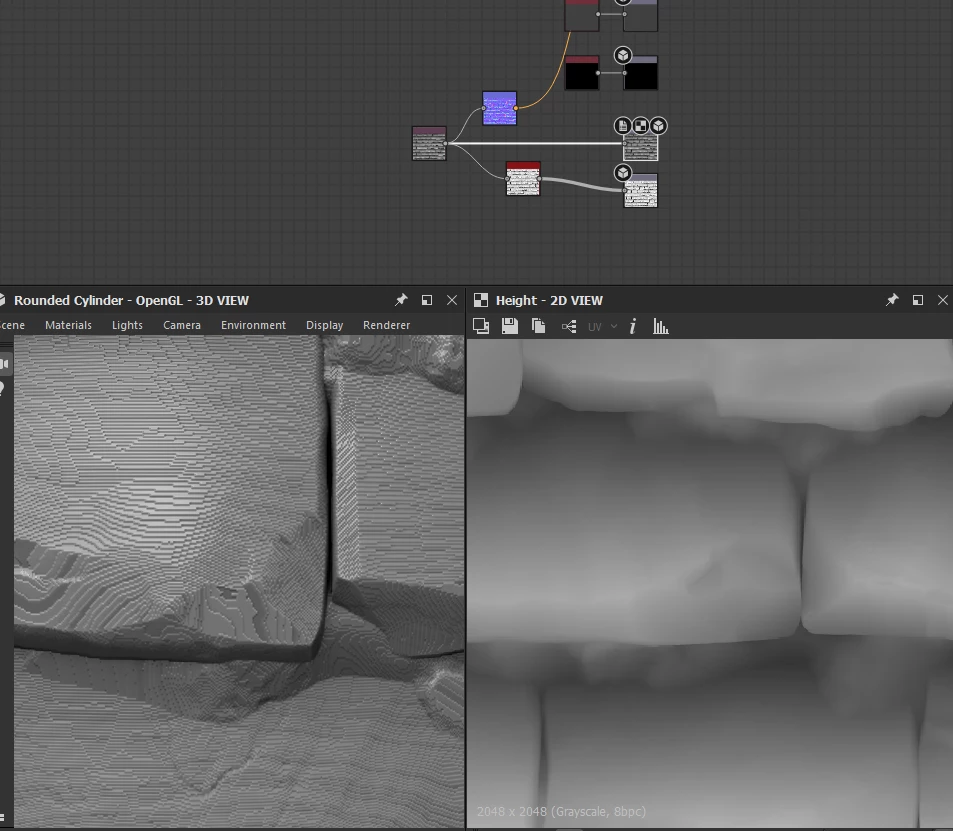
When I use heightmaps that i bake externaly as a base i get these stepping artifacts even though my bakes look smooth. any ideas where this might come from. Tried 8 bit and 16 bit images, png tga and tiff. Same issue with textures from xnormal, maya and marmoset
This topic has been closed for replies.

3 replies

Vincent GAULT
Community Manager
Community Manager
September 7, 2021

Can we see the normal map as well?

Participant
April 26, 2024

Hi! 

I'm confronted with the same problem actually. I tried a lot, like 16bit pictures and also trying to work with 32bit data (didn't work). 
In all cases I used "Shapes" Templates from Substance Designer. Maybe they are the problem? Honestly I couldn't generate a better picture as a base in PSD myself. So now I accepted my fate having these artifacts... but still not happy... 

Does anyone know the solution? 
There must be a way (wich could be taking no close up renderings and ignoring the artifacts) but I just wanna know. Gives me nightmares :') 

Sincerely 
crying Diana

Cyril Dellenbach
Community Manager
Community Manager
April 29, 2024

Hi crying Diana,


Thanks for the message.


This issue was indeed due to the bitmap being in 8 bit depth. We had (and still have) frequent discussions on this topic, and we should maybe make things clearer for users (maybe with some sort of warning).


You can check our latest Community Digest, we dedicated a section to this issue, and we also have a dedicated page in our documentation.


Basically you have one of your node that is in 8 bit depth, which isn't enough for a smooth gradient resulting with these stepping artifacts in the Normal and Height outputs. You have to locate the node and switch its bit depth to 16. Please note that switching an external bitmap to 16 won't work.


Regards,

Cyril Dellenbach (Micro) | QA Support Artist | Adobe
davescm
Community Expert
Community Expert
September 6, 2021

Your screenshot shows the hallmarks of an 8 bit heightmap which only has 256 discrete levels between black an white i.e. lowest possible and highest possible. The number of levels is restricted even further if your heightmap is mainly mid values. 

This is confirmed in your 2D view which shows the height channel as 8bpc.

Use 16 bit throughout the chain for height information.

LyndersonAuthor
Participant
September 6, 2021

'Tried 8 bit and 16 bit images, png tga and tiff. Same issue with textures from xnormal, maya and marmoset'

Bit depth doesn't change anything unfortunately


Screenshot I just a simplyfied version of the graph

LyndersonAuthor
Participant
September 6, 2021

HQ Blur and other nodes that soften make things worse