Participant
Jun 26, 2021 7:24 PM UTC
Answered

Tessellation Setting for Project

Hello, i am creating material in SD every time i close and open SD i have to setup tessellation setting like tessellation factor, scale, phong tessellation factor. is there a way save those setting in package or project?

This topic is closed to new replies. Start a new post to keep the conversation going.
Luca Giarrizzo
Luca GiarrizzoCorrect answer
Community Manager
Jun 28, 2021 6:56 AM UTC

Hello,


You can save the current state of the Scene in the 3D View so it is automatically restored each time a new 3D View is started.

In the 3D View panel, open the Scene menu and select the Save Current State As Default option.


Please note that some parameters are still reset to default when switching graphs during a session. This is a known limitation and we appreciate your patience. You can use the Reset Scene option in the Scene menu, or close the panel and start a new 3D View using the New 3D View option in the Windows menu.
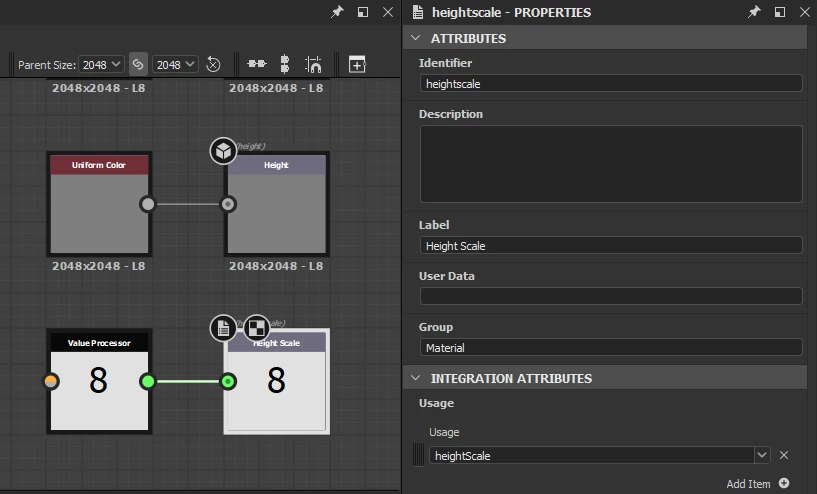
 

That being said, you can ensure some parameters – such as Height Scale – are reliably set to a specific value per graph each time a graph is loaded, by creating an Output node in the graph, setting up the desired usage, and pass a value to it – e.g. using a Uniform Color or Value Processor node.


I hope this helps!

Luca Giarrizzo | Quality Engineer - Substance 3D Designer | Adobe

1 reply

Luca Giarrizzo
Community Manager
Luca GiarrizzoCommunity ManagerCorrect answer
Community Manager
Jun 28, 2021 6:56 AM UTC

Hello,


You can save the current state of the Scene in the 3D View so it is automatically restored each time a new 3D View is started.

In the 3D View panel, open the Scene menu and select the Save Current State As Default option.


Please note that some parameters are still reset to default when switching graphs during a session. This is a known limitation and we appreciate your patience. You can use the Reset Scene option in the Scene menu, or close the panel and start a new 3D View using the New 3D View option in the Windows menu.


That being said, you can ensure some parameters – such as Height Scale – are reliably set to a specific value per graph each time a graph is loaded, by creating an Output node in the graph, setting up the desired usage, and pass a value to it – e.g. using a Uniform Color or Value Processor node.


I hope this helps!

Translate
Luca Giarrizzo | Quality Engineer - Substance 3D Designer | Adobe

