Known Participant
November 8, 2022
Answered

Use image range to drive a filter

  • November 8, 2022
  • 2 replies
  • 435 views

Hi there,


This might be a weird question. But you guys might have some ideas about how to go about this.

Is there a way to use an bitmap's range to drive another filter's attribute like a normals intensity?
We have a bunch of normal maps, some of them are sharp and others are faint. And we are trying to increase the normal intensity on the faint ones, using the Substance Automation toolkit and a suitable substance template if relevant.

An initial idea was to find a filter that returns the image range as output values, and apply that value to a normals intensity filter's intensity attribute. But the Range filter doesn't have a range output. This may not be a typical Designer workflow. Any suggestion?


Thank you


Isabelle

This topic has been closed for replies.
Correct answer davescm

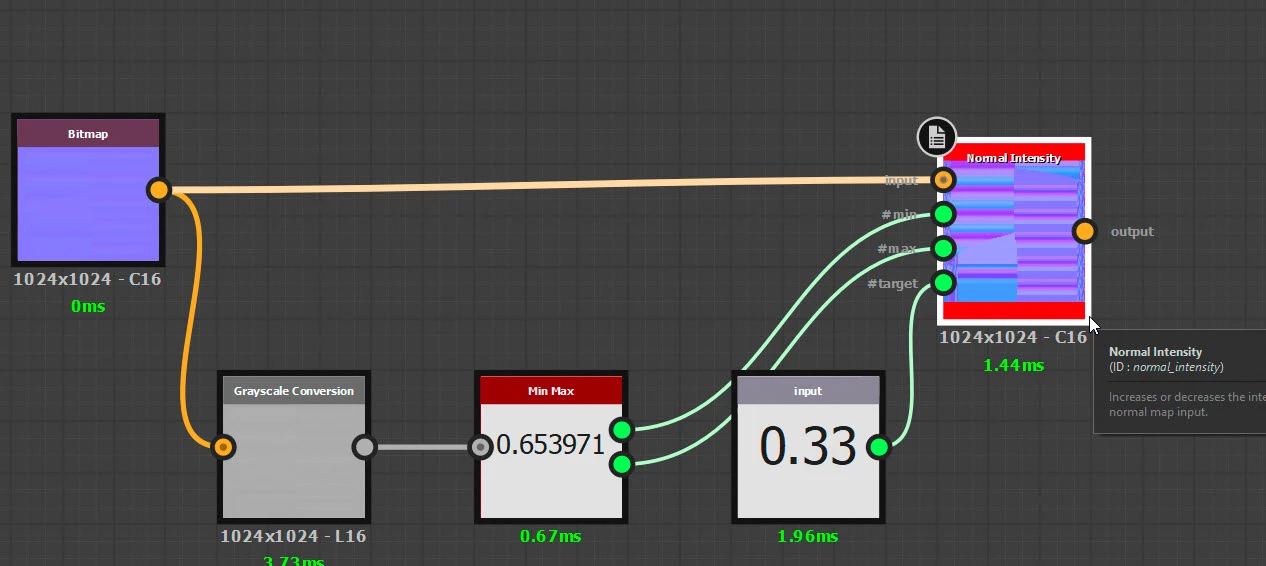
You could convert to greyscale and use a min max node. So something like this :


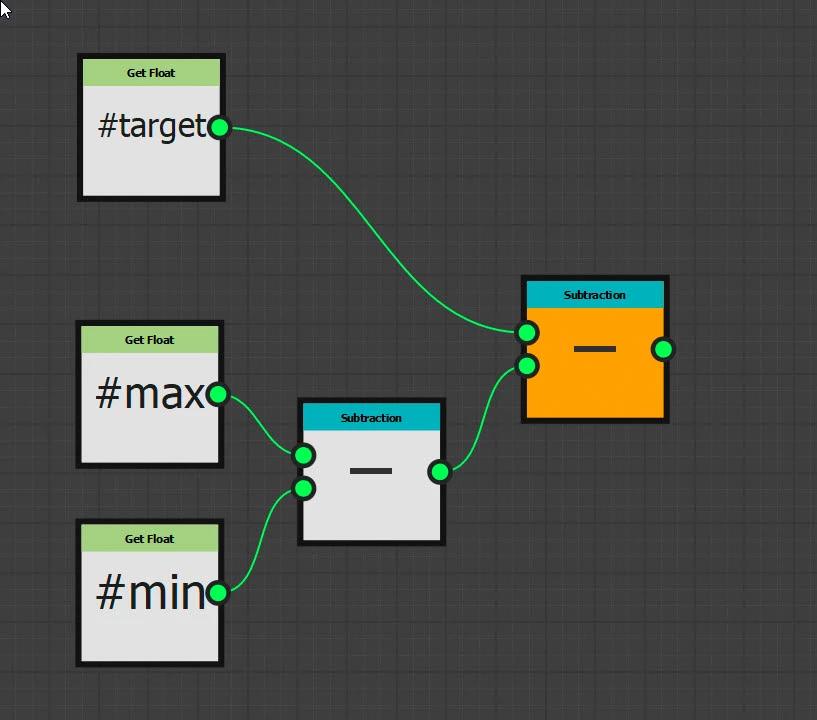
With intensity driven by a function.


This was quick and dirty but I'm sure you could adapt it for your purpose


Dave

2 replies

davescm
Community Expert
davescmCommunity ExpertCorrect answer
Community Expert
November 9, 2022

You could convert to greyscale and use a min max node. So something like this :


With intensity driven by a function.


This was quick and dirty but I'm sure you could adapt it for your purpose


Dave

ihauliAuthor
Known Participant
November 9, 2022

Thank you so much @davescm!
I wasn't aware that you could add custom inputs on a filter ( like #min, #max and #target here ), this is awesome, and works perfectly here.

Also, to get the image range, I was searching filters called '*range*', but min max makes total sense now. This is exactly what we needed!


Thank you, this is of huge help.


ShelLuser
Inspiring
November 9, 2022

First, I'm not sure what you're referring to when you mention 'range', also considering the many different properties which a bitmap can have. In addition I also can't fully comment on the process to do this either simply because the node which I'd be using for this, the Pixel processor, is a node I'm still studying.


But having said that, I don't see why this workflow wouldn't be possible in Designer; it's very easy to have one node control the other no matter what; of course I am referring to the use of functions. But I could imagine the pixel processor being capable to pick out these required ranges; also storing the appropriate values into local variables, after which the function(s) in the filter can pick up on that and apply the necessary offsets.

ihauliAuthor
Known Participant
November 9, 2022

By range I mean the used range that shows up in the histogram view, see screen shot attached.