jerryh97053054
Participant
April 8, 2022
Answered

Vector Map Multiplier Tile Sampler

  • April 8, 2022
  • 1 reply
  • 966 views

Hey All,


   I am struggling to comprehend how I can achieve decently predictable results when applying the vector map multiplier to the Tile generater node. For example, I want to use it in the rotation channel of the tile node.  It's easy to know what will happen with a rotation map multiplier, but the vector map, as far as I observe seems pretty random.  I'm sure it's user error/misunderstanding on my part but I've yet to find literature that can explain what is happening beyond the quick description in the documentation( 'Uses Vector Map to drive per-tile rotation').  I get that of course, but I would like to know what exactly is happening in this process that will let me know what sort of image to expect, so I can customize them better.  A vector map in this case is a normal map, correct?  Anyone know of a good resource I can reference to clarify this?

This topic has been closed for replies.
Correct answer davescm

Hi

A good way to find out how a complex node works is to open it up and take a look at the graph within it. If you right click on the tile sampler, you can open the reference. Then right click the FX map and choose Edit Fx-Map. Click on the quadrant and then open the function graph at the top of the properties panel next to  Color/Luminosity.


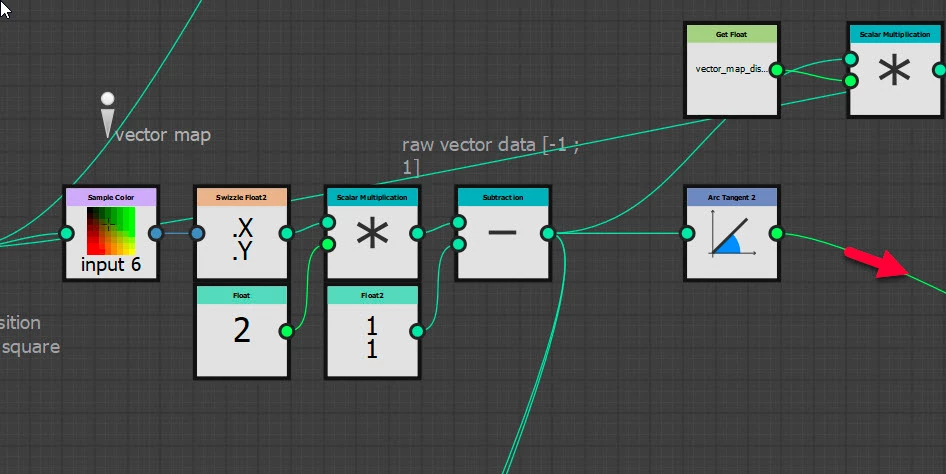
You will see that the Red and Green values are read from the vector map, at the position of each tile. The values in each of the R & G channels, which run from 0 to 1, are scaled to run -1 to + 1. That gives a set of x and y co-ordinates, and those co-ordinates  are used to calculate an angle from point 0,0. The Blue component is ignored. That calculated angle is used to change the rotation and its strength is set by the multiplier slider.


Dave


1 reply

davescm
Community Expert
davescmCommunity ExpertCorrect answer
Community Expert
April 8, 2022

Hi

A good way to find out how a complex node works is to open it up and take a look at the graph within it. If you right click on the tile sampler, you can open the reference. Then right click the FX map and choose Edit Fx-Map. Click on the quadrant and then open the function graph at the top of the properties panel next to  Color/Luminosity.


You will see that the Red and Green values are read from the vector map, at the position of each tile. The values in each of the R & G channels, which run from 0 to 1, are scaled to run -1 to + 1. That gives a set of x and y co-ordinates, and those co-ordinates  are used to calculate an angle from point 0,0. The Blue component is ignored. That calculated angle is used to change the rotation and its strength is set by the multiplier slider.


Dave


Luca Giarrizzo
Community Manager
Community Manager
April 11, 2022

Excellent answer and advice @davescm!

Indeed, checking out the implementation of nodes is a great learning experience.


Luca Giarrizzo | Quality Engineer - Substance 3D Designer | Adobe