Ayush Bakshi
Inspiring
April 22, 2023
Answered

"Visible If" not working

  • April 22, 2023
  • 1 reply
  • 1355 views

Hi! People,

There's a boolean input node having indentifer name as "bevel_type"

There's a second input value node.


I want input value node to be visible when "bevel_type" is true.

I'm finding such a simple stuff difficult.

I used this as guide:

Visible if: control visibility of inputs, outputs and parameters | Substance 3D Designer (adobe.com)


The expression I entered in the "Visible If" of input value node is:


input["bevel_type"] == True

input.bevel_type == True


A) There's no way to add line_break/ENTER/Return in "Visible If" field as shown in the documentation link above.

B) It's just giving me yellow exclamation.



This topic has been closed for replies.
Correct answer davescm

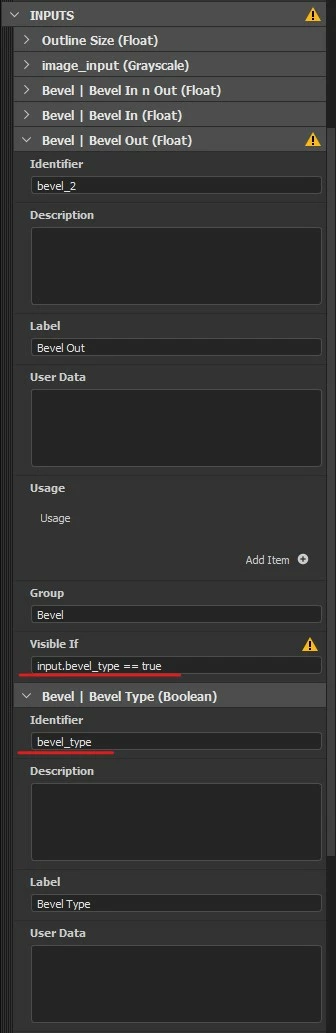
Here's the screenshot:

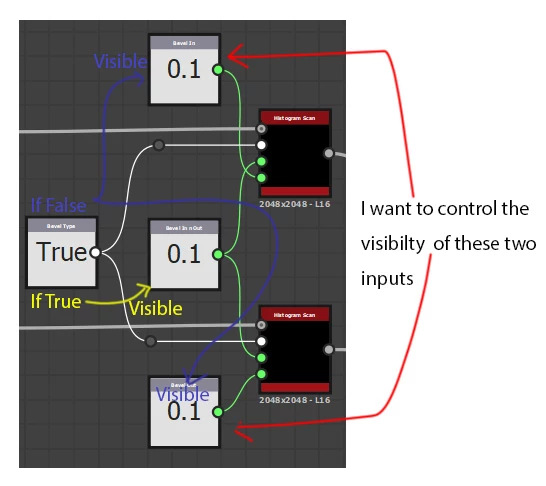
I want to control the visibility of two inputs (Bevel In and Bevel Out) using the bevel_type input (boolean type).


Thanks for the screenshot, now I see the difference between what we were doing.

As far as I am aware, Visible If has to reference an input parameter (in the input parameters section) rather than an input value node.


Dave

1 reply

davescm
Community Expert
Community Expert
April 22, 2023

Hi

If the identifier for your Boolean Input parameter is bevel_type You just need


input.bevel_type == true


Note the spaces before and after == and also lowercase true


This looks like a Substance Designer question so I will move the thread to that forum


Dave

Ayush Bakshi
Inspiring
April 22, 2023

Hey, Thanks for the quick reply.

I tried:

input.bevel_type == true

and

input["bevel_type"] == true


Unfortunately that didn't work.


In such problem I don't know what else to check. The identifier exists, the letter case is correct, good syntax.


davescm
Community Expert
Community Expert
April 22, 2023

Can you show a screenshot of the input parameter labelling and also the other input visible if entry as below (where it is working here)


Dave