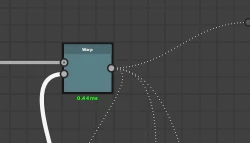
If you right click on an empty space in the graph and choose 'Clear Node thumbnails' (or press F5) the thumbnail cache is emptied and the grey dotted lines indicate that the thumbnails following along that link are not up to date.
You can can double click a node to recalculate the thumbnails up to that point or right click an empty space and choose 'Compute Node Thumbnails' to calculate them all.
(A red dotted line indicates an incompatible link e.g. a grey output connected to a colour input)
thanks for the response, another question i have is how to go to pins directly within a graph, do i need to click something or choose which pin from a dropdown to automatically go there?





 AdChoices