Participating Frequently
August 7, 2023
Answered

Why and how does this work?

  • August 7, 2023
  • 1 reply
  • 334 views

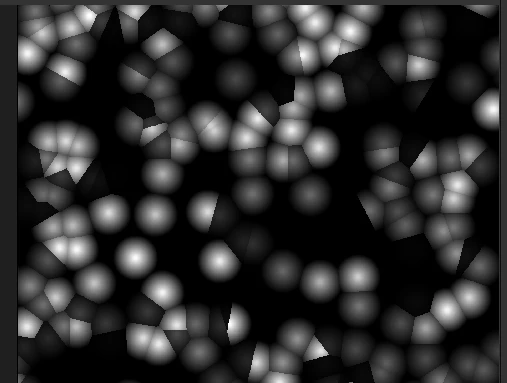
Hi, here i have a tile sampler, a level, and a distance. When i plug levels into the distance all the white specs get much bigger - why does this happen?


Also when i plug the tile sample into the distance it changes the white speck to white grey ad black, i have no idea whats going on or why it does that?


Thanks for any help, the results of plugging nodes in and seeing the output is extremely confusing.
This topic has been closed for replies.
Correct answer davescm

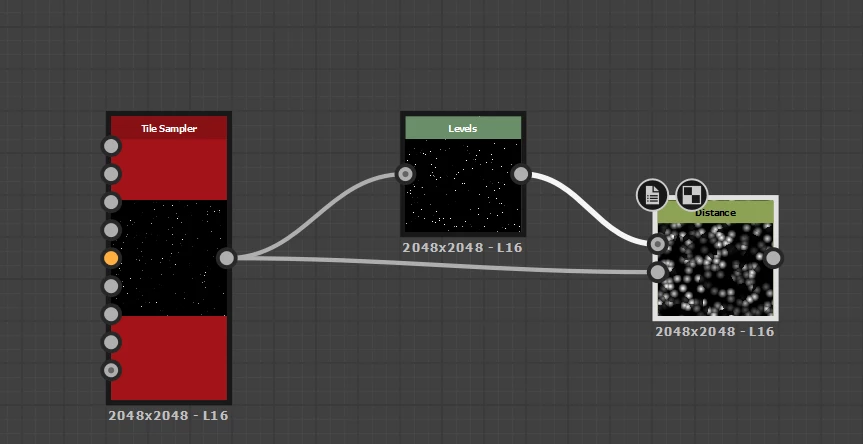
If I plug levels into the mask input without changing any levels parameters then it looks identical to the direct connection without the levels node. I assume you are using a levels node to adjust the mask input.

As for the grays - zoom in to the tile sampler output and see the starting points. Are they pure white or shades of grey. Normally it will be the latter after scaling,  so those shades are used in the source input and combined with the calculated values from the mask input.

Depending on what you are trying to do, either disconnect the source input, or use a levels input on the source. Alternatively you can feed it with a different image as in the example below.


More on the distance node here:

https://helpx.adobe.com/substance-3d-designer/substance-compositing-graphs/nodes-reference-for-substance-compositing-graphs/atomic-nodes/distance.html


Dave


1 reply

davescm
Community Expert
davescmCommunity ExpertCorrect answer
Community Expert
August 7, 2023

If I plug levels into the mask input without changing any levels parameters then it looks identical to the direct connection without the levels node. I assume you are using a levels node to adjust the mask input.

As for the grays - zoom in to the tile sampler output and see the starting points. Are they pure white or shades of grey. Normally it will be the latter after scaling,  so those shades are used in the source input and combined with the calculated values from the mask input.

Depending on what you are trying to do, either disconnect the source input, or use a levels input on the source. Alternatively you can feed it with a different image as in the example below.


More on the distance node here:

https://helpx.adobe.com/substance-3d-designer/substance-compositing-graphs/nodes-reference-for-substance-compositing-graphs/atomic-nodes/distance.html


Dave


Participating Frequently
August 7, 2023

Thank you for the help. Im still wrapping my head around substance designer. It seems its for adjusting black, white, grey and color values to achieve a desired outcome. Its a bit of a beast to get to grips with!

davescm
Community Expert
Community Expert
August 8, 2023

No problem. You are doing the right thing. Try things out, experiment and shout out if you encounter something that doesn't seem to make sense.

Dave