
Participating Frequently
June 24, 2021
Answered

Window layout not loading properly

  • June 24, 2021
  • 3 replies
  • 1642 views

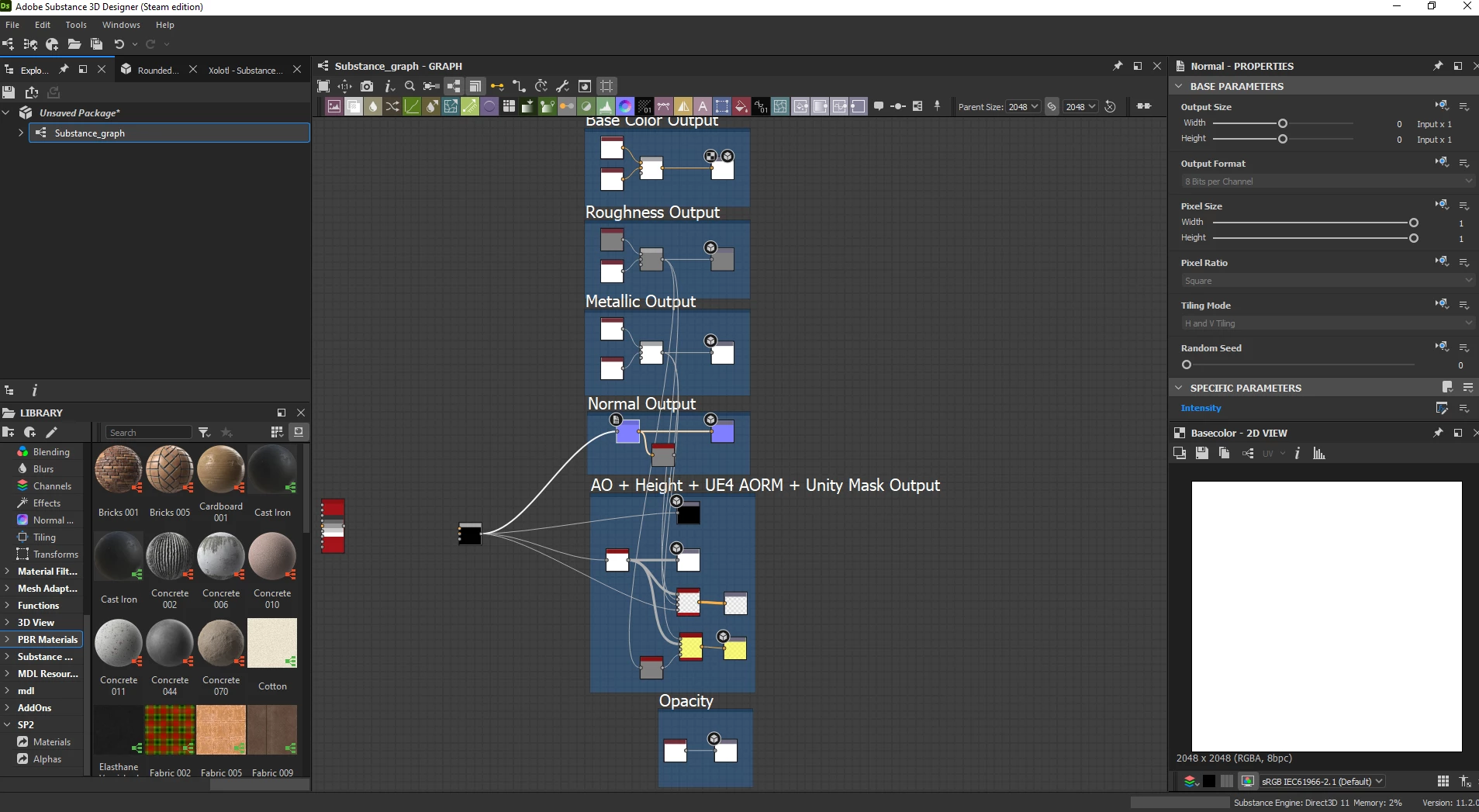
After the update to the latest version, the windows layout not loading properly. I tried to reset the layout and remake it again, but each time I open Designer, I'm getting the wrong layout, like in the image:
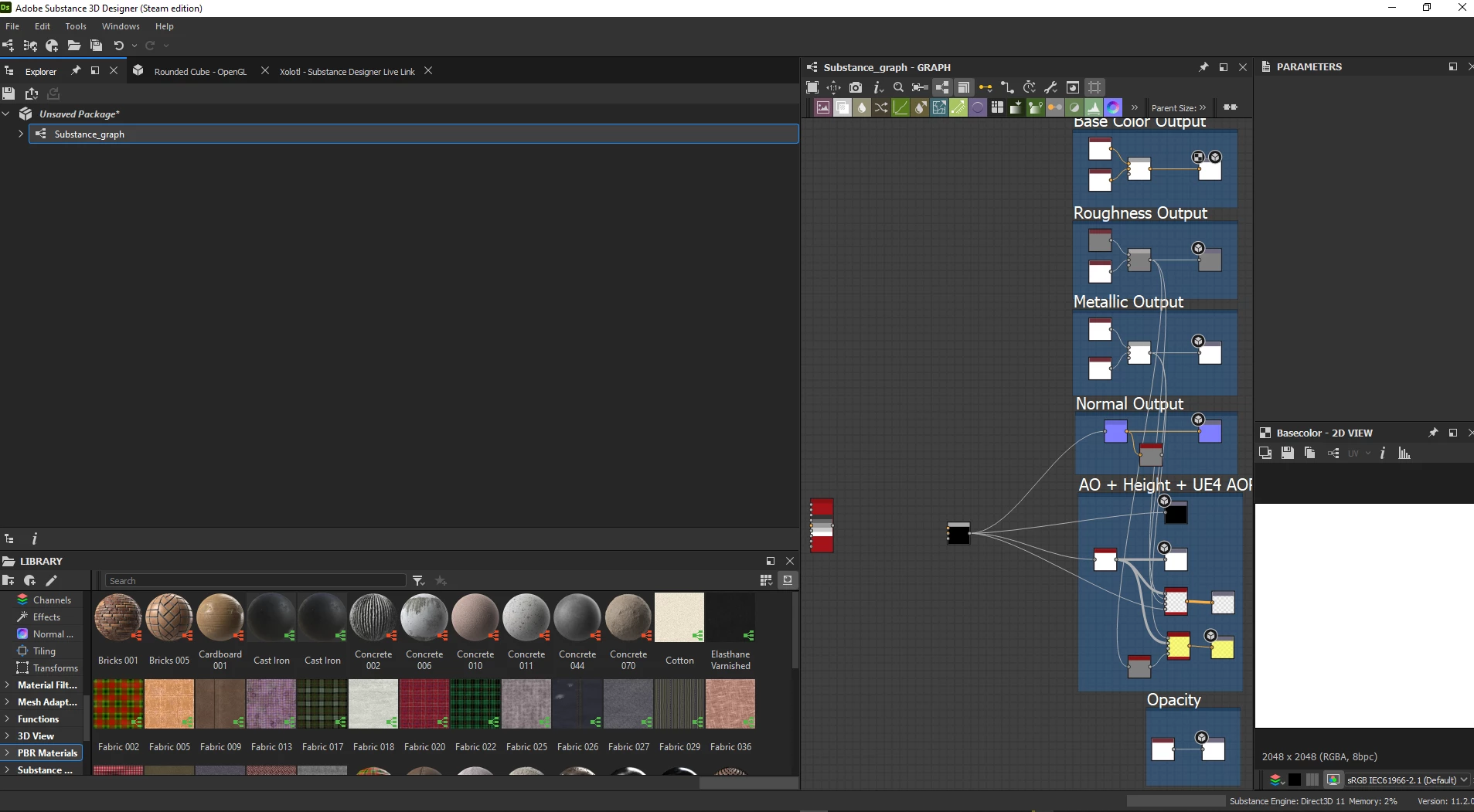
And this is what I expect:
Correct answer Luca Giarrizzo

Hello @Kelheor,


We are working on fixing other issues for this bugfix release, we are nearly done!

I am aware this layout issue is frustrating and I appreciate your patience in the meantime.


Best regards.


Hello @Kelheor,


Substance 3D Designer 11.2.2 is now live, and includes a fix for this layout issue.

Again, I thank you for your patience. Please give this new version a try and let us know of the results!


Best regards.


3 replies

Luca Giarrizzo
Community Manager
Community Manager
July 30, 2021

Hello,


The issue is now fixed internally. This improvement will be available in the next bugfix version of the 11.2 release.

Again, thank you!


Best regards.


Luca Giarrizzo | Quality Engineer - Substance 3D Designer | Adobe
KelheorAuthor
Participating Frequently
August 31, 2021

Another month has been passed - the issue still exists on the Steam version. I wonder when this update will be published?

Luca Giarrizzo
Community Manager
Community Manager
August 31, 2021

Hello @Kelheor,


We are working on fixing other issues for this bugfix release, we are nearly done!

I am aware this layout issue is frustrating and I appreciate your patience in the meantime.


Best regards.


Luca Giarrizzo | Quality Engineer - Substance 3D Designer | Adobe
Luca Giarrizzo
Community Manager
Community Manager
July 28, 2021

Hello,


I am able to consistently reproduce the issue by following these steps:


  1. Open the Windows menu and select the Reset Layout option
  2. Close Substance 3D Designer
  3. Open Substance 3D Designer
  4. Move the 3D View panel into the Explorer panel so it merges as a tab
  5. Close Substance 3D Designer
  6. Open Substance 3D Designer


The issue can also be triggered by moving any panel onto any other as a tab, as long as the tabs are placed along the left border of the main window.


Our engineers will investigate further and try to implement a reliable fix. I will update you in this thread when we have further developments.


We were tracking this issue for some time, thank you for your help and patience!


Best regards.

Luca Giarrizzo | Quality Engineer - Substance 3D Designer | Adobe
Luca Giarrizzo
Community Manager
Community Manager
June 24, 2021

Hi!


Thank you for reporting this issue! Please share your log file so we can investigate this problem.


To export a log file:

  • Open the Help menu
  • Select the Export Log File... option
  • Select a destination folder and click Save

Then, you may attach the exported file to a reply in this thread.


Please note the log file contains some information about your system (hardware, some project file path, OS, drivers...). Let me know if you are uncomfortable with sharing this information on a public board.


Thank you for your help and patience!


Luca Giarrizzo | Quality Engineer - Substance 3D Designer | Adobe
KelheorAuthor
Participating Frequently
June 24, 2021

Hello.


I'm not comfortable sharing log files in public. Please give me an email address to where I can send it since I can't send a bug report via Substance Designer:


Luca Giarrizzo
Community Manager
Community Manager
June 24, 2021

Hello,


Sure thing! You may send it to substance3d-support@adobe.com and mention my name in the content of the message.


Luca Giarrizzo | Quality Engineer - Substance 3D Designer | Adobe