January 12, 2026
Question

World-Space Normals in PBR Renderer Node

  • January 12, 2026
  • 1 reply
  • 105 views

Hey there,

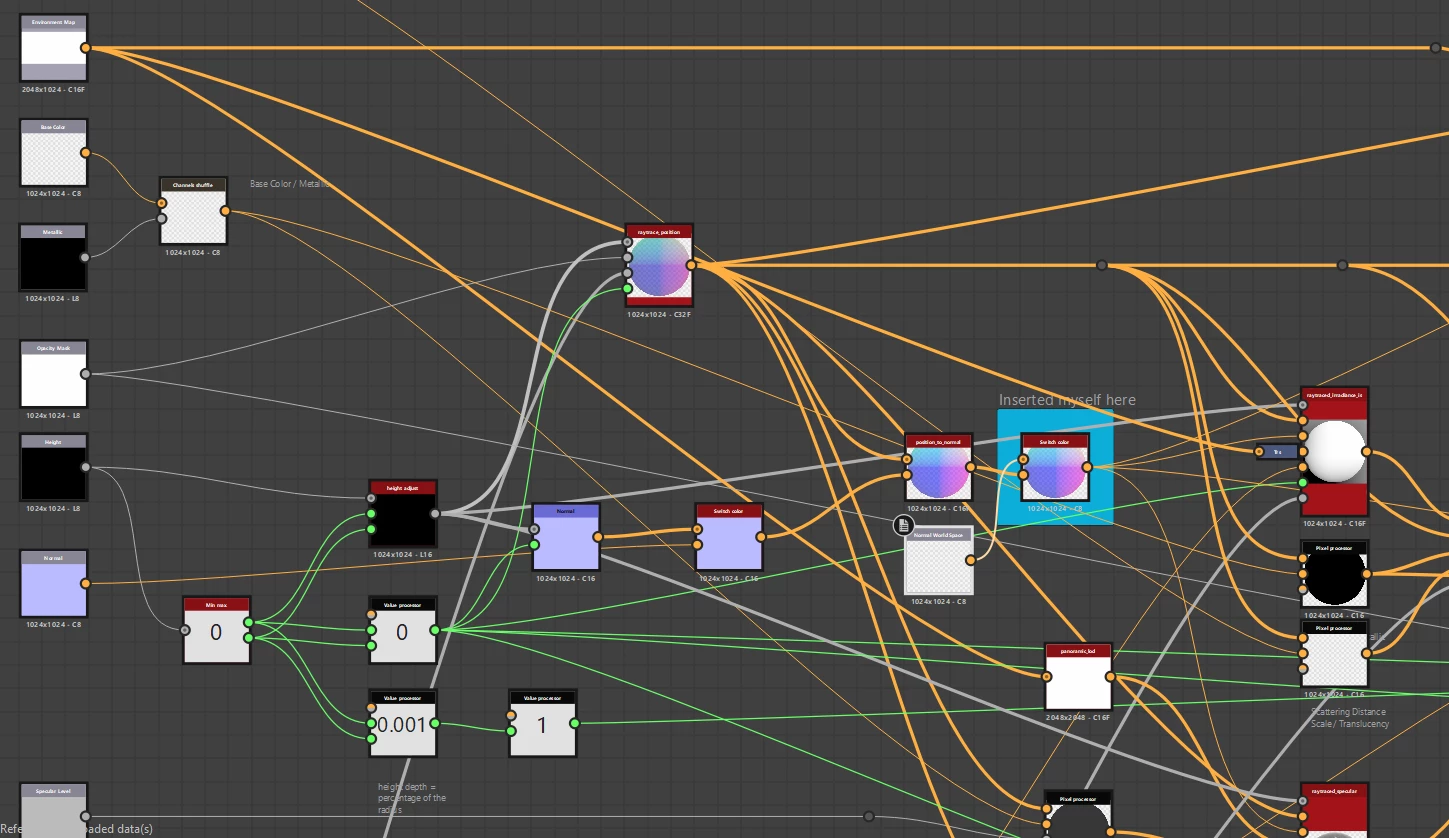
I’m working with the wonderful PBR Renderer node (pbr_render2.sbs), customized to prerender PBR textures into a single "unlit" color texture with neutral lighting and AO. Surprisingly, it works quite well, but I’ve run into some core issues.


Feeding prebaked World-Space Normals to replace the standard projection causes:

  • HDRI projection behaving incorrectly (inconsistent and partial)
  • Visual glitches, like noise or lighting appearing from below

These are the most visible problems. There may be deeper issues especially since, from what I understand (now), this is fundamentally a 2D-based node which makes full 3D simulation likely impossible.


Do you think there is a way to modify the PBR Renderer to respect World-Space Normals and fix HDRI projection without rewriting underlying functions? Any advice would be greatly appreciated.

Thanks!
Filip37028751ebx4_0-1768229772580.png

Filip37028751ebx4_1-1768229949991.png

fgjfghfhg.png


1 reply

Community Manager
January 13, 2026

Hi!

Yes, putting the world space normal here will probably work. However you have to make sure the normal vectors are actually "unpacked" 3d vectors in the [-1, 1] range. You can do that with a pixel processor with a simple sample(normal)*2.0 - vec3(1.0). And don't forget to set the pixel processor output format to either 16f or 32f.


Also the displacement and shadows will obviously not work so make sure it's set to 0.


Btw there is a filter in Painter that does pretty much the same named Baked lighting filter (environment), iirc.


There is room for improvement on both this one and the PBR Render node, it's on the long list of things to do 🙂

January 14, 2026

This is it, or at least part of it. Thank you!

What’s still left are the glitches coming from raytraced_specular node: roughness banding, dithering noise, and what looks like incorrect projection. From what I can tell, this all comes from the aniso_angle_level input and pixel processor named xyz: specular color, or what inputs into it. Shuffling channels there does change the result, in the right-ish direction.

Any insight into what those inputs are expected to be, or how they should be set up when a WSN is used?

FP37028751ebx4_0-1768391355904.png

Community Manager
January 16, 2026

I'd need to have a closer look..
Are you on the Substance Discord by any chance ?